
-
Version: v13
-
Version Date: 2026-02-24
-
Prepared By: Bluetooth SIG Technical Content Team
Version History
|
The Drafting Guidelines Version History table is now on Confluence. |
Acknowledgments
|
Name |
Company |
|---|---|
|
Torah Cottrill |
Senior Technical Editor, Bluetooth SIG, Inc. |
|
Jaym Gates |
Program Manager, Specification Delivery, Bluetooth SIG, Inc. |
|
Nathan Keyes |
Senior Manager, Technical Publications, Bluetooth SIG, Inc. |
|
Karen Kim |
Senior Director, Technical Content, Bluetooth SIG, Inc. |
|
Cathy McDonald |
Senior Technical Writer, Bluetooth SIG, Inc. |
|
Melissa Mickael |
Manager, Specification Publishing, Bluetooth SIG, Inc. |
|
Angela Yao |
Senior Technical Writer, Bluetooth SIG, Inc. |
|
Monica Wylld |
Senior Technical Editor, Bluetooth SIG, Inc. |
|
Ingrid Casey |
Senior Technical Editor, Bluetooth SIG, Inc. |
This document, regardless of its title or content, is not a Bluetooth Specification as defined in the Bluetooth Patent/Copyright License Agreement (“PCLA”) and Bluetooth Trademark License Agreement. Use of this document by members of Bluetooth SIG is governed by the membership and other related agreements between Bluetooth SIG Inc. (“Bluetooth SIG”) and its members, including the PCLA and other agreements posted on Bluetooth SIG’s website located at www.bluetooth.com.
THIS DOCUMENT IS PROVIDED “AS IS” AND BLUETOOTH SIG, ITS MEMBERS, AND THEIR AFFILIATES MAKE NO REPRESENTATIONS OR WARRANTIES AND DISCLAIM ALL WARRANTIES, EXPRESS OR IMPLIED, INCLUDING ANY WARRANTY OF MERCHANTABILITY, TITLE, NON-INFRINGEMENT, FITNESS FOR ANY PARTICULAR PURPOSE, THAT THE CONTENT OF THIS DOCUMENT IS FREE OF ERRORS.
TO THE EXTENT NOT PROHIBITED BY LAW, BLUETOOTH SIG, ITS MEMBERS, AND THEIR AFFILIATES DISCLAIM ALL LIABILITY ARISING OUT OF OR RELATING TO USE OF THIS DOCUMENT AND ANY INFORMATION CONTAINED IN THIS DOCUMENT, INCLUDING LOST REVENUE, PROFITS, DATA OR PROGRAMS, OR BUSINESS INTERRUPTION, OR FOR SPECIAL, INDIRECT, CONSEQUENTIAL, INCIDENTAL OR PUNITIVE DAMAGES, HOWEVER CAUSED AND REGARDLESS OF THE THEORY OF LIABILITY, AND EVEN IF BLUETOOTH SIG, ITS MEMBERS, OR THEIR AFFILIATES HAVE BEEN ADVISED OF THE POSSIBILITY OF SUCH DAMAGES.
This document is proprietary to Bluetooth SIG. This document may contain or cover subject matter that is intellectual property of Bluetooth SIG and its members. The furnishing of this document does not grant any license to any intellectual property of Bluetooth SIG or its members.
This document is subject to change without notice.
Copyright © 2015–2026 by Bluetooth SIG, Inc. The Bluetooth word mark and logos are owned by Bluetooth SIG, Inc. Other third-party brands and names are the property of their respective owners.
1. Introduction
These Bluetooth Drafting Guidelines (Drafting Guidelines) provide principles and rules for the drafting, presentation, and structure of Bluetooth specifications and documents (collectively, “Bluetooth Documents”).[1] When drafting new or enhancing existing Bluetooth Documents, authors are required to follow these guidelines (see the Specification Management Process Document (SMPD) [1]).
If these Drafting Guidelines differ from other Bluetooth policy or process documents, then notify the Bluetooth SIG Technical Content team (see Section 1.6). If these guidelines conflict with the Brand Guide for Bluetooth Trademarks [6], then follow the instructions in the Brand Guide for Bluetooth Trademarks [6].
1.1. Purpose
To produce precise and unambiguous documents and identify and mitigate potential legal risks, apply the general principles and rules spelled out in these Drafting Guidelines. The guidance on style herein also produces documents that are consistent in appearance.
1.2. Scope
The scope of this document covers drafting principles, document structure and elements, and general rules and recommendations. For more information about templates, see Section 3.
1.3. Document types covered
The Drafting Guidelines apply to all Bluetooth Documents as they progress through the specification development process (Requirements Phase, Development Phase, Validation Phase, and Adoption/Approval Phase) and the specification issue process.
Although the Drafting Guidelines pertain primarily to specifications, they can provide guidance for other types of documents such as policy documents, process documents, charters, and informational publications.
1.4. Audience
This document is intended for all the Bluetooth Special Interest Group (SIG) members who develop and write Bluetooth Documents and for the BSTS team who edits them. The role of the team is not to change the meaning of technical content in Bluetooth Documents, but rather to apply general principles and rules to help make the technical content unambiguous and highlight and help mitigate potential legal issues.
1.5. Drafting Guidelines updates
This document is updated as needed to support the efforts of the Bluetooth SIG Working Groups (WGs), Study Groups, Expert Groups, committees, and SIG Staff writers who develop and maintain Bluetooth Documents.
In advance of publication, BSTS will announce to BARB any relevant Drafting Guidelines updates under consideration. BARB will have time to review and comment on the updates before the Drafting Guidelines are published. For information on providing feedback on the Drafting Guidelines, see Section 1.6.
When new updates are published, these updates will be included in the Technical Update.
1.6. Feedback
To request help or to ask a question about a Drafting Guidelines topic, members should contact BSTS at specreview-editor@bluetooth.org.
To request addition of new styles or other conventions to the Drafting Guidelines or provide feedback about existing guidelines, members should file an issue in the Bluetooth SIG issue tracking system [2].
2. Drafting principles
This section describes the principles to consider when drafting Bluetooth Documents.
2.1. Objective of standardization
Document standardization provides implementers and other readers with unambiguous documents that establish uniform and consistent engineering and technical criteria, methods, and processes. When applying these principles to Bluetooth Documents, consider the following:
-
Provide information that fulfills but does not exceed the scope of the document.
-
Be succinct, accurate, and unambiguous.
-
Use visual aids like figures and tables to address complexity.
-
Use consistent language.
-
Help implementers who have not participated in the drafting process comprehend the subject matter.
2.2. Consistency
Maintaining consistency and uniformity throughout each Bluetooth Document and across the suite of Bluetooth Documents helps readers to accurately comprehend requirements for the purposes of implementation and compliance. Consistency especially helps readers adhere to requirements across multiple documents. The Drafting Guidelines provides consistency on these topics:
-
Acronyms, initialisms, and abbreviations
-
Document structure
-
Figures and tables
-
Images
-
Language conventions
-
Readability
-
Quantities and units of measurement
-
Text styles and formatting
2.3. Drafting responsibilities of document authors
Multiple authors collaborate to draft documents, so it is important to maintain uniformity, which aids comprehension and makes the drafting process more efficient. During the drafting process, authors have these responsibilities:
3. Bluetooth templates
All specification drafts should start from the appropriate Bluetooth Document template, which are used from the NWP through the validation stage. The “look and feel” of Bluetooth Documents is based on a defined set of template styles that follow consistent fonts and colors.
Templates for Bluetooth Documents are in Microsoft® Word format with file name extension .dotx and are available for download on the Documents & Resources page on bluetooth.com [7]. Each Bluetooth template provides a document layout with main section headings. The main section headings include summaries that explain the objective of each section. Bluetooth templates also include these elements:
-
Microsoft® Word character and paragraph styles (see Section 3.4)
-
Pre‑formatted tables
-
Placeholder text for the title page, headers and footers, disclaimer and copyright notice, version history, acknowledgments table
When creating a new Bluetooth Document, use the appropriate Bluetooth template. Do not copy an existing document to create a new document. Do not create new styles within the template. The Bluetooth templates provide the most current disclaimer and copyright notice, boilerplate language for other standard text items, and Microsoft® Word formatting styles. The appropriate Microsoft® Word styles are pre-loaded into the templates.
For information on how to apply document file names and revision numbers, see the Bluetooth Document Naming and Marking Document [3].
For help on which template to use, ask BSTS or email the Technical Content team at specreview-editor@bluetooth.org.
3.1. Numbering of document elements in Bluetooth templates
The Bluetooth templates use integers to number pages, section headings, tables, figures, and captions. When the appropriate template styles are used, then the numbering schemes and cross-reference settings for these elements will be updated correctly and linked cross-references will work properly.
Specific to the Bluetooth Core Specification, part titles and appendix headings are labeled with uppercase letters (e.g., Part C, Appendix B).
If a numbered table or figure is added, deleted, or moved within a document, then subsequent elements of that type in the document are usually renumbered to reflect that change. If an automatic update does not occur, a manual update may be required. For guidance on adding references to numbered headings, tables, and figures in documents, see Section 4.1.1.
3.2. Document sections
This section contains best practices for using the sections contained within the Bluetooth templates.
When creating a new document, use the most recent version of the appropriate Bluetooth template and adhere to the template instructions.
3.2.1. Cover page
The first page of a Bluetooth Document is the cover page. The cover page is required and is built into the templates.
Table 3.1 provides guidance on the best practices for filling out the elements of a cover page. The template will contain all elements that should be included; do not add or remove elements from the cover page.
|
Cover Page Element |
Rules |
Examples |
|---|---|---|
|
Title |
|
Fitness Machine Profile |
|
Version |
Include the proper version and revision integers, per the DNMD [3]. |
d0.7r01, d1.0r01, v1.0, d1.1r04, v1.1 |
|
Bluetooth word mark and subtitle |
|
Bluetooth® Profile Specification |
|
Version Date |
Use the format “yyyy-mm-dd”, using numerals for the month and day, with a leading zero for single-digit months and days. |
2018-02-12 |
|
Prepared By |
Provide the name of the WG, Study Group, Expert Group, committee, task force, or Bluetooth member. For an NWP, this is either the WG alias or member company contact person's email. It may also include the author’s name. |
Sports and Fitness Working Group Company Inc. Jane Smith |
|
Feedback email |
Replace “group” with the WG alias. |
|
|
Abstract |
Include a brief description of the document’s contents. |
“This profile enables a collector device to connect and interact with a fitness machine intended for sports and fitness applications.” |
3.2.2. Version history and related sections
After the cover page and before the disclaimer, there is a section covering the document’s version history and the content authors (i.e., the Acknowledgments table). In addition to these tables, a Bluetooth Document may contain a Change History section (see Section 3.2.2.2).
3.2.2.1. Document version history
The Version History table is required. The table lists three categories of information: version numbers, dates, comments that summarize the changes to the previous version made in each iteration. The first entry in the table contains the template version. This entry must not be removed.
The terms “version”, “draft”, and “revision” are defined as follows:
-
Version: A specification adopted by the BoD, indicated by a lowercase “v” as defined by the Document Naming and Marking Document (DNMD) [3]. BSTS will fill in the date on which the BoD adopted the specification.
-
Draft: A draft of a specification under development, indicated by a lowercase “d” as defined by the DNMD [3].
-
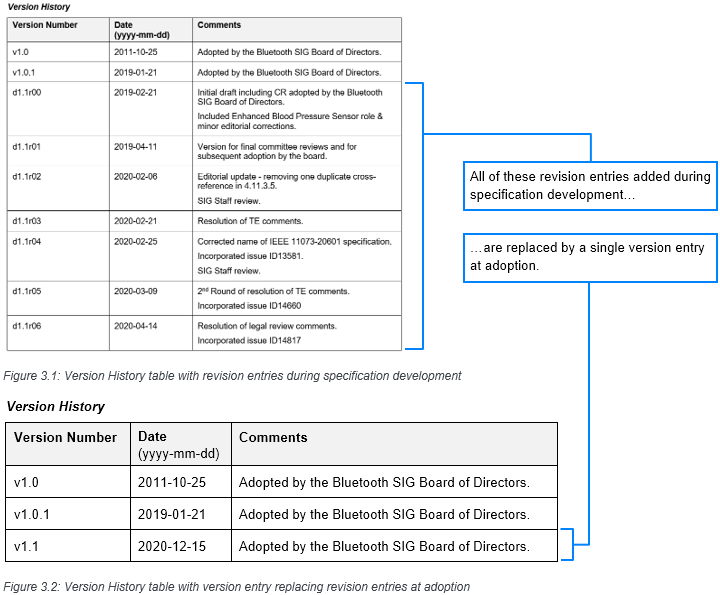
Revision: An iteration of a draft, indicated by a lowercase “r” as defined by the DNMD [3]. During the development of a new specification, authors can add revision entries to inform readers of changes during that current specification's development cycle. However, these entries are not intended to be public-facing. When the Voting Draft is submitted to the BoD for adoption, all previous entries will be deleted and BSTS will enter the specification's adoption date.
When inserting a Version History table entry into a previously approved or adopted document, adhere to the established sorting pattern within the document. In new documents, Version History table entries are listed from oldest to newest.
Version History table comments should be concise, clear, and constructed as follows:
-
Comments regarding changes to technical content (e.g., “Design altered to use a Control Point attribute for all write operations and clarify server behavior”) or that impact use of the document (e.g., “Removed Section 9.4, Content Control ID”) should be descriptive to ensure readers understand what changes were made in previous iterations.
-
Comments regarding editorial changes or minor adjustments made in response to review comments should be summarized (e.g., “Addressed review comments from SIG Staff, Legal, BARB, and WG members”).
-
Previous Version History table entries should not be modified unless approved by the group that authored the previous document. Modifications should only be made for corrections that add value, consistency, and clarity to the entries.
-
The Version History table should not include hyperlinks.
-
The Bluetooth SIG Technical Content team will add the following review information to the Version History table during editorial review:
-
For NWP documents: BSTS will add a new row at the bottom of the Version History table with an incremental number, the date updated, and the phrase “SIG Staff review in accordance with the Bluetooth Drafting Guidelines.”
-
For FRD, d0.5, DIPD, d0.7, FIPD, d0.9, CR, Expedited Specification Updates, and Voting Draft documents: BSTS will not add a new row or increment the number in the Version History table. Instead, BSTS will add a new paragraph to the current row in the Comments column with the phrase “SIG Staff review in accordance with the Bluetooth Drafting Guidelines.”
-
3.2.2.1.1. Examples of the Version History table
The following two figures illustrate the Version History table from the same specification at two different stages in the development cycle. The first is during specification development for v1.1 and consists of two version entries (v1.0 and v1.0.1) and multiple revision entries. The second is after the adoption of v1.1, when all of the revision entries have been replaced with a single-version entry.
 |
3.2.2.2. Change history
For updates to specifications, a Change History section summarizing changes to the new version over the previous version is required. This section is located immediately before the Language section. The Change History section is added during the Adoption phase. A new Bluetooth Document does not have a Change History section.
If a Bluetooth Document with multiple versions has not previously had a Change History section, then one should be added in the new version. It is left to the discretion of the authors whether or not earlier versions of the document are included in the added Change History section.
For example: If HFP v1.1 is being updated to HFP v1.2, then a Change History section would be added within HFP v1.2 to show the changes from v1.1 to v1.2. In this example, the authors choose not to include the changes between HFP v1.0 to HFP v1.1 in the Change History section in HFP v1.2, because the Change History did not exist in those versions.
Do not remove the Change History after it has been added.
Guidelines for the Change History section are as follows:
-
The name of the section is “Change History”.
-
The introduction to the Change History section states, “This section summarizes changes at a moderate level of detail and should not be considered representative of every change made.”
-
The Change History section has subsections divided by version comparisons using the format “Changes from vX.Y.Z to vX.Y.Z” (e.g., Changes from v1.0 to v1.1).
-
Changes are presented in separate subsections titled as follows:
-
New and updated features (see Section 3.4.2.1)
-
Removed features (see Section 3.2.2.2.2)
-
Issues incorporated in vX.Y.Z (see Section 3.2.2.2.3)
-
3.2.2.2.1. New and updated features
Following a brief introduction, present this subsection using a table consisting of columns titled Feature Name, Description, and Location. The Description should be no longer than a sentence or two and derived from the abstract of the feature’s CR document.
-
The Location column indicates the section(s) in the Bluetooth Document where the new or updated feature is located, formatted as hyperlinks following the guidelines defined in Section 3.4.1.1.
-
If a new or updated feature’s locations cannot be easily quantified, then write “Many” in the Location cell.
|
Feature Name |
Description |
Location |
|---|---|---|
|
MPEG-2 AAC MPEG-4 AAC HE-AAC HE-AACv2 AAC-ELDv2 |
Addition of new Object Types |
Many |
|
MPEG-D DRC |
Addition of codec support |
[Section ] [Section ] |
|
MPEG-D USAC |
Addition of codec support |
[Section ] [Section ] |
3.2.2.2.2. Removed features
The following guideline applies only to new versions of specifications. It is not necessary to add a Removed features subsection to sections describing the change history of previous versions.
Following a brief introduction, present this subsection using a bullet list or a table. If no features were removed, then present this section with a single sentence stating, “No features were removed in this version.” It is helpful for implementers to know that no features were removed.
3.2.2.2.3. Issues incorporated in vX.Y.Z
This section is presented as a table with at least two columns: A Section column where sections with issues are listed in the order in which they appear in the Bluetooth Document and an Issues column listing the number of the issues assigned by the issue tool, as illustrated in Table 3.3.
|
Section |
Issues |
|---|---|
|
Global / Several Parts |
11426, 11695, 12596, 14641, 15243, 15634 |
|
Front matter |
15851, 16794 |
|
V0A: Consolidated Table of Contents |
12495 |
|
V0B: Bluetooth Compliance Requirements |
12495, 13250, 15754, 15874, 16979 |
|
V0C: Revision History and Acknowledgments |
12495, 15631, 15632, 16032, 16312, 16605, 17067 |
Additionally, when a significant number of issues are found in multiple sections that relate to a particular feature or technology, it might be helpful for implementers to see the related issues in a separate table. Present issues in a separate subsection with a heading identifying the feature or technology. Following a brief introduction, this subsection includes an issues table using the same structure as described above.
3.2.3. Acknowledgments
The Acknowledgments table is required and lists the names of individuals who substantially participated in the development of the document.
Individuals should be included in the Acknowledgments table if they have done one or more of the following:
-
Proposed a solution that was included in the document
-
Proposed an idea that was included in the document
-
Proposed text that was included in the document
Individuals should not be included in the Acknowledgments table if their participation was limited to the following:
-
Proposed editorial corrections or minor clarifications that are included in the document
-
Participated in interoperability testing of a specification
-
Contributed to a separate document related to the document
-
Attended meetings to discuss the document
-
Identified a problem with the document but did not provide the solution that was included in the document
If an individual requests to be included in the Acknowledgments table, and they or others identify activities that constitute substantial participation, then the WG should include them. To be listed in the Acknowledgments table:
-
Individuals must be affiliated with a Contributing Adopter, Associate, or Promoter member company, or be an Adopter Expert.
-
Individuals who do not have a SIG member account or are not joined to the Document Owner group must have their member company affiliation confirmed by the group leadership. Group leadership must notify SIG staff that the individual meets affiliation requirements.
Individuals may be identified with more than one member company from the Bluetooth SIG if their participation occurred at different times when they represented different member companies. However, the name of each member company that the individual represents must be the same as the name listed in the Bluetooth member database. The names of the participating individuals can be listed in the order that the WG decides is appropriate.
After an individual is included in the Acknowledgments table at the FRD stage or any stage following, their name remains in the table through all remaining stages of specification development unless they request to be removed. For updated versions of a document, if the Acknowledgments table becomes very long, then the WG may move the table to the end of the document.
If WG members do not agree on how to address acknowledgment scenarios not covered in these guidelines, then the WG Chair or Vice Chair will decide.
3.2.4. Disclaimer and copyright notices
The disclaimer and copyright notices are required and appear before the Table of Contents (TOC) in the front matter in all documents. There are two versions of the disclaimer: one for specifications, and one for non-specification documents, such as informational publications (i.e., white papers) and process documents. See the Document Naming and Marking Document (DNMD) [3] for the full text of the disclaimer and copyright notices.
Do not make any changes in the disclaimer or copyright text. BSTS will enter the copyright year during the editorial review of a document.
By default, the disclaimer and copyright text is locked. If the text requires updates, then BSTS will make the changes using tracked changes. After the WG has seen the changes, BSTS will unlock the text, accept the changes, and re-lock the text. If the text is not locked, notify the writer assigned to the WG.
3.2.5. Contents
The Contents section is required and contains the table of contents (TOC). This section starts on the page that immediately follows the disclaimer and copyright notice.
The TOC includes heading levels 1 to 4 for sections in the main body of the document and appendixes. The TOC reflects the layout of the document structure and includes standard sections and headings of Bluetooth Documents. When headings are removed or changed in the document body, those changes are also reflected in the TOC.
To update the TOC, turn off track changes, navigate to Microsoft® Word’s automated Update Table feature and select update entire table. After updating the TOC, turn track changes back on so that no markup text is shown in the TOC. Do not make any changes to the TOC manually, such as rewording headings or changing the number of heading levels.
3.2.6. Language
The Language section (see Section 7.1) is required in Bluetooth templates for specifications starting at the Development phase (i.e., from the 0.7/FIPD stage onward). This section includes the Reserved for Future Use and Prohibited subsections; these are included in the appropriate templates. The Language section and its subsections are locked by default and must not be moved, changed, or deleted.
3.2.7. Document body
The body of a Bluetooth Document contains the primary document content. This is where information and technical requirements are provided.
To maintain external references between Bluetooth Documents and to prevent issues with test suite documents, preserve section numbers in the document body by adding new top-level sections to the end of the document body (i.e., before the Acronyms, initialisms, and abbreviations section) or by adding subsections. When adding new subsections, add the new subsection as the last one in the higher-level section.
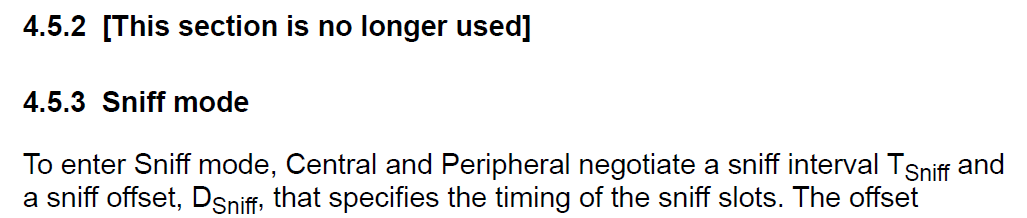
If all content in a section is removed from a Bluetooth Document, then preserve the former section number. Update the former section heading with “[This section is no longer used]” (see Figure 3.2).
 |
3.3. Accessibility
Accessibility in Bluetooth Documents covers the minimum font size in text and images, the use of color, and the use of alt text. The Bluetooth templates cover most of these standards with the use of built-in styles. The following guidance assumes that a specification author has started with the appropriate template for the document they are creating.
When creating Bluetooth Documents, use the styles found in the Bluetooth templates for all new content. The directions in this section assume that the starting document is a Bluetooth template.
Images: If inserting a figure as a picture, make sure that any text or figures can be read without modification.
-
When selecting colors outside of the blue, black, and gray shades used in the templates, select colors with high contrast. Do not use low-contrast or hard-to-read combinations, like light green and white.
-
Be aware that too high contrast ratios (e.g., pure black on white) or too low contrast ratios (below 4.5:1, e.g. blue text on light blue background) may reduce readability by visually impaired readers.
-
Avoid red/green color combinations to differentiate information.
-
Do not use watermarks or images behind text.
-
If the image is not clear without modification by the user, or if it is pixelated, a different figure should be used.
-
When creating images, ensure that they will fit on the page in a vertical format without requiring the user to manually adjust the image.
-
To convey information in a graphic format, consider not only relying on color, but also utilizing graphical elements such as dotted versus solid lines, underlining, and italics.
-
Maintain consistency in graphical choices within images. If a dotted line has been used to indicate a dependency in one image, do not use it to indicate an association in another image.
-
If an image is too visually crowded to be read clearly as-is on the page, ensure that the image, when magnified, meets the other qualifications above.
-
Do not use directional terms, such as up, down, or below, as these terms are not useful to people using screen-reading software. Provide additional information that allows for specific navigation.
Creating new figures within a Bluetooth Documents template: To create a new figure with text within a Microsoft® Word template, select the Figure text style from the Styles tab within a copy of the appropriate template. This will apply the appropriate style, font, and size to the text.
Alt Text: Alt text is a specific form of captioning used by screen reading software to describe an image to a user who is using assistive technology. Alt text differs from captions in that a caption describes the purpose of an image, while alt text describes the image itself.
All images and figures should be captioned with alt text. Microsoft® Word provides fields for alt text which allow assistive devices to read the text aloud while hiding the text from view for those users who do not use assistive devices. Alt text is intended to describe the visuals of the figure, rather than the purpose of that figure. Be specific but brief.
To access the alt text entry form in a Microsoft® Word template, right-click on the image, then click View Alt Text. This will open up a sidebar with clear instructions on adding alt text, and a box in which to enter it.
3.4. Style and format
Bluetooth Documents must use the default appearance set forth in the templates. The paragraph and character styles in each Bluetooth template create a consistent, professional, and functional document. These styles are applied to the templates and must not be changed.
3.4.1. General (paragraph-level) text
3.4.1.1. Links
Apply the Document Hyperlink character style to the “hot” link text in all cross-references.
Document Hyperlink applies Bluetooth blue but does not change the font size of the current style. For links like URLs, Microsoft® Word automatically applies the default Hyperlink style. Document Hyperlink also removes the underline associated with that style.
Note that the example text below does not contain functional links, these are formatted as examples only.
|
Link type |
Formatting |
Examples |
|---|---|---|
|
Links to sections: Use the Cross‑Reference feature of Microsoft® Word to insert the link. |
Capitalize “Section”. |
In body text: Section 5.3 In Notes: see Section 5.3 ("see" is lower-cased in this usage) |
|
Apply the Document Hyperlink style to the section number only (the text which links directly to the section). |
||
|
Links to tables and figures: Use the Cross‑Reference feature of Microsoft® Word to insert the link. |
Apply the Document Hyperlink style to both the “Table” or “Figure” label and the number. |
[] [] |
|
Capitalize “Table” or “Figure”. |
||
|
External links (links to URLs) |
To replace the default Microsoft® Word Hyperlink style, apply Document Hyperlink to the link text. |
Bluetooth Brand Guide: https://www.bluetooth.com/develop-with-bluetooth/marketing-branding [1] GATT Bluetooth Namespace Descriptor |
|
Links to documents or web pages in a References section (Cross-Referencing) |
To replace the default Microsoft® Word Hyperlink style, apply Document Hyperlink to the link text. |
This Mesh Model specification [2] defines models (along with their required states and messages) in addition to the models defined in the Mesh Model specification [2]. |
|
Email address |
To replace the default Microsoft® Word Hyperlink style, apply Document Hyperlink to the link text. |
|
3.4.2. Headings
The Bluetooth templates include Heading 1 through Heading 6 levels for the main body of the Bluetooth Document and Apx Heading 1 through Apx Heading 4 levels for appendixes. The TOC includes only Heading 1 through Heading 4 and Apx Heading 1 through Apx Heading 4. Do not add additional heading levels to the document or the TOC.
Text between heading levels is not required, although it may be used to provide context and improve readability. If text is included to provide a break between a section heading and its subsection headings, then the text should provide relevant information on the section and its subsections.
When writing headings, use “down style” (i.e., sentence style) capitalization (for more information about capitalization, see Section 8.1.2). Headings are numbered for ease of reference. Decimal points (i.e., periods) separate the numerals to designate subordinate section levels. To apply the appropriate style to a heading, use the Microsoft® Word styles provided in the templates.
3.5. Notes, tables, and table note guidelines
In tables and table notes, apply the built-in Microsoft® Word styles and the format guidelines in this section.
3.5.1. Note guidelines
For best practices on Notes content, see Section 7.2.9.
-
Notes must be complete sentences.
-
Apply the Notes/Conditionals style in Microsoft® Word.
-
Follow each “Note X” with a colon. Capitalize the first word that follows the note label (e.g., “Note: Example text…”).
-
Put each note in a separate paragraph and insert a tab space between the colon and the text. For example:
Note 1:
-
<insert text>
-
3.5.2. Table guidelines
When creating tables:
-
Align tables flush with the left margin of the page.
-
For tables that continue to the next page, apply the Repeat Header Rows table property in Microsoft® Word so that the table column headings appear on each page.
-
When introducing a table in a sentence, end the introductory sentence with a period (.). Do not end with a semicolon (;) or colon (:).
-
For tables containing numerical data, state the units of measurement in the column headings.
-
For additional instructions on punctuating content in table cells, follow the guidelines for bullet lists found in Section 8.4.1.
3.5.3. Table captions
To create table captions:
-
Place a table caption immediately below the table it pertains to and align the caption flush with the left margin of the page.
-
Apply the Caption style in Microsoft® Word.
-
Capitalize the word “Table,” the first word of the caption text, and any proper nouns that would normally be capitalized in text.
-
Use noun phrases or short sentences and “down style” capitalization for table captions.
-
Use end punctuation (i.e., period) only for table and figure captions that are complete sentences.
3.5.4. Table notes and conditional statements
To create table notes and conditional statements:
-
Position table notes and conditional statements directly below the table caption.
-
Apply the Notes/Conditionals style in Microsoft® Word.
-
Capitalize the first word that follows the table note or conditional statement label (e.g., “C.1: Mandatory if …”).
-
“Optional”, “Excluded”, and “Mandatory” shall be capitalized in all uses.
Examples:
-
Correct: "It is otherwise Optional to include..."
-
Incorrect: "It is otherwise optional to include..."
-
Correct: "This role is Mandatory."
-
Incorrect: "This role is mandatory."
-
-
Put each table note and conditional statement in a separate paragraph, number them sequentially, and insert a tab space between the colon and the text.
Examples:
-
C.1: <insert text>
-
C.2: <insert text>
-
Note 1: <insert text>
-
Note 2: <insert text>
-
-
Reference the table notes and conditional statements in the tables they pertain to.
3.5.5. RFU bits and values table guidelines
When describing the meaning of enumerated values or bits in a table, and some values or bits do not have an assigned meaning yet, write “all other values” or “all other bits” as the last entry in the table. Describe the values or bits as reserved for future use (RFU) and include RFU in the acronyms, initialisms, and abbreviations table. Do not include explicit ranges or numbers of bits.
3.5.6. Table conventions for unused cells
The templates for 0.7 and 0.9 profile and service specifications contain a section that define the conventions for communicating a requirement in a table, as well as the conventions for indicating a cell that has no value or content. Such cells are referred to as unused table cells.
Include these conventions and add them to any specification where an unused cell appears in a table. This section of conventions should appear prominently and early in the specification so that it is clear that the conventions apply to all tables to which they might apply.
Indicate an intended absence of a value or other content with either the word “none” (without quotation marks) or a hyphen (i.e., a “minus” sign). If a WG decides, at its discretion, to use an additional form of notation in a specification’s tables—such as an ellipsis (…) to indicate a gap in a series of values—add an explanation of that notation in the specification’s section on table conventions for requirements and unused cells.
If a particular table uses notation that differs from the initially expressed table conventions for unused cells, explain this additional notation in the introduction of the table to which it applies.
These conventions are provided for illustrative purposes only and should not be copied from these Drafting Guidelines for the purpose of adding them to a specification in development. To ensure you are using the most current iteration of these conventions, download either of the latest 0.7/0.9 templates from bluetooth.com, open the template, and copy the conventions from that template.
For previously adopted specifications that use “N/A” to indicate “Not Applicable”, Working Groups (WGs) are encouraged to replace “N/A” with either “none”, a hyphen, or an unused table cell—depending on whichever the WG deems most appropriate—and remove the “Not Applicable” (N/A) clause from the specification’s explanation of table conventions for requirements. However, a WG can, at its discretion, keep those occurrences in the specification rather than replacing them. In such a case, use “N/A” consistently without variations (e.g., “n/a”, “NA”, “na”). If the WG chooses to keep the occurrences of “N/A”, then insert the following clause between the explanation for “Excluded” and “Conditional” in the specification’s table conventions for requirements: “Not Applicable” (N/A).
3.5.7. Referencing tables
When referencing a table:
-
Use the Cross-reference feature in Microsoft® Word to create a hyperlink to the referenced table.
-
Apply the Document Hyperlink style in Microsoft® Word to the hyperlink.
|
Table Text Type |
Style to Apply |
Example |
|---|---|---|
|
Table header row |
Table heading |
See the header row of this table. |
|
Table entry |
Table Text, Subtle Body Text, Cell Body |
See this table entry. |
|
Table caption |
Caption |
See the table caption. |
|
Notes and conditional statements |
Notes/Conditionals |
See the example of a conditional statement, “C.1”, following this table. |
- C.1:
-
This is an example of a conditional statement.
3.5.8. Table and table note format
|
Table element |
Format |
Example |
|---|---|---|
|
Entire table |
Left-align on page. |
See this table. |
|
Heading row |
Apply Keep with next paragraph format. |
See the top row of this table. |
|
With the header row selected, either select Repeat as header row at the top of each page (Table properties > Row tab) or select Repeat header rows on the Layout tab of the ribbon. |
||
|
Table cells (all text, numbers, units of measurement, symbols, bullet lists) |
Do not let short table rows break across pages. To prevent a table row from breaking across pages in a Microsoft® Word document, on the Row tab of the Table properties, uncheck the Allow row to break across pages option. (By default, this option is not selected.) |
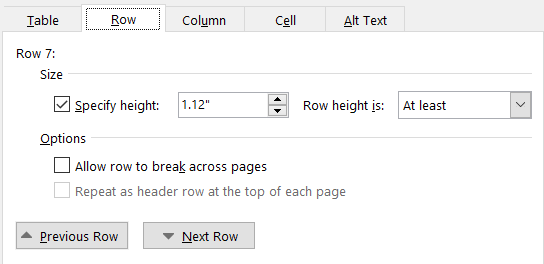 See this table’s Paragraph properties. 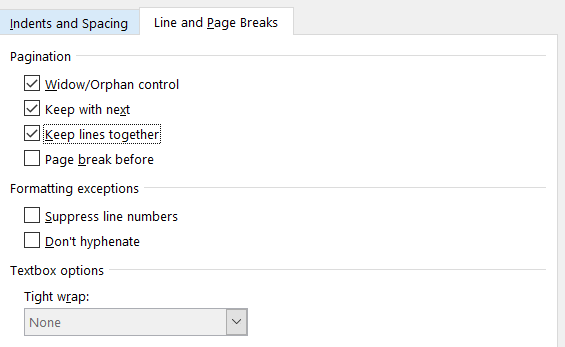 |
|
Apply Keep with next and Keep lines together paragraph format to one or more table rows if needed to prevent an awkward page break within a short table. |
||
|
Notes, conditional statements |
Enter a tab after the note label colon (e.g., “C.1:”). This sets up the hanging indent that is included in the Notes/Conditional style. |
See the note conditional statement following this table. |
3.6. Footnotes
Apply the following styles to footnotes:
-
Number footnotes using numerals in consecutive order throughout the entire document.
-
Each footnote should be a new paragraph.
-
The footnote numbers are formatted as superscripts in the text and in the actual footnotes.
-
In the text, place the superscript footnote numbers after punctuation such as periods, commas, parentheses, and quotation marks, but before dashes, colons, and semicolons in a compound sentence.
-
Place the footnotes at the bottom of the page that they are cited on.
-
Do not include mandatory requirements in text footnotes.
3.7. Subscript and superscript styles
Subscript and superscript are text formatting styles. Subscript is used in formulas, equations, and variables. Superscript is used in trademark and copyright notices and footnotes. These formatting styles can be set to keyboard shortcuts, or in Microsoft® Word’s formatting options.
For additional guidelines on using superscript in footnotes, see Section 3.6. For guidelines on using subscript in formulas and mathematical equations, see Section 9.2.4.
3.8. Appendixes
Appendixes consist of supplementary material at the end of a document, immediately after the last numbered section (usually the References section (see Section 4)). Appendixes typically contain relevant supporting information that is helpful to implementers and other readers. For example, appendixes might include sample data, test conditions, or tables that list object types.
The following guidelines apply to appendixes:
-
Make sure that all document appendixes are included after the numbered sections in the TOC.
-
Put appendixes at the end of a document.
-
Name the first appendix “Appendix A”, the second one “Appendix B”, and so on.
-
For Heading 2 to Heading 4 appendixes, use numbers following the appendix letters, with periods separating them.
Examples:
-
Appendix C [Appendix Title]
-
C.1 [Heading text]
-
C.1.1 [Heading text]
-
C.1.1.1 [Heading text]
-
-
-
-
-
Do not add “Section” before “Appendix” and the appendix title.
Examples:
-
Correct: Appendix A Message Sequence Charts
-
Incorrect: Section 10 Appendix A – Message Sequence Charts
-
-
For figures and tables in appendixes, use the following numbering style, where the uppercase letter following “Figure” or “Table” denotes the appendix:
Examples:
-
Figure A.1: Error sequence generation
-
Table C.3: Nomenclature
-
-
Do not place punctuation between the appendix letter and the title.
-
The default tab space built into the heading style is a sufficient separator.
-
Use “appendix” and not “annex” for any supplemental section or document that follows the last numbered section in a Bluetooth Document.
-
Use “appendixes” and not “appendices” for the plural of “appendix” (see the Merriam-Webster.com Dictionary [4]).
3.9. Examples
Use examples in Bluetooth Documents to help implementers understand technical subject matter and validate their work. An example does not form a requirement. Present examples in text paragraphs, tables, screenshots, diagrams, and illustrations.
Follow these guidelines for examples:
-
It is acceptable to present brief inline examples in regular text paragraphs, either parenthetically or in a separate sentence (“…any color value (e.g., red, green, blue)” or “For example, use any color value…”).
-
To set an example off from the body text, start a new paragraph with an unnumbered Example heading with the Strong,Bold template style applied. Then start a new paragraph with the example text. To indent the heading and paragraphs comprising the example, apply the Body Text Indent style (under a regular text paragraph) or the List Paragraph style (under a bullet paragraph).
Example
Set off example text in a new paragraph.
-
If multiple examples relate to the same text, then list the examples after the paragraph or section. Label them “Example 1”, “Example 2”, and so on. Restart example numbers at “1” for each list. Example numbers are independent of section numbers.
For short examples that are grammatically parallel, use tables with at least two columns to present multiple examples that pertain to the same subject matter.
Continuous Tenses
Examples
Present continuous
I am reading the book.
Past continuous
I was reading the book.
Future continuous
I will be reading the book.
Table 3.7. Examples of continuous tenses in table format
-
For examples in table format, insert the table caption below the table (“Table 4.5: Examples of …”). Select the References ribbon and then select Insert caption (the Caption style is applied automatically).
-
For examples in figure format, insert the figure caption below the figure (“Figure 4.5: Example of …”). Select the References tab and then select Insert caption (the Caption style is applied automatically).
-
It is acceptable but not necessary to call out examples in preceding text. For a single example, use “in the following example” or similar wording, unless the example is in a table or figure, in which case, insert a cross-reference link to the table or figure caption. For multiple, numbered examples, use “…see Example 6” or similar wording.
-
Do not use “shall”, “shall not”, “should”, “should not”, “may”, or “may not” in the text of an example.
-
It is acceptable to use the words “must”, “can”, and “will”.
-
If “must” expresses a natural consequence of a previously stated requirement, then cite the requirement’s precise location using the conventions stated in Section 5.
-
If “must” is expressing an indisputable statement of fact, then it does not require a cross-reference.
3.10. Sample data
Bluetooth Documents sometimes contain sample data for reference purposes. Use sample data to complement the definitions provided elsewhere in the document and enhance understanding of the subject matter. Implementers often use sample data to verify implementations and to avoid potential misunderstandings.
There are many types of sample data, including data generated by or pertaining to tests, security, encryption, code, functions, sequences, keys, hopping, and broadcasting.
3.10.1. Presenting sample data
Put large volumes of sample data in appendixes at the end of specifications. Add cross-reference links to those appendixes in the body text. Do not manually format sample data (e.g., paragraph and line spacing, word spacing, indents, etc.). To minimize the chances of introducing new errors, format data as follows:
-
Always add sample data as a new paragraph, flush with the left text margin.
-
From the source material, copy and paste sample data as text.
-
If sample data is copied as text, then apply the Code style.
-
To enhance readability, adjust the type size, if necessary.
-
If sample data is copied as a screenshot, then apply the Figure style.
-
-
To enhance readability, adjust the size of the image, if necessary.
-
An instance of sample data is not an illustration. Do not number or add a caption to it.
-
Where appropriate, precede sample data with a heading.
-
Where appropriate, introduce the sample data in the immediately preceding text with either a complete sentence or an introductory clause or phrase (e.g., “…as shown in the following sample data:”).
3.10.2. Examples of sample data usages
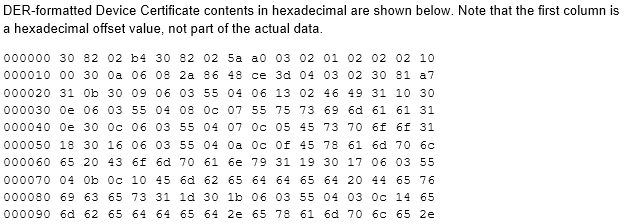
Figure 3.3 and Figure 3.4 illustrate two of the many types of sample data used in specifications.
 |
 |
4. References in Bluetooth Documents
The References section is usually the last numbered top-level section in Bluetooth Documents (followed by any optional appendixes). In the Bluetooth Core Specification [9], the References section is a Part of its own rather than being in each Part because the same reference might occur in several Parts. When the References section is last, the section number might change if a new top-level section is added during a specification enhancement. Therefore, do not reference the References section number in another Bluetooth Document because the cross-reference might break. If a Bluetooth Document cites external documents, then include them in a References section. For detailed information about internal and external references and language considerations, see Section 4.1.1. For guidance on content from other documents, see Section 7.2.6. Bluetooth Documents may contain internal document references as well as references to external sources. Internal references to information within the document should be used whenever possible to aid the reader and reduce redundant information. References may also be made to another Bluetooth Document or web page.
If the text cites more than one reference number (i.e., "certificates [6][7][8][10][11]"), rewrite the text to clarify the item each reference number points to (i.e., "certificates (see ITU-T X.509 [6], RFC 5280 [7], RFC 6818 [8], RFC 6960 [10], and RFC 8399 [11])").
This section covers the following topics:
-
Internal vs. external references
-
How to create and cite references
-
How to create the References section
4.1. Internal vs. external references
The reference type dictates which text elements are set as a hyperlink, as well as the content and documentation of the reference.
4.1.1. Internal references
A reference to another section or element (e.g., tables, figures) within the same Bluetooth Document is an internal reference. Internal references are not listed in the References section.
4.1.2. External references
A reference to another source (in whole or in part), whether or not it is published by the Bluetooth SIG, is an external reference. A source from outside the Bluetooth SIG is referred to as an external source, while Bluetooth Documents are referred to as internal sources, and both are referred to as external references.
Consider the following when adding an external source to a specification:
-
Identify the purpose of the reference. Does the information help explain how to implement, or is it simply background information that provides additional content for the specification or a portion of the specification?
-
Are there any requirements in the referenced source that are not included in the Bluetooth Document? If there are requirements, then do they relate to mandatory or optional requirements?
-
If the referenced source is background information that is not needed to understand or implement the Bluetooth Document, then the document author must identify why the reference should be included in the specification. The author must clearly mark the reference as a “Note:”.
For example:
“Note: For a detailed analysis of the differences between TAI and UTC, including the important concept of leap seconds, see NIST Time Frequently Asked Questions (FAQ) , from the Physical Measurement Laboratory of the National Institute of Standards and Technology of the U.S. Department of Commerce.”
4.1.2.1. Requirements for external references
The following requirements must be met for each external reference:
-
If the referenced source is required to implement the specification, then the author must identify in the specification the specific requirements.
-
Refer to a final version of a referenced source (not to a draft, deprecated, or withdrawn version). When the external reference is to a non-Bluetooth standard or specification, do not follow the version number with “or later” (this is used only for Bluetooth Documents).
-
Exception: It is acceptable to reference a draft Internet Engineering Task Force (IETF) document or a JSON schema (which links to IETF documents). This exception does not include IETF documents labeled as “Internet-Draft” because they expire by design.
-
-
Refer to a web page or document hosted by the Bluetooth SIG if possible. Avoid referring to external sources if there are Bluetooth documents that will suffice.
-
Refer to a document that is in English.
-
Identify external sources early (ideally, at the 0.7 stage; 0.9 stage at the latest).
-
Is any of the content from the reference, in whole or in part, copied directly into the Bluetooth Document? If so, then an early legal review is required.
-
Only refer to content which is available to all members.
-
Refer to a document that is free and publicly available, if possible. If there is a cost to an externally referenced source, then the cost should be nominal (approximately $500 USD or less). If the cost is higher than $500, then there must be a review and approval by the Bluetooth SIG Executive Director.
-
In reference entries for websites, include the current, correct URLs in the citations, and provide a hyperlink to the URLs. If possible, a Digital Object Identifier (DOI) should be used instead of a direct link. Apply the Document Hyperlink style to the URL.
-
In reference entries for printed books, use the standard syntax described in Section 4.2.2.
-
Unless the Terms of Use for the document’s hosting site indicates otherwise, refer to the specific version of the document, including the document number, author or company name, title and volume/edition/version (if applicable), month and year of publication, and download link (if applicable).
-
In released, public-facing specifications, ensure that all sources may be accessed by all members.
-
Do not refer to a document in a personal folder (at an academic institution or similar).
-
Do not refer to documents using links to the “Internet Archive Wayback Machine”.
-
Do not reference test documents.
-
Do not reference Wikipedia.
4.2. How to create and cite references
This section provides guidelines for creating and citing the following types of references:
-
Internal references
-
External references
-
Excerpts from a third-party document
4.2.1. How to create and cite internal references
Any internal reference to a specific section, table, or figure within the same document should be linked to that section, table, or figure. The reference should be in parentheses and should read “(see Section X.X)”. Link formatting should only be applied to the section number; do not link “see” or “Section”. In all cases, apply the Document Hyperlink style in Microsoft® Word to the link text (see Section 3.4).
4.2.2. How to create and cite external references
An external reference in a Bluetooth Document includes a square-bracketed number that hyperlinks to the corresponding reference citation listed in the References section. Include the square brackets when applying the Document Hyperlink style (e.g., [1]) in Microsoft® Word to the reference number.
There is no specific order for allocating external reference numbers to allow for any new references or document restructuring that may occur in future document versions. The numbers in the bracketed reference hyperlinks in the body of a document are generated automatically according to the order in which the references are listed in the References section. To maintain the reference numbers of existing references that are linked within the document, new references should be added to the end of the list in the References section instead of inserted at the beginning or in the middle of the list.
For a reference to a specific section in an external reference, cite the section number and heading. This helps avoid inaccurate references or nonfunctional links if section numbers change in the referenced resource.
When referencing external sources, ensure:
-
Every external reference cited in the document is included.
-
The URL goes to the landing page of the referenced source if there is a download cost.
-
The URL goes to the exact location of the referenced source (e.g., download if the Terms of Use (TOU) of the website permits it), if it is publicly available, and if there are no associated fees. If possible, an ISO DOI link should be used.
-
For references to the European Telecommunications Standards Institute (ETSI) website, the link must be added as a plain text URL to address certain ETSI restrictions on links to its website.
-
Do not refer to a table or figure in an external reference by only its table or figure number. Instead, cite the text of the table or figure caption and the table or figure number in the reference.
Examples:
-
For an analysis of the differences between TAI and UTC, see NIST Time Frequently Asked Questions (FAQ) .
-
A Host is required to address USB requests to a specific interface (see ).
The type of link determines which part of the reference text contains the link—that is, the “hot” text that can be clicked to open the target.
External references to publicly available documents published by any person or entity other than Bluetooth SIG, Inc. (Third-Party Document) are discouraged. If information in a Third-Party Document is essential within a Bluetooth Document to understand or implement the document, then the document author has two options:
-
Excerpt the needed information into the Bluetooth Document (this is the preferred method). For guidance on how to format excerpted content and its citations, see Section 4.2.2.1.
-
BSTS will provide a legal review to determine if excerpting (in whole or in part) from the source document is permitted and send the results to the author.
-
-
Reference a Third-Party Document.
-
BSTS will check the referenced document to determine if the source has been previously reviewed and determined to comply with the Bluetooth SIG policy and is legally permitted, in which case, BSTS will accept the reference. If not, then BSTS will submit the Third-Party Document for review and send the results to the author.
-
When referencing an external source (such as a third-party white paper or standard) in a Bluetooth Document, the reference should be limited to the title, source, and location where it is publicly available (e.g., the URL of a public website). It might be acceptable to discuss the substance of and how to apply third-party content when referencing (not replicating) it within a Bluetooth Document, provided that the document provides accurate references to the content in the external source.
|
Example: “Mesh defines times based on International Atomic Time (TAI). The base representation of times is the number of seconds after 00:00:00 TAI on 2000-01-01 (that is, 1999‑12‑31T23:59:28 UTC). A fairly simple formula is used to convert this representation to a human‑readable form with dates, hours, minutes, and seconds.” Note:
[1] “NIST, NIST Time Frequently Asked Questions (FAQ) (Physical Measurement Laboratory of the National Institute of Standards and Technology of the U.S. Department of Commerce), https://www.nist.gov/pml/time-and-frequency-division/nist-time-frequently-asked-questions-faq” |
For full citations of external sources, use the standard syntax shown below, in the order shown (not all types of references will include all of these elements). This applies to both websites and printed books:
[<reference number>] <author or company name>, <“title and volume/edition/version (if applicable)”>, <month and year of publication (if applicable)>, <web link (for online publications)>
Examples:
-
[1] World Wide Web Consortium, “Extensible Markup Language (XML) 1.0 (Third Edition)”, February 2004, http://www.w3.org/TR/2004/REC-xml-20040204/
-
[2] R. Hayes, G. Pisano, and S. Wheelwright, Operations, Strategy, and Technical Knowledge. Hoboken, NJ: Wiley, 2007
For citations of printed books and documents, the International Standard Book Number (ISBN) and International Standard Serial Number (ISSN) are not included in the citation syntax.
Make sure all references are introduced with well-structured, complete sentences that clearly explain the purpose of the reference. Provide the exact title and version of the referenced source.
Example:
-
For a detailed analysis of the differences between TAI and UTC, including the important concept of leap seconds, see National Institute of Standards and Technology (NIST) Time Frequently Asked Questions (FAQ) [1], from the Physical Measurement Laboratory of the National Institute of Standards and Technology of the U.S. Department of Commerce.
4.2.2.1. How to add and format excerpted text and their citations
Use the following guidelines to format excerpted text and its citations:
-
Add quotations marks to excerpted text.
-
If the excerpted text comprises 40 or more words, then display the excerpted text in a freestanding block of text without quotation marks.
-
-
Apply the List Continue style to the excerpted text to indent the text.
-
Apply the List Continue 2 style to the second and subsequent paragraphs within the freestanding block of text.
-
-
Add the citation at the end of the excerpted text after the end punctuation. In the citation, include the page(s) or paragraph number.
-
Provide the context needed to understand the excerpt. Include only the relevant portions. Indicate excised text using ellipses (…) as needed.
4.2.3. Bluetooth Document references
When a Bluetooth Document references concepts that are defined in another approved Bluetooth Document, reference the other Bluetooth Document for those concepts. It is permissible to summarize concepts before cross-referencing them, but do not restate the concepts. Repeating concepts in multiple documents invites inconsistency (e.g., when one document is updated, and the other is not). Similarly, if a term is originally defined in another Bluetooth Document, then reference the definition in the original Bluetooth Document.
The rule of referencing already-defined concepts instead of duplicating the text generally applies to final versions of Bluetooth Documents. For efficiency in the document creation process, draft documents might reference another document or duplicate text from another Bluetooth Document. It is acceptable to duplicate text in draft documents if the final version of the document contains the correct reference and additional text is removed. Note in early versions of Bluetooth Documents any text that will be removed from the final version.
Do not reference Bluetooth specifications that are deprecated or withdrawn.
Bluetooth Documents that are X-level specifications (e.g., v1.0, v2.0) must include the “.0” in the version number, per the DNMD. Specifications and documents with a single active version do not require the “.0” (e.g., CSS v11).
When referencing Bluetooth Core Specification, versions 4.2 through 5.4, the reference must be to the amended version (i.e., Bluetooth Core Specification (amended), Version 4.2 or later).
Include “Bluetooth” in the reference only if “Bluetooth” is part of the specification title. For a Bluetooth specification, include “or later” in the reference, even if the specification has not had an enhancement or maintenance version released. For non-specification Bluetooth Documents or references to documents which are not Bluetooth Documents, only the specific version may be referenced; do not include “or later” even if later versions have been released.
Bluetooth supporting documents (Assigned Numbers, Device Properties, and GATT Specification Supplement) should be referenced generically, without a version number. The reference should include a link to the appropriate page on Bluetooth.com, as shown in the following examples.
For references to a Bluetooth specification, use the following syntax for citations in the body:
<[Specification Title] Specification>, <Version [number or range]>, [<reference number>]
Examples:
-
Bluetooth Core Specification, Version 6.1 or later [1]
-
Mesh Model Specification, Version 1.0.1 or later [2]
-
Common Audio Profile, Version 1.0 [3]
-
Core Specification Supplement Version 11 [4]
-
Bluetooth Assigned Numbers, https://www.bluetooth.com/specifications/assigned-numbers
-
Bluetooth Device Properties, https://www.bluetooth.com/specifications/specs/device-properties/
-
GATT Specification Supplement, https://www.bluetooth.com/specifications/gss/
Refer to a numbered section in another Bluetooth Document by its section number, such as “(see Section 3.2.7)”. References to the Bluetooth Core Specification contain additional information not included in general Bluetooth Document citations. For example:
-
Reference to the Bluetooth Core Specification by another Bluetooth Document: The two devices shall create a guaranteed connection using the authentication procedure described in Volume 3, Part C, Section 9.3, in the Bluetooth Core Specification [2].
-
Reference to another Volume, Part, Section within the Bluetooth Core Specification: The Host initiating the terminate connection procedure shall use the Link Layer Termination procedure defined in [Vol 6] Part B, Section 5.1.6.
-
Reference to a numbered section within a Bluetooth Document: The Generic Attribute Profile (GATT) is required if the GATT provisioning bearer defined in Section 5.2.2 supported or if the GATT bearer defined in Section 3.3.2 is supported.
-
Reference to a numbered section in another Bluetooth Document: Where characteristics are defined in the GATT Specification Supplement (GSS), see Section 2.2 in GSS [3].
For references to Bluetooth documents or web pages that contain a website URL, verify that the URL is valid and functional. For example:
-
Appropriate Language Mapping Tables, https://www.bluetooth.com/language-mapping/Appropriate-Language-Mapping-Table
-
Bluetooth Assigned Numbers, https://www.bluetooth.com/specifications/assigned-numbers/
-
GATT Specification Supplement, https://www.bluetooth.com/specifications/gss/
Links to sections: For the Bluetooth Core Specification 9, the “Vol”, “Part”, and “Section” words and their associated numbers or letters are included in the link text.
For example: “If an authentication fails, then the scheme described in shall be applied.”
In all other specifications, only the section number contains the link (inserted as a cross-reference link). Apply the Document Hyperlink style to the link. Use the format “… (see Section X.Y)” for internal references that are in parentheses. For example:
-
Each sequence described in Section 4 shall be defined as a transaction.
-
If the key descriptor is not supported, then the AC Server does not send a Key Descriptor Response (see ).
Links to figures and tables: In figure and table links, both the label and the figure or table number are included in the link text. For example:
-
The Authentication_Key parameter shall be set to the value specified in .
-
An example of binding a MAC address to a physical link is shown in .
4.3. How to create the References section
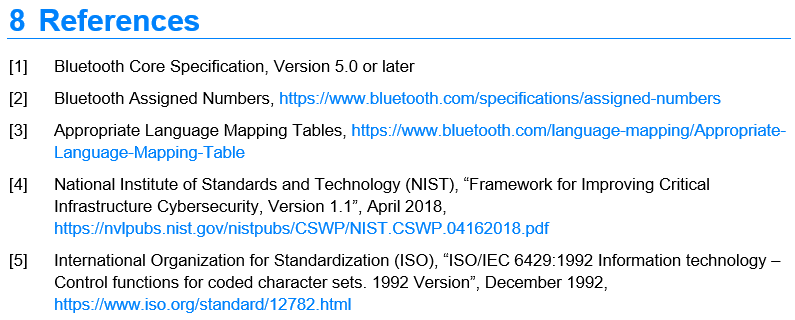
Bluetooth Documents often contain a References section. The References section contains a list of full citations for the numbered external references that are called out in the body of a document (see Figure 4.1). For more information on the placement of the References section in Bluetooth Documents, see Section 4.
A completed References section will contain all external references (to internal and external sources) found in the specification:
 |
There are a few consistent guidelines for all forms of reference creation and usage:
-
Do not include end punctuation (i.e., period) at the end of references.
-
All references must be directly hyperlinked to the section that is being referenced, or the References section of the referenced source. This includes references to tables and figures.
-
All external references to both internal and external sources must be included.
-
Bluetooth Documents should not reference the SMPD or Drafting Guidelines or list them in the References section.
-
List the references in numerical order in the References section. If additional references are added after the original References section is generated, then review the references throughout the document to check that each number is cross-referenced correctly. Add new references to the end of the existing list of references (the reference number will be automatically added in Microsoft® Word).
-
After deleting references that are no longer used, Microsoft® Word automatically renumbers the list of references.
-
BSTS updates all internal cross-reference links during editorial reviews.
-
5. Terminology and abbreviations
A defined term refers to a term or phrase that, according to these guidelines, ought to be (and consequently is) defined. Acronyms and abbreviations follow guidelines that are separate from those for defined terms (see Section 5.4).
5.1. Enhancement vs. new specifications
Some previously adopted specifications pre-date the Drafting Guidelines. Enhancement specifications are not required to alter terminology to conform to these guidelines. However, to aid readers in understanding how the specification addresses terminology, an enhancement specification should include, in a prominent place, an explanation of how and where any terms are defined, and any scheme for identifying a defined term within the text (e.g., capitalization, italic formatting, etc.).
New specifications (i.e., those that have not been previously adopted) should follow the terminology guidelines from Section 5.2 onward.
5.2. Terminology guidelines for new specifications
This section covers the following topics:
-
Term categories based on their place of origin
-
Criteria to determine if a term should be cross-referenced or defined
-
Guidelines to define and cross-reference terms
-
Conventions to communicate terms, acronyms, initialisms, and abbreviations
5.2.1. Term categories based on their place of origin
Terms that appear in a Bluetooth Document vary by place of origin. These places can be thought of in terms of concentric circles, with each larger circle having a broader place of origin than the smaller circles.
-
Local term: The term originates within the specification currently being written.
-
Bluetooth term: The term originates in another Bluetooth Document and is a part of the Bluetooth ecosystem. This category also applies to terms whose meaning within the Bluetooth ecosystem differs from their meaning elsewhere.
-
External term: The term originates from a source external to Bluetooth. Frequently, such terms are defined in the standard of another standards developing organization (SDO) or by a corporation that created the technology that the term describes.
-
Industry term: The term is widely used in the wireless and related industries. In some cases, the term is also known to the general public (e.g., smartphone, firewall). It is typically assumed that the readers of Bluetooth Documents have a functional knowledge of the definitions of industry terms. If an industry term is defined in a Bluetooth Document in a way that differs from industry usage, then it can lead to confusion and misunderstanding. When possible, a Bluetooth Document should inform the reader of where an authoritative definition for an industry term is located.
 |
5.2.2. Determine if a term should be cross-referenced or defined
Define or cross-reference terms in Bluetooth Documents based on the criteria in the following subsections.
5.2.2.1. Criteria for cross-referencing a term
Cross-reference a term if both of the following are true:
-
The technology described cannot be properly understood or implemented without access to the definition of the term.
-
The term’s origin is another Bluetooth Document, an external source, or an industry source as described in Section 5.2.1. For instructions on how to cross-reference a term, see Section 5.2.3.1.1.
- Note:
-
For terms with a Bluetooth origin, if the term is defined in the Bluetooth Core Specification [9], then cross-referencing the term is left to the discretion of the author due to the level of effort involved in cross-referencing the first use of every such term. This is compensated for by communicating that many Bluetooth terms are defined in the Bluetooth Core Specification, as described in Section 5.2.4. Cross-reference Bluetooth terms that are defined in other Bluetooth Documents.
5.2.2.2. Criteria for defining a term
Define a term if all of the following are true:
-
The term appears for the first time in the Bluetooth ecosystem in the document (i.e., it is a local term (see Section 5.2.1)).
-
The term has a specific meaning in the context of the document that is different from the plain-English definition.
-
The term, as used in the document, is not defined in another Bluetooth Document, an external source, or an industry source as described in Section 5.2.1.
-
The technology described within the Bluetooth Document cannot be properly understood or implemented without access to the definition of the term, whether by defining the term or cross-referencing it.
5.2.2.3. Programmatic terms
As is common practice, programmatic terms like field names and parameters are usually defined in a table, and this practice should be used in Bluetooth Documents. Those terms might require additional explanation in the body text that follows the table. List those terms and define or explain them in the manner that makes the most sense.
5.2.3. How to define and cross-reference terms
5.2.3.1. Define terms
No special formatting or capitalization of a defined term is required.
Define terms that meet the criteria in Section 5.2.1 and are not already defined in another document as follows:
-
Readers expect to find a definition on the first use of a term. Therefore, after the term’s first use in body text, enclose in parentheses either:
-
The definition,
or,
-
If the definition appears elsewhere within the same document, then a cross-reference to the location of the definition in the Bluetooth Document.
-
5.2.3.1.1. Cross-reference terms
Cross-reference terms that meet the criteria in Section 5.2.2.1 on their first use in a Bluetooth Document per Section 4 and Section 3.4.
Optionally, if a document section involves key concepts, then include a table that defines those concepts near the beginning of the section (e.g., see Volume 2, Part H, Section 7 of the Bluetooth Core Specification [9]).
The guiding principle for Bluetooth Documents is to give readers the information they need to understand and implement the technology described in the Bluetooth Document and to present that information as clearly as possible.
5.2.4. Communicate conventions for terms, acronyms, initialisms, and abbreviations
Communicate Bluetooth terminology conventions to readers:
-
In a prominent location such as an introduction, include the following paragraph:
“Terms, acronyms, initialisms, and abbreviations that have a specific meaning in the context of this Bluetooth Document or the Bluetooth environment in general are, on their first use in this Bluetooth Document, either defined or cross-referenced. Bluetooth-specific terms that are not defined in this specification are defined in other Bluetooth specifications, such as the Core Specification.”
-
If the Bluetooth Document contains an optional Terminology section, then the paragraph must also include the following text:
“Defined terms that are used in this document are listed in Section X.”
(“X” is the cross-reference to the section number for the Terminology section.)
5.3. How to implement a Terminology section
Draft an optional Terminology section as follows:
-
Insert the Terminology section as the last subsection under the Introduction section in a Bluetooth Document.
-
For reader convenience, include in the Terminology section a table that lists all of the terms defined in the Bluetooth Document.
-
Add an introductory sentence before the Terminology table. For example, “Table 1.2 lists all of the terms defined in this document.”
-
Terms are defined at their first use. So, the Terminology table does not include definitions. The table lists the terms and the sections where they are defined.
Structure the Terminology table as shown in Table 5.1.
|
Term |
Definition Location |
|---|---|
|
Multiple Sensor |
Section |
|
Segmentation |
Section |
5.4. Acronyms, initialisms, and abbreviations
Spell out the first occurrence of an acronym, initialism, or abbreviation not in a table or title (i.e., paragraph, bullet list, or procedure) followed by the acronym, initialism, or abbreviation in parentheses. In some cases, it might make more sense to use the acronym, initialism, or abbreviation and then spell it out in parentheses. Thereafter, use only the acronym, initialism, or abbreviation.
If the first occurrence of an acronym, initialism, or abbreviation is in a table, then use the acronym, initialism, or abbreviation and not the spelled-out version. The purpose of this rule is to avoid impacting the readability of the table. Spell out the acronym, initialism, or abbreviation in the first non-table occurrence.
Acronyms, initialisms, and abbreviations that are common in everyday usage (e.g., Wi-Fi or 5G) do not need to be spelled out.
When spelling out an acronym, initialism, or abbreviation, do not capitalize the first letter of each word (initial caps), unless it is a proper noun or the capitalization guidelines state that it should be capitalized. A few examples are provided below.
|
Example acronym or abbreviation |
Spelled out |
|---|---|
|
MSC |
Incorrect: Message Sequence Chart Correct: message sequence chart |
|
GATT |
Incorrect: generic attribute profile Correct: Generic Attribute Profile |
|
HSL |
Incorrect: Hue, Saturation, Lightness Correct: hue, saturation, lightness |
|
WG |
Incorrect: working group Correct: Working Group |
6. Grammar and usage
Grammar defines a set of rules for arranging words into sentences to express ideas within a specific language. Word usage outlines the linguistic choices for conveying meaning within a given context.
The Bluetooth Drafting Guidelines provides the following writing principles:
-
An adherence to common rules of clarity and conciseness
-
The use of acceptable words and phrases via a word usage list
For spelling, use the first (preferred) spelling in the Merriam-Webster.com Dictionary [4].
Some beneficial resources to learn more about writing and publishing practices are The Chicago Manual of Style [5], The Elements of Style [10], Ten Lessons in Clarity and Grace [11], and the ASD-STE100 Simplified Technical English [12].
6.1. Grammar
This section provides guidance on some of the English grammar issues that commonly occur in draft Bluetooth Documents.
6.1.1. Use of articles: “a”, “an”, or “the”
An article is a word that introduces a noun and indicates whether the noun is specific (“the”) or nonspecific (“a” or “an”). This section covers the following topics:
-
When is an article needed before a noun?
-
When to use "the” vs. “a” or “an”?
-
When to use “a” vs. “an”?
6.1.1.1. When is an article needed before a noun?
An article is required in table and figure references. An article is not required before a table or figure label and number.
Correct:
-
“The state is composed of the fields defined in .”
-
“ shows the element-model structure for a device.”
An article is required with defined terms (such as a specific feature, protocol, service, or model). When the defined term is followed by the object type, introduce the defined term with an article. If the defined term is not followed by the object type, then an article is not required.
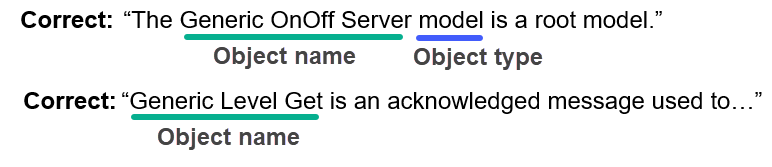 |
6.1.1.2. When to use “the” vs. “a” or “an”
Use “the” to refer to a specific object. Use either “a” or “an” to refer to a nonspecific object. For example:
-
“A network can have one or more subnets.”
-
“A unicast address is allocated to an element…”
-
“The primary element is addressed using the first unicast address assigned to the node.”
-
“If the device is a door lock…”
-
“The Node Identity state determines if a node is advertising on a subnet using Node Identity.”
6.1.1.3. When to use “a” vs. “an”
Use “a” before words that start with consonants that are pronounced as consonants. Use “an” before words that start with vowels or are pronounced as if they start with vowels. For example:
-
“a device has an attention timer”
-
“an unsuccessful procedure”
-
“a failed procedure”
-
“an yttrium compound” (the consonant “y” makes an “ih” sound here)
-
“a universal process”
-
“an honorable man” (the consonant “h” is silent here)
-
“a TTL value” or “a PDU”
-
“an ETA” or “an OOB delivery method”
6.1.1.4. When to use an article before the Bluetooth SIG
When referring to the Bluetooth SIG as a membership organization, use the article “the” before the Bluetooth SIG. For example:
-
Correct: The Bluetooth Special Interest Group (SIG) or the Bluetooth SIG
-
Correct: Join the Bluetooth SIG!
-
Incorrect: Join Bluetooth SIG.
When referring to Bluetooth SIG, Inc., the formal entity responsible for managing operations of the Bluetooth SIG, do not use an article before the name. For example:
-
Correct: Bluetooth SIG, Inc. is headquartered in Kirkland, WA.
-
Incorrect: The Bluetooth SIG, Inc. is headquartered in Kirkland, WA.
6.1.2. Pronouns
When a pronoun (e.g, “it”, “they”, or “these”) is used in place of a word to avoid repeating that word, make sure it is easy for readers to identify which word the pronoun is replacing. If in doubt, then repeat the word instead of using the pronoun.
In a long sentence that contains phrases and clauses, consider repeating the noun instead of using a pronoun, or break up the sentence into smaller, less complex sentences.
Unclear: “If the client had previously determined that the server did not have the «Service Changed» characteristic, or it determines by reading the «Database Hash» characteristic that the database has not changed, then service discovery may be skipped.”
Better: “If the client had previously determined that the server did not have the «Service Changed» characteristic, or the client determines by reading the «Database Hash» characteristic that the database has not changed, then service discovery may be skipped.”
6.1.3. When to use “that” vs. “which”
If a clause (i.e, a part of a sentence) can be removed from the sentence without rendering that sentence incomplete, then begin the clause with “which” and set the clause off with commas. If a clause contains information that is essential to understanding the sentence, then begin the clause with “that” and do not set it off with commas.
Examples of clauses that can be removed without negatively impacting the sentence (use “which” and set off with commas):
-
“The only difference is that the primary element handles the Configuration Server model, which is used for network management, in addition to the other models.”
-
“The reported information in a NINFO shall not exceed the maximum size of an Upper Transport Control PDU, which is 256 octets.”
Examples of clauses that are essential to the meaning of a sentence (use “that” and do not set off with commas):
-
“An asset might have batteries that must be replaced often.”
-
“If a device fails to receive a Coarse Clock Adjustment notification that was sent, then the device needs to recover the current piconet clock.”
6.2. Write using active voice
When writing, use active voice. Active voice is when the subject acts or acts on an object. For example: A node (subject) scans (acts) for messages (object). Sometimes writers switch this structure to the passive voice, where the object acts on the subject. For example: Messages (object) are scanned (acts) by nodes (subject). Usually, the passive voice obscures meaning and should be avoided.
One way to identify passive voice is to add a prepositional phrase to the end of the sentence such as “by us” (e.g., “clean drinking water was provided by us”).
The downside of passive voice is that it obscures cause and effect. Without an explicit subject, it is very difficult for a reader to understand the relationship between interacting elements. For example, the passive sentence “The control plane functionality is provided” is less clear than its active counterpart “The Channel Manager provides the control plane functionality”.
Using passive voice is the right choice in cases where:
-
The acting agent is unimportant or unknown.
-
The emphasis needs to be on the results.
-
The active voice is jarring compared to existing passive-voice text.
Active voice is recommended in all other instances.
6.3. Syntax
Syntax guides how to connect words into sentences to express meaning.
6.3.1. Keep sentence structure simple
In the English language, the clearest and most concise sentences use a subject → verb → object structure. Consider the following sentence:
|
Subject |
Verb |
Object |
|---|---|---|
|
The Channel Manager |
provides |
the control plane functionality. |
|
agent |
action |
goal |
In this structure, the subject (the agent causing the action) acts upon or in relation to an object. Each of these three elements (the subject, the verb, and the object) can increase in complexity and still be easy to follow if they remain in this order. However, shorter sentences are easier to follow.
6.3.2. Organize conditional content according to its logic
If content is conditional (e.g., an If… Then structure), then lay it out according to its logic. Describe the conditional content first and then the results that come from those conditions.
6.4. Word usage list
The following is a word usage list for common word usage recommendations for words and phrases in Bluetooth Documents. Consult this guide to make sure documentation is clear and specific for Bluetooth implementers.
|
Original word/phrase |
Alternative word/phrase |
Example |
|---|---|---|
|
A number of |
Be as specific as possible, although it is understood that sometimes an exact quantity is not available; request accurate data from the WG. |
Incorrect: The security model defines a number of separate keys (the device key (DevKey), the application key (AppKey), and the network key (NetKey)) to secure the messages. Correct: The security model defines three separate keys (the device key (DevKey), the application key (AppKey), and the network key (NetKey)) to secure the messages. |
|
Anticipate |
Expect |
Incorrect: When used in the Configuration Request, the continuation flag indicates the responder should anticipate receiving multiple request packets. Correct: When used in the Configuration Request, the continuation flag indicates the responder should expect to receive multiple request packets. |
|
As (when used as “as the reason that”) |
Because (check context first) |
Incorrect: This is required as the architectural model does not assume that a Controller has limitless buffering. Correct: This is required because the architectural model does not assume that a Controller has limitless buffering. |
|
As prescribed by |
As defined by |
Incorrect: Although the user may get involved in authentication as prescribed by the IO capabilities of the two devices, falling back to the in-band association model will prevent deadlock conditions when one or both devices have stale OOB Authentication Data. Correct: Although the user may get involved in authentication as defined by the IO capabilities of the two devices, falling back to the in-band association model will prevent deadlock conditions when one or both devices have stale OOB Authentication Data. |
|
Complies |
Do not use. Change the word to, for example, “follows”, “meets”, “compatible with”, “based on,” or “uses the format of”. |
Incorrect: Each time it needs a new Access Address, the Link Layer shall generate a new random value that complies with the following requirements: Correct: Each time it needs a new Access Address, the Link Layer shall generate a new random value that meets the following requirements: |
|
Currently |
Consider if it can be removed without changing intent |
Incorrect: The LPNAddress field shall be set to the unicast address of the Low Power node that is currently being removed. Correct: The LPNAddress field shall be set to the unicast address of the Low Power node that is being removed. |
|
Desires, wants, wishes, and other personifying words |
Rewrite to remove words that ascribe human qualities to technology |
Incorrect: The following is only required on the server if the services on the server want to be added, modified, or removed. Correct: The following is only required on the server if the services on the server can be added, modified, or removed. |
|
Due to |
Because of |
Incorrect: If the attribute value cannot be written due to an application error, then… Correct: If the attribute value cannot be written because of an application error, then… |
|
For instance |
For example |
Incorrect: For instance, if the 6-digit value of ra is 131313, then… Correct: For example, if the 6-digit value of ra is 131313, then… |
|
For so long as |
“As long as” or “While” |
Incorrect: There are limited uses for such links, and these uses are normally dependent on the continuous repetition of data from the higher layers for so long as it is valid. Correct: There are limited uses for such links, and these uses are normally dependent on the continuous repetition of data from the higher layers while it is valid. |
|
Hence |
Therefore, |
Incorrect: Hence the architecture is incapable of representing these logical transports with a single transport layer. Correct: Therefore, the architecture is incapable of representing these logical transports with a single transport layer. |
|
In an effort to |
To |
Incorrect: In an effort to allow for some time slipping, an uncertainty window is defined around the exact receive timing. Correct: To allow for some time slipping, an uncertainty window is defined around the exact receive timing. |
|
In order to |
To (sometimes “in order to” is necessary if it is unclear what “to” applies to, but it is typically removed at the start of a sentence) |
Incorrect: In order to improve the reliability of delivery, the isochronous data packets can be unconditionally re-transmitted by increasing the number of subevents in every event. Correct: To improve the reliability of delivery, the isochronous data packets can be unconditionally re-transmitted by increasing the number of subevents in every event. |
|
In the event that |
If (sometimes “in the event that” is necessary to indicate that an event triggers the conditional) |
Incorrect: In the event that two devices happen to share the same PHY channel in the same area… Correct: If two devices happen to share the same PHY channel in the same area… |
|
It |
Refer to the item or concept by name, if possible, or clarify what “it” means. |
Incorrect: It is a specification. Correct: Core v5.4 is a specification. |
|
Manner in which |
“The way” or “How” |
Incorrect: Here is a fictitious service browsing hierarchy that illuminates the manner in which browse group descriptors are used. Correct: Here is a fictitious service browsing hierarchy that illuminates how browse group descriptors are used. |
|
May not |
"Does not", "will not", "might not", "it is not always possible that" |
In some usages, "may not" has the meaning of "must not", while in others, it means "it might not". |
|
Prior to |
Before |
Incorrect: Prior to returning to the Connection and Standby state, the device may go through the Page Scan substate. Correct: Before returning to the Connection and Standby state, the device may go through the Page Scan substate. |
|
Provided that |
If |
Incorrect: Provided that the message passes the input filter, it is delivered to the network layer for further processing. Correct: If the message passes the input filter, then it is delivered to the network layer for further processing. |
|
Since (when used instead of “because” and not relating to time) |
Because |
Incorrect: Since all Bluetooth devices are required to implement GAP, any additional profiles implemented by a Bluetooth device become supersets of GAP. Correct: Because all Bluetooth devices are required to implement GAP, any additional profiles implemented by a Bluetooth device become supersets of GAP. |
|
Subsequently |
Evaluate on a case-by- case basis. If possible, use “after”, “later”, or “then”. |
Incorrect: When the AMP Controller receives the HCI_Short_Range_Mode command, it shall indicate an HCI_Command_Status event. Subsequently, after the MAC programming is completed, the Controller shall generate an HCI_Short_Range_Mode_Change_Complete event. Correct: When the AMP Controller receives the HCI_Short_Range_Mode command, it shall indicate an HCI_Command_Status event. Later, after the MAC programming is completed, the Controller shall generate an HCI_Short_Range_Mode_Change_Complete event. |
|
The use of |
Omit this term (in some contexts, “the use of” is necessary) |
Incorrect: The 802.11 AMP shall support the use of four address field frame format for all data frames after (re)association. Correct: The 802.11 AMP shall support the four-address field frame format for all data frames after (re)association. |
|
Thus |
Therefore, |
Incorrect: Each time encryption is activated, a new encryption key shall be generated. Thus, the lifetime of the encryption key does not necessarily correspond to the lifetime of the authentication key. Correct: Each time encryption is activated, a new encryption key shall be generated. Therefore, the lifetime of the encryption key does not necessarily correspond to the lifetime of the authentication key. |
|
Utilize |
Use |
Incorrect: Similarly, multiple client applications can utilize a Service Discovery Protocol (SDP) client to query servers on behalf of the client applications. Correct: Similarly, multiple client applications can use a Service Discovery Protocol (SDP) client to query servers on behalf of the client applications. |
|
Whilst |
While |
Incorrect: The set of features supported by the LM shall not change whilst the Controller has a connection to another device. Correct: The set of features supported by the LM shall not change while the Controller has a connection to another device. |
6.5. Contractions
Contractions (e.g., can’t, isn’t, that’s) are often used in writing to convey a more informal tone. In specification writing, they may reduce the clarity of a sentence, or create confusion. It is suggested that contractions be avoided in Bluetooth Documents.
6.6. Punctuation
|
Punctuation type |
Symbol |
Usage |
Example |
|---|---|---|---|
|
AM/PM |
AM/PM |
Denotes time periods. Do not put a space between the number and the symbol. |
The audio sensor is set to activate at 6AM. |
|
ampersand |
& |
Shorthand for ‘and’. Should not be used in specifications. |
Do not use. |
|
apostrophe |
' ('s or s') |
Used in contractions, plurals, and possessives. |
The specification’s tables have been updated. |
|
brackets |
[ ] |
Allows for the insertion of editorial material inside quotations. Used to denote references. |
[] |
|
colon |
: |
Used to separate two independent clauses when the second explains or illustrates the first. |
The specification is complete: new tables have been inserted. |
|
comma |
, |
Indicates a pause between parts of a sentence. It is also used to separate items in a list and to mark the place of thousands in a large numeral. |
The specification is complete, and the draft has been approved. |
|
e.g., |
e.g., |
“For example…” Only use in parentheticals (); add a comma after usage (e.g.,). |
When the sensor activates (e.g., in case of a fire) … |
|
em dash |
– |
Used to denote emphasis or parenthetical information. Used in a similar manner to commas, parenthesis, and colons when more emphasis is required. |
The specification – as requested by the WG – has been completed. |
|
exclamation point |
! |
Punctuation that occurs at the end of an exclamatory sentence. As such, it is not followed by a period or question mark. Should not be used in specifications. |
Do not use. |
|
hyphen |
- |
Used to represent a span or range of numbers, dates, or time. There should not be a space between the hyphen and the adjacent material. Depending on the context, the hyphen is read as “to” or “through”. |
The specification will be reviewed from 2022-12-2 to 2023-01-10 |
|
i.e., |
i.e., |
“That is…” Only use in parentheticals (), add a comma after usage (i.e.,). |
When the sensor activates (i.e., when it is functioning as expected) … |
|
parentheses |
( ) |
Parentheses (always used in pairs) allow a writer to provide additional information. The parenthetical material might be a single word, a fragment, or multiple complete sentences. |
The specification (as requested by the WG) has been completed. |
|
period |
. |
Indicates the end of a sentence. |
The specification is complete. |
|
question mark |
? |
Terminal punctuation denoting a question or uncertainty. Sentences closed with a question mark should not also contain a period. |
Is the specification complete? |
|
quotation marks |
“ ” |
Used in the verbatim quoting of references and excerpted information, or to clarify |
“The water content is 20 ml/l” |
|
semicolon |
; |
Commonly used between two independent clauses (i.e., clauses that could stand alone as separate sentences) when a coordinating conjunction (for, and, nor, but, or, yet, so) is omitted. |
The specification is complete; the final review will take place next week. |
Punctuation in relation to quotation marks:
The American usage convention is to place punctuation such as commas and periods inside the closing quotation mark. In consideration of the global audience (many of whom speak English as a second language) and the potential for readers to misunderstand the punctuation as literally inclusive to the quoted text, Bluetooth Documents use the convention of placing punctuation such as commas and periods outside the closing quotation mark (e.g., After the L2CAP_CONFIGURATION_RSP packet is received with result “Pending”, L2CAP may issue the necessary checks with the Controller…). The only case where quoted text should end with a punctuation mark inside the closing quotation mark is if the quote literally includes the punctuation.
7. Specification drafting best practices
Documents published by the Bluetooth SIG reflect both the hard work and intellectual property of the Bluetooth SIG and its members. To help mitigate legal problems, a legal review of draft documents is conducted prior to adoption and publication. The guidelines in this section help members draft documents that achieve efficient and straightforward legal review. Following the Drafting Guidelines reduces the level of effort necessary to address potential legal issues identified during the legal review cycle.
The Drafting Guidelines apply to documents in all stages of development. WG participants might find that exceptions are necessary during the drafting process, such as in early draft documents and planning artifacts like NWPs and FRDs. Similarly, exceptions might be necessary in a final document. If a WG identifies a need to deviate from the Drafting Guidelines, then the WG should immediately contact BSTS at specreview‑editor@bluetooth.org for help with resolving the issue. BSTS may require additional information to understand the specific text, its background, technical context, and any rationale for the differences.
A list of keywords and phrases that might require legal review is provided in Section 7.3.
7.1. Language
The Language section in Bluetooth specifications contains three subsections:
-
Language conventions: defines conventions for and the meanings of specific words
-
Reserved for Future Use: defines conventions for using the “Reserved for Future Use” designation
-
Prohibited: defines conventions for using the “Prohibited” designation
The appropriate Language text is provided in each specification template. For the authoritative and current text of the Language section, use the appropriate template from www.bluetooth.com.
Be consistent with respect to language conventions: If a Bluetooth Document states that it follows certain usage conventions, such as the language conventions provided in specifications, then follow those conventions consistently throughout the document.
7.2. Guidelines for drafting specifications
7.2.1. Outcomes
Do not make assurances regarding outcomes. Do not imply that compliance with a Bluetooth Document will meet any person or company’s needs.
-
Avoid words like "ensure" and "guarantee".
-
Put appropriate limitations around any language that states a cause-and-effect relationship.
Examples:
-
Correct: “When the Inquiry_Cancel command has completed, a Command Complete event shall be generated. No Inquiry_Complete event will be generated for the canceled Inquiry process.”
-
Incorrect: “The network cache prevents devices from relaying previously received messages by adding all messages to a cached list.”
-
Correct: “Note: By adding all messages to a cached list, devices can use the cache to identify messages the device has already received and avoid relaying those messages again.”
7.2.2. Security and privacy
Avoid making statements regarding security or privacy. It is acceptable when defining a requirement that is motivated by privacy- or security-related concerns to present the requirement and include factual statements about the information that might be exposed if the requirement is not implemented. If a group or committee is aware of a privacy or security concern about a feature or function described in a Bluetooth Document, then they must immediately report it to BSTS at specreview‑editor@bluetooth.org for review. There might be situations where it is advised to include a warning in the document to inform readers of potential risk.
Incorrect: “However, where privacy is a concern, the Local Name field should not be included in the Advertising Data.”
Correct: “If the Local Name is included in the Advertising Data or Scan Response Data, then the identity of the device could be exposed and tracked.”
Correct: “It may not be possible to use directed advertising to achieve a connection when using resolvable private addresses (RPAs). The ability to connect will depend on the capabilities of the peer device.”
7.2.3. Regulatory requirements
Do not discuss laws or regulatory requirements in a final specification. When drafting a Bluetooth Document, Working Groups (WG) are free to discuss relevant technical considerations. If the justification of choice for a specification (or portion thereof) is a regulation of a particular jurisdiction, then discussion regarding the justification may be included in the notes and comments of draft documents. Before the final Bluetooth Document is submitted for approval, all notes and comments regarding the justification of choice must be removed. If a WG believes that it is necessary to include discussion of a law or regulatory requirement in a final Bluetooth Document, then Bluetooth SIG Legal review and BoD approval is required. Submit requests for review and approval to BSTS by the 0.9/CR stage.
Each member company is responsible for determining what laws and regulations apply to their Bluetooth products and to ensure compliance.
-
Avoid phrases like "due to regulatory requirements" or "to comply with law".
-
Do not interpret or state regulatory requirements.
-
Do not state or imply that compliance with law is the reason for a particular requirement, even if the requirement is designed to facilitate a member’s compliance with law.
Incorrect:
“Regulations require data integrity and data unambiguity between the Sensor and Collector applications even outside the Bluetooth data transfer. Since some portions of the communication path between the Sensor and Collector could include devices or software that do not meet these requirements, a system called E2E-Protection may be necessary.”
Correct:
“Some portions of the communication path between the Sensor and Collector could include devices or software that do not have data integrity and data unambiguity between the Sensor and Collector applications outside the Bluetooth data transfer. If data integrity and data unambiguity is needed, then a system called E2E-Protection may be necessary.”
7.2.4. Membership agreements and governing documents
Do not reference the membership agreements (e.g., the Patent/Copyright License Agreement (PCLA), Bluetooth Trademark License Agreement (BTLA), Membership Commitment Agreement, etc.) or governing documents (Articles of Incorporation, Bylaws, policies, etc.).
Do not attempt to interpret or clarify the membership agreements or governing documents. These documents need to “speak for themselves”. The Bluetooth SIG does not provide legal advice or interpret the meaning of these documents for members.
-
Do not make any statements regarding licenses, grant of rights, or intellectual property rights such as patents, trademarks, and copyrights.
-
Do not make any statements regarding the PCLA, BTLA, or any of the other membership agreements.
-
Do not attempt to summarize or restate the Bylaws of the Bluetooth SIG. It might be acceptable to reference the Bylaws when referring to requirements (e.g., “adopted in accordance with the Bylaws”).
-
Do not attempt to define terms that are already defined in the Bluetooth SIG’s governing documents or membership agreements, such as “Bluetooth Product”.
7.2.5. Bluetooth specification scope
Bluetooth specifications define the technical requirements for Bluetooth interoperability and provide the information needed to implement the specification. Limit content of a Bluetooth specification to the intended scope. For example, the scope of a specification is to define a set of requirements and describe how to implement the requirements. The process that a member must follow to demonstrate that their Bluetooth-enabled product complies with a specification and meets other requirements established by the Bluetooth SIG for qualification is outside the scope of the specification itself:
-
Avoid references to the Bluetooth Qualification Process or the Bluetooth Qualification Program.
-
Avoid statements about declaration or qualification.
-
Avoid references to compliance with a specification and to compliant portions.
7.2.6. Content from Third Parties
Do not incorporate any content (e.g., text, code snippets, images, or graphics) in a Bluetooth Document unless:
-
The content was created by staff from the Bluetooth SIG or a member of the Bluetooth SIG, and the member provides the content to the Bluetooth SIG in the course of the member’s participation in activities with the Bluetooth SIG.
OR
-
The Bluetooth SIG has permission (e.g., a license) to use the content in the manner proposed.
Third-party content is not licensed to the Bluetooth SIG under the membership agreements. Any use of third-party content (even if it is open source or available on the internet) requires review and approval of the license terms by Bluetooth SIG Legal. Bluetooth SIG Legal determines if the requisite rights are provided to include the content in the Bluetooth Document. Working Groups should identify any required third-party content for BSTS as soon as possible, so Bluetooth SIG Legal can review license terms.
7.2.7. Background discussion
Do not explain why particular methodologies are selected in final specifications in final versions of Bluetooth Documents. Simply state whether the requirement is mandatory or optional, without further discussion.
Discussion about the decision-making process is necessary and appropriate in documents produced earlier in the specification development cycle, such as NWPs, FRDs, DIPDs, FIPDs, and 0.5 stage draft documents, or in the exchange of comments during reviews of draft specifications. For example, if a WG is considering equally valid but mutually exclusive solutions to requirements, such as flooding vs. routing in mesh, then discussion of the merits of each solution under consideration is acceptable within 0.5/DIPD stage materials. These discussions are out of scope for a published specification, which should simply state the chosen methodology.
7.2.8. Guidelines for using “must”
Among the terms listed in the language conventions, “must” needs the most guidance and clarity. Use “must” only to express an indisputable statement of fact or to express a natural consequence of a previously stated requirement. Use “shall” not “must” when stating mandatory requirements. The following are examples of how to use “must”:
-
Indisputable statement of fact: An indisputable statement of fact is one that is always true regardless of the circumstances.
Acceptable:
“The Bluetooth radios must be in range of each other to communicate.”
“If two devices want to communicate over the RF spectrum, then the devices must be tuned to the same RF frequency at the same time.”
-
Natural consequence of a previously stated mandatory requirement: A consequence of a mandatory requirement is natural if it is the only result that can occur when the requirement is implemented.
-
When “must” is used to state a natural consequence of a mandatory requirement, the statement:
-
Clearly indicates that the consequence is “required by” or “a consequence of” the requirement.
-
References the exact location of the requirement. When referring to the location of a requirement, be specific so that the reader can find it. Below are instructions and examples regarding how to reference the location; however, if a requirement is located in a section with multiple requirements, then it may be necessary to provide additional details in order to identify the precise location of the requirement.
-
-
If the underlying requirement is in the same section of the same document, then say it is “in this section”.
Acceptable:
-
“As a consequence of sending a ReqSeq Sequence error as required in this section, the L2CAP entity must close the channel.”
Not Acceptable:
-
“The L2CAP entity must close the channel.”
-
“Because of the requirement stated above, L2CAP entity must close the channel.”
-
-
If the requirement immediately precedes the sentence containing “must”, then it is acceptable to say “Therefore … must …”
Acceptable:
-
“The Central will not receive transmissions broadcast on the connectionless channel. Therefore, higher-layer protocols must loopback any broadcast data traffic being sent to the Central if required.”
Acceptable:
-
“Different bearers for the same client may be on links with different security properties. Therefore, the server must not assume that when a client has been authenticated on the link carrying one bearer, it has been authenticated on all bearers.”
-
If the underlying requirement is in another section of the same document, then include a reference to the exact section or subsection where the requirement appears. A referenced mandatory requirement can exist anywhere in the specification.
-
-
Acceptable:
-
“Because the Light LC Linear Output state is bound to the Light Lightness Linear state as required by Section 6.2.3.6.1, the Light LC Server model must be located on an element that is separate from the element on which the Light Lightness Server model is located.”
-
If the underlying requirement is in another document, then include a reference to the full name of the referenced document, followed by a linked cross reference in square brackets to the line within the referencing document where the referenced document is listed, and then the section number.
-
-
Acceptable:
-
“If the advertising is non-connectible, then BR/EDR must be used, as required by the Transport Discovery Service Specification , Section 3.2.”
Not Acceptable:
-
“The Client must determine when to disconnect.”
-
“If the advertising is non-connectible, then BR/EDR must be used.”
-
-
If the underlying requirement is in another document that contains multiple volumes and parts, then include a reference to the full name of the referenced document, followed by a cross reference in square brackets, and provide the exact location of the requirement (i.e., Volume, Part, and Section number). The cross reference in square brackets links to the entry in the "References” section of the document being drafted.
Acceptable:
-
“Because the device is in the Peripheral role, the device must support the undirected connectable mode, as required in the Core Specification in Volume 3, Part C, Section 1.2.”
-
“As required by the GATT Profile defined in Volume 3, Part G of the Core Specification , the Client must determine when to disconnect.”
-
“Note: As required by the GATT profile defined in Volume 3, Part G of the Core Specification , for encryption to be used, both devices must support and enable encryption.”
Not Acceptable:
-
“Because the device is in the Peripheral role, the device must support the undirected connectable mode.”
-
-
-
When using “must” in a note: Before using “must” in a note, consider whether the text in the note describes or explains how to implement the document. If so, then the statement (regardless of whether it includes “must”) should not be in a note. When using “must” in a note, follow the guidelines outlined in this section (including, if the “must” statement expresses a natural consequence of a previously stated requirement, the guidelines for identifying the precise location of the previously stated requirement).
7.2.9. Note
Use a note to call attention to a particular point, requirement, or implication or remind the reader of a previously mentioned point. A note is useful for clarifying text to which the reader ought to pay special attention. It is never to be used for text that describes or explains requirements or how to implement the document (even if the reader could implement the information). Each note must be set off in a separate paragraph and begin with “Note:”.
The following rules apply to notes:
-
Do not use the words “shall”, “shall not”, “should”, “should not”, “may”, or “may not” in a note.
-
Do not include text that describes or explains requirements or how to implement them.
-
A note can mention a requirement, but if it does, then it must include a cross-reference to where that requirement is described or explained.
-
It is permissible to use the words “must”, “can”, and “will” in a note. In the case of “must”, the guidelines in Section 7.2.8 still apply.
Figure 7.1 shows an example of a note.
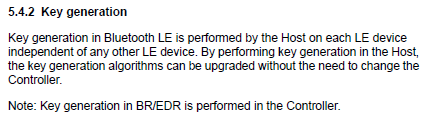 |
7.3. Keywords flagged during SIG reviews
The following words and phrases (and their variations) might require a closer review of Bluetooth Document text and are provided here as a guide to authors and SIG Staff. This list is not designed to be comprehensive and may evolve over time as new issues and terms emerge.
|
Word/phrase flagged |
Notes |
|---|---|
|
black |
To capture “black list”, “black-list”, or “blacklist”. |
|
compli* |
To capture “compliance”, “complies”, etc. |
|
comply |
– |
|
conform |
To capture “conformance”. |
|
copyright |
– |
|
current/currently |
Delete or reword; it’s ambiguous. |
|
declar* |
To capture “declare”, “declaration”, etc. |
|
defin* |
To capture “defined terms”, “definitions”, etc. |
|
design |
– |
|
ensure |
– |
|
future |
Do not imply features in a future release. |
|
guarantee |
– |
|
have to |
Change to “shall” or “must”. |
|
informative |
– |
|
law |
– |
|
licens* |
To capture “license”, “licensing”, etc. |
|
logo |
– |
|
master |
– |
|
must |
Make sure “must” is used as intended per the Language conventions table and follows the guidelines in Section 7.2.8. |
|
normative |
– |
|
note |
Make sure to follow the guidelines in Section 7.2.9. |
|
patent |
– |
|
PRD |
– |
|
privacy |
– |
|
qualif* |
To capture “qualify”, “qualification”, etc. |
|
recommended that |
Change to “should”. |
|
regulat* |
To capture “regulatory”, “regulation”, etc. |
|
required to |
Change to “shall”. |
|
scope |
To capture “in scope” or “out of scope”. |
|
slave |
– |
|
trademark |
– |
|
typical* |
To capture “typically”. |
|
unless otherwise stated/unless otherwise specifically stated |
Is the intended meaning “unless otherwise stated in this specification” or somewhere else? If it is referring to another specification, then specify which specification. |
|
unreliable |
– |
|
white |
To capture “white list”, “white-list”, or “whitelist”. |
7.4. Guidelines for drafting informational publications
It is strongly preferred that all technical materials are published by the Bluetooth SIG in a specification. The licenses in the Patent and Copyright License Agreement (PCLA) apply to Bluetooth specifications. Unlike specifications, an informational publication is not validated through an Interoperable Prototype Test Event (IOP). Therefore, authors should consider if this content would be better suited as an appendix to or within the body of an associated specification.
However, including additional content in a specification might extend the specification adoption timeline or significantly increase the length. The process and requirements for developing an informational publication are detailed in Section 11 of the SMPD [1].
7.5. Appropriate language
The Bluetooth SIG is committed to being an inclusive organization that welcomes all individuals regardless of gender, race, religion, sexual orientation, culture, or national origin. Avoid language that is stereotypical or insensitive to any individual or group of individuals. To that end, the Bluetooth SIG is committed to the use of appropriate language in all Bluetooth Documents. Terms identified as inappropriate are not to be used in Bluetooth Documents approved after August 2020.
For a list of inappropriate terms and the terms selected to replace them, see the Appropriate Language Mapping Tables document [13]. The first time replacement terms are used in an enhanced specification, then the specification will indicate that formerly used terms have been updated with appropriate language replacements and will point readers to the mapping table. The replaced terms are not to be listed in Bluetooth Documents. To replace a term that is defined in the Bluetooth Core Specification [9], use the term listed in the Core section of the Appropriate Language Mapping Tables document [13].
When replacing a term for which no term in the mapping table applies, the relevant WG should develop an alternate term with BSTS and then inform the Bluetooth Architectural Review Board (BARB) for visibility.
For enhanced Bluetooth Documents that contain replacement terms, add a new item in the References section with a link to the Appropriate Language Mapping Tables document [13]. Add a statement on replaced terms after the Language conventions table and any accompanying text (for DIPDs, add the statement at the end of the Introduction section).
8. Capitalization, lists, and object naming
Unless otherwise prescribed in these guidelines, follow grammar, capitalization, punctuation, spelling, and numbering guidance in the Chicago Manual of Style [5] (subscription-based).
For spelling, use the first (preferred) spelling in the Merriam-Webster.com Dictionary [4].
8.1. Capitalization
This section provides guidance regarding the correct use of capitalization in Bluetooth Documents.
8.1.1. Capitalization in terms
When referring to the names of organizations, the full names are initial capitalized. Initial capitalization is the practice of capitalizing the first letter in a word. For example, “Bluetooth SIG, Inc. is headquartered in Kirkland, WA.” The articles (i.e., a, an, the) before the full names are lowercased even when part of the official name, unless the article is at the beginning of a sentence. For example, “Thank you for joining the Bluetooth SIG.”
When referring to an object in the abstract, do not capitalize the object type if the term is not a defined term. For example, do not capitalize “profile”, “service”, or “specification” when they are not part of an object name or otherwise defined term.
However, there are some exceptions to this rule in Bluetooth Documents. Table 8.2 and Section 8.1.2 list capitalization styles to use for some of the most common Bluetooth terms.
If you are not sure whether to capitalize a term, and the term is not listed in the Drafting Guidelines, then contact the BSTS writer assigned to your Working Group or committee, or email specreview‑editor@bluetooth.org.
|
Term |
Capitalization style |
|---|---|
|
Working Group |
Initial capitalization |
|
Study Group |
Initial capitalization |
|
Chair, Vice Chair |
Initial capitalization |
|
profile, service, specification |
Lowercase these terms in abstracts. Initial capitalize these terms when they are part of a name or used in a defined term. |
|
Document types (e.g., New Work Proposal, Functional Requirements Document) |
Initial capitalization |
8.1.2. Capitalization in headings, titles, and captions
These capitalization styles are in alignment with the more modern, friendlier tone of the “new blue” brand documented in the Brand Guide for Bluetooth Trademarks [6].
8.1.2.1. “Up” and “down” capitalization styles
Depending on context, two capitalization styles are used in document headings, titles, and captions: “up style” and “down style” (see Table 8.2).
8.1.2.1.1. “Up style” capitalization
(Also known as "title-style capitalization".)
Guiding principle: All major words (see the “DO capitalize” list below) are capitalized.
DO capitalize:
-
The first word of the title.
-
Verbs (including “is”), nouns, adverbs, adjectives, pronouns (including “its”), and prepositions that have five or more letters.
-
Prepositions that are considered part of a verb (e.g., the preposition “up” in “Back Up the Provisioning Database to the Cloud”).
-
“That” and other conjunctions, including “when”, “where”, and “but”.
DO NOT capitalize:
-
Articles such as “a”, “an”, and “the”.
-
Prepositions that have four or fewer letters and that are not considered part of a verb.
8.1.2.1.2. “Down style” capitalization
(Also known as “sentence-style capitalization”.)
Guiding principle: Capitalization of headings and display text follows the conventions of capitalization in regular text sentences.
DO capitalize:
-
The first word of the title or caption.
-
Words that are capitalized in regular text paragraphs.
-
Acronyms, initialisms, and most abbreviations.
-
Words that are capitalized in field names, property names, and names of objects such as models, elements, states, and messages.
-
The table or figure label and the first word of the caption text.
DO NOT capitalize:
-
Common nouns, including the object type that often follows the name of an object such as a state, message, model, or element (e.g., “the Generic OnOff state”).
-
Verbs, nouns, prepositions, adverbs, and so forth that are not capitalized in regular text paragraphs.
8.1.2.1.3. Where to use “up style” and “down style” capitalization
Capitalize text elements in Bluetooth Documents as described in the Drafting Guidelines (see Table 8.2).
|
Text Element |
Capitalization Style |
Examples |
||||
|---|---|---|---|---|---|---|
|
Title |
Up style |
|
||||
|
All headings (Heading 1 through Heading 6) |
Down style |
|
||||
|
Body text |
Down style |
The Authorization Control Service (ACS) enables an AC Server to protect access to specific GATT resources by defining which GATT resources and related interactions are protected and by describing the information security controls that shall be used to interact with those resources. |
||||
|
Figure caption |
Down style |
|
||||
|
Table caption |
Down style |
|
||||
|
Table column headers |
Up style |
 |







8.1.3. Capitalization of other text
The following rules pertain to regular text, table text, and lists in Bluetooth Documents.
DO capitalize:
-
Proper nouns in any grammatical construction or context
A proper noun is a word or group of words that denotes the name of a specific person, place, or thing. (Examples of proper nouns are “Nikola Tesla”, “Asia”, “the United Nations”, and “Interpol”.)
-
The words “Section”, “Table”, "Step", "List", and “Figure” in cross-references to numbered sections, tables, steps, and figures in the same document or another document
-
The words “True” and “False” in Boolean equations or other logical expressions
-
The Boolean operators “AND”, “OR”, “NOT”, “AND NOT”, and “XOR” (using all capital letters), only when used as operators
DO NOT capitalize:
-
Nouns such as “profile”, “service”, and “specification” (unless the words “profile” and “service” are part of the specification name)
-
The words "section", "table", "step", and "figure" if the word is not referring to specific, numbered items or instructional material
-
Object types such as “command”, “parameter”, “event”, and “function”, whether they are being used in the abstract or following a defined term (e.g., “…the HCI_LE_Encrypt command”)
-
Names of International System of Units (SI) units of measurement that derive from people’s names (e.g., “newtons”)
-
Common nouns (as opposed to proper nouns) in spelled-out acronyms, initialisms, or abbreviations
Examples:
-
Correct: “…a graphical user interface (GUI)…”
-
Incorrect: “…a Graphical User Interface (GUI)…”
-
Correct: “…the Logical Link Control and Adaptation protocol (L2CAP) …”
-
Correct: “…the acknowledgment/repeat request (ARQ) scheme…”
-
Correct: "In Step 1, you will be shown how to copy the document."
-
Incorrect: "The first Step is to create a new document."
8.2. Acronyms, initialisms, and abbreviations
Acronyms are a type of abbreviation; they are words formed from the uppercase initial letters of compound terms and commonly pronounced as words (e.g., “UNICEF”). Initialisms are formed the same way as acronyms, but the letters are pronounced separately (e.g., “CPU”). In these Drafting Guidelines, the term “acronyms” refers to both acronyms and initialisms unless otherwise specified.
Bluetooth Documents contain many acronyms, initialisms, and abbreviations. These terms shall be defined (spelled out) in the documents in which they appear, unless they are common terms defined in the Merriam-Webster.com Dictionary [4] (e.g., “URL”, “HTTP”, and “ASCII”).
8.2.1. Acronyms, initialisms, and abbreviations in body text
This section provides rules for introducing and defining acronyms, initialisms, and abbreviations in body text.
-
Spell out the full term on the first instance of each acronym, initialism, or abbreviation in the text of a document. Introduce the condensed form, enclosed in parentheses, immediately after the spelled-out term.
Example: “The service universally unique identifier (UUID) shall be set to ….”
-
When referring to the Bluetooth SIG as a membership organization, spell out the “Special Interest Group” on the first instance with “SIG” in parentheses.
Example: "The Bluetooth Special Interest Group (SIG)"
-
It is acceptable to introduce and define acronyms, initialisms, and abbreviations in introductory sections across multiple sections or volumes of the document.
-
Include each acronym, initialism, or abbreviation in the Acronyms, initialisms, and abbreviations section of the document (see Section 11, for example).
-
When defining acronyms, initialisms, and abbreviations for the names of organizations, spell out the names exactly as the organizations themselves do.
-
Do not use periods after the individual letters in acronyms or initialisms:
-
Correct: "PDU"
-
Incorrect: "P.D.U."
-
-
Do not abbreviate regular English words, such as “approx.” for “approximate”.
-
Do not present acronym or initialism definitions as equations (e.g., “FAQ = frequently asked questions”).
-
Do not define SI unit symbols, which are technically not considered abbreviations. For example, do not spell out and define the SI symbol “A” as “ampere (A)”, regardless of the context or whether it is the first instance of the symbol in a document, volume, part, or section.
-
Follow the guidelines in Section 6.1.1.3 regarding use of “a” vs. “an” with acronyms, initialisms, and abbreviations.
-
The following Latin abbreviations and their spelled-out English equivalents may be used in Bluetooth Documents and do not need to be defined or included in the table of acronyms, initialisms and abbreviations:
-
“etc.” | “and so on”
-
Always use a comma before either form of this usage.
-
Do not begin a sentence, list item, table entry, or caption with “Etc.”, “E.g.”, or “I.e.”.
-
Do not spell out “etc.” as “et cetera” in a document.
-
-
“e.g.” | “for example”
-
Use a comma after either form of this usage wherever it precedes the example itself (“e.g.,”).
-
Use a comma before “for example” wherever it follows the example itself (“…in this sentence, for example.”).
-
Do not use “e.g.” following the example itself.
-
-
“i.e.” | “that is”
-
Use a comma after either form of this usage preceding the example itself (“i.e.,”).
-
Do not use either form of this usage following the example itself.
-
-
“vs.” | “versus”
-
-
Whether choosing the abbreviated or spelled-out forms of these expressions, strive for consistency in their use throughout a document.
8.2.2. Capitalization of Bluetooth acronyms, initialisms, and abbreviations
Table 8.3 lists capitalization styles to use for some of the most common Bluetooth acronyms, initialisms, and abbreviations. Use the styles as shown.
|
Acronyms, initialisms, and abbreviations |
|---|
|
Bluetooth Architectural Review Board (BARB) |
|
Bluetooth Qualification Review Board (BQRB) |
|
Board of Directors (BoD) |
|
Draft Improvement Proposal Document (DIPD) |
|
Final Improvement Proposal Document (FIPD) |
|
Functional Requirements Document (FRD) |
|
Interoperable Prototype Test Event (IOP) |
|
New Work Proposal (NWP) |
|
Test & Interoperability Committee (BTI) |
8.3. Object naming conventions
Consistent capitalization and formatting conventions for the various types of named objects in Bluetooth Documents set off the object names from the surrounding text. This enhances the readability and usability of the technical information.
The objects must be labeled correctly according to their type (e.g., a state, mesh model, field, etc.). Specify the object name, rather than simply referring to “the mesh model” or “the attribute”. For example, specify “the Mesh Device Firmware Update model” instead of referring to “the model”.
8.3.1. Table of object naming conventions
Table 8.4 lists capitalization and format conventions for common object types that appear in Bluetooth Documents. The table documents conventions to apply to named objects. Do not apply these conventions to casual references to an object type.
Unless otherwise noted, do not capitalize the object type identifier (e.g., “event” or “command”), which is not considered part of the object name.
Unless noted in the entry, do not apply special formatting like italics to an object name.
|
Object Type |
Naming Convention |
Examples |
|---|---|---|
|
association model |
Each word capitalized |
Just Works association model |
|
attribute (database object) |
Core only: Each word capitalized; underscore between words Other specifications: camelCase, no underscore See also: object (database) |
Core: Allocated_Unicast_Range attribute All others: allocatedUnicastRange attribute |
|
characteristic |
Each word capitalized |
Device Name characteristic |
|
client |
Each word capitalized, including “Client” |
SDP Client GATT Client Light Lightness Client |
|
command |
Each word capitalized; underscore between words |
HCI_LE_Encrypt command LE_Test_End command |
|
controller |
Each word capitalized, including “Controller” In references to the Core Controller, always capitalize “Controller”, even in references to “the Controller”. For controllers other than the Core Controller, do not capitalize “controller” in references to “the controller”. In specs other than the Bluetooth Core Specification, refer to the Core Controller as “the Core Controller” in all references. |
BR/EDR Controller Bluetooth Low Energy Controller Light Lightness Controller |
|
cryptographic function |
Lowercase; italicized |
f1, f2, f3, g |
|
database |
Each word capitalized, including “Database” See also: object (database), attribute (database object) |
Service Discovery Protocol Database Mesh Configuration Database |
|
declaration |
Each word capitalized |
Characteristic Value declaration |
|
device property |
Each word capitalized |
Average Input Current device property |
|
element |
Each word capitalized |
EDCA Parameter Set element |
|
error code description |
Each word capitalized Use guillemets around ATT error code descriptors that are defined in the Bluetooth Attribute Protocol (ATT) Specification. |
Authentication Failure error code (0x05) the error code Different Transaction Collision (0x2A) «Attribute Not Found» |
|
event |
Each word capitalized; underscore between words |
LE_Packet_Report event |
|
feature |
Each word capitalized |
Generic AMP feature |
|
field |
Core only: Each word is capitalized, with an underscore between words. Other specifications: Each word is capitalized, no underscore between words. |
Core: SAM_Index field Other specifications: SAM Index field |
|
fixed group address |
All lowercase; hyphen between words |
all-friends address all-nodes address |
|
host |
Each word capitalized, including “Host” In references to the Core Host, always capitalize “Host”, even in references to “the Host”. For hosts other than the Core Host, do not capitalize “host” in references to “the host”. In specs other than the Bluetooth Core Specification, refer to the Core Host as “the Core Host” in all references. |
BR/EDR Host LE Host |
|
interface |
Each word capitalized, including “interface” |
Local Network Interface Host Controller Interface Advertising Bearer Network Interface |
|
layer |
Each word capitalized Capitalize “Layer” only when “Layer” is included in an acronym for the layer name—for example, Link Layer (LL). |
Application layer Transport layer Foundation Model layer Link Layer (LL) |
|
mesh model |
Each word capitalized |
Sensor Setup Server model Light Lightness Client model |
|
message |
All letters capitalized; underscore between words |
LMP_FEATURES_RES message |
|
message type |
Each word capitalized |
a Get message a Status message |
|
mode |
Each word capitalized |
Sniff mode Enhanced Retransmission mode |
|
node type |
Each word capitalized |
Relay node Low Power node |
|
object (database) |
A single, non-capitalized word Use camelCase if the name includes multiple words. See also: attribute (database object) |
provisioners netKeys |
|
packet |
Each word capitalized |
Synchronization Train packet ATT Write Command packet |
|
parameter |
Each word capitalized; underscore between words |
Inquiry_Length parameter |
|
PDU |
All letters capitalized, underscore between words Prefix the PDU name with the namespace layer acronym (e.g., “HCI_” or “LL_”). Exceptions are allowed. |
LL_VERSION_IND AUX_ADV_IND |
|
procedure |
Each word capitalized See also: sub-procedure |
Synchronization Scan procedure Key Refresh procedure |
|
profile |
Each word capitalized, including “Profile” |
Generic Access Profile (GAP) Mesh Configuration Database Profile |
|
protocol |
Each word capitalized, including “Protocol” |
Link Manager Protocol (LMP) Logical Link Control and Adaptation Protocol (L2CAP) |
|
role |
Each word capitalized |
Broadcaster role Observer role Central role |
|
server |
Each word capitalized, including “Server” |
SDP Server GATT Server Generic OnOff Server |
|
service |
Each word capitalized, including “Service” |
Object Transfer Service Indoor Positioning Service |
|
state |
Each word capitalized |
Composition Data state Subscription List state |
|
sub-procedure |
Each word capitalized See also: procedure |
Write Without Response sub-procedure |
|
symbolic constant |
All letters capitalized underscore between segments if segmentation is used |
Time Inter Frame Space (T_IFS) |
8.3.2. How to reference named objects
The guiding principle for capitalization of named objects is to capitalize object names but not related concepts or generic usages.
In a formal object name reference, do not capitalize the object type or descriptor unless it is considered part of the object name (see Table 8.4). For example, reference “the ADP Client” or the “Service Discovery Protocol Database” (both “Client” and “Database” are considered part of the object name) but “the Synchronization Train packet” or the “Composition Data state” (both “packet” and “state” are not considered part of the object name).
After a named object is introduced, including both the object name and the object type identifier (e.g., “the LMP_FEATURES_RES message”), subsequent mentions within the same section do not need to include the object name if the context is clear. They can instead reference the object type (e.g., “the message”). However, it is imperative that the object referred to be unambiguous.
Examples:
-
Clear: “The Generic OnOff Server model is a root model. This model may be used to represent a variety of devices that do not fit any of the model descriptions defined but support the generic properties of On/Off.”
-
Ambiguous: “The Generic Power OnOff Client model extends the Generic OnOff Client model. The model may operate on states defined by the Generic Power OnOff Server model.”
8.3.3. Format of object names
When referencing named objects:
-
For object types that include underscores or hyphens between words, do not include spaces around the underscore or hyphen.
-
For object types that should be italicized, apply the Emphasis style in Microsoft® Word instead of manually applying italic formatting. Apply the style to the name but not the object type descriptor (e.g., “the f1 cryptographic function”).
8.4. Lists
8.4.1. Bullet lists
-
If the items in a list are not sequential, then use a bullet list. An exception is the list of references in the References section, which is a numbered list.
-
Capitalize the first word of each list item.
-
If the first word in a bulleted item is intended to be used without initial capitalization (e.g., feature or command names), then it is acceptable to start that one list item with initial lowercase.
-
-
To determine ending punctuation for list items, follow these guidelines:
-
If a bullet list contains only phrases or single words, then do not end each list item with any punctuation.
-
If a bullet list contains one or more full sentences, then end all items in the list with a period.
-
If the items in a bullet list complete the introductory sentence, then end all items with a period.
-
Correct:
In addition to encouraging students to prepare for each day’s class, well-designed pop quizzes can:
-
Encourage knowledge transfer from the previous day’s homework by asking students to apply the knowledge.
-
Help the teacher identify information that is unclear to students.
-
Provide an additional resource for students when they study for a final exam.
-
-
Incorrect:
The auto repair shop provides the following services:
-
Brake pad replacement.
-
Multipoint vehicle inspection.
-
Engine oil and filter change.
-
Battery replacement.
-
-
-
If the items in a bullet list are sentence fragments but complete the introductory sentence, then end all items in the list with a period.
-
Correct: Items often found in backyard shops include:
-
Power and hand tools.
-
Measuring tapes.
-
-
-
In a Microsoft® Word document, use the appropriate List Bullet style (List Bullet, List Bullet 2, List Bullet 3, etc.) in the Bluetooth template to indent the list items beneath the preceding text paragraph.
-
Construct all items in a list with parallel elements (e.g., all list items are sentences or all list items are fragments). Start each item in a list with a verb or verb phrase (all verbs in the same tense) or start each item in a list with a noun or noun phrase.
-
Example of list items that start with a verb and are sentences:
-
Correct:
Before leaving the house, do the following:
-
Switch off the lights.
-
Activate the alarm.
-
Lock the door.
-
-
-
Example of list items that start with a noun and are fragments:
-
Correct:
Before leaving the house, check the following:
-
Garage and porch lights
-
Alarm system
-
Patio sliding doors
-
-
-
8.4.2. Boolean and other “and” or “or” lists
-
Do not end list items with “and”, “or”, “and/or”, or “but”.
-
Instead of using “or” at the end of a list (where only one item is to be chosen), use introductory text such as “Choose one of the following options:” or something similar.
-
Instead of using “and” at the end of a list, use introductory text such as “Complete all of the following steps:” or “Choose all applicable options in the following list:” or something similar.
-
-
Do not use commas or semicolons at the end of bulleted list items.
-
Correct:
Choose one of the following colors:
-
Red
-
Blue
-
Yellow
-
-
Incorrect:
The available colors are:
-
Red,
-
Blue, and
-
Yellow.
-
-
-
Wherever possible, present all the elements of a Boolean logical expression (such as an algebraic relationship or database search syntax) on a single line in a list item or in text, rather than as separate items in a vertical list. Use all capital letters for the Boolean operators (“AND”, “OR”, “NOT”, “AND NOT”, and “XOR”), and use parentheses where appropriate to avoid ambiguity.
-
Correct:
-
Implement Option 1 AND (Option 2 OR Option 3).
-
-
Incorrect:
-
Option 1 AND
-
Option 2 OR
-
Option 3
-
-
-
For more information about introducing lists and punctuating list items, see the Chicago Manual of Style [5].
8.5. Alphabetical ordering of letters, numerals, and symbols
Use the following guidelines to order letters, numerals, and other symbols [16]:
-
Sequence of letters, numerals, and symbols:
-
Spaces
-
Symbols other than numerals
-
Punctuation marks
-
Numerals (0 through 9)
-
Letters (A through Z)
-
-
Order numbers in headings in ascending arithmetical order.
-
Headings that begin with numerals precede headings that begin with letters.
-
Order decimal fractions (written with or without an initial zero) by their arithmetical value.
-
Use the word-by-word arrangement for headings (spaces precede all other characters; keep together headings that begin with the same word(s)).
-
Punctuation in numbers does not impact the order.
Example 1:
Energy
Energy in a Period Of Day
Energy32
Example 2:
Fixed String 8
Fixed String 16
Fixed String 24
Example 3:
Particulate Matter - PM1 Concentration
Particulate Matter - PM2.5 Concentration
Particulate Matter - PM10 Concentration
9. Numbering and mathematical guidelines
This section provides guidance on numbers, numbering, quantities, units of measurement, and mathematical guidelines, including symbols.
9.1. Numbers, quantities, units of measurement, and ranges
This section provides rules for numerical quantities, percentages, units of measurement, and ranges.
9.1.1. General rules for numerical values
-
Use a comma, not a period, as the thousands separator in numbers (e.g., 21,278).
-
Always hyphenate spelled-out fractions (e.g., “one-fifth”), regardless of whether they are being used as nouns or adjectives.
-
Use nonbreaking spaces and hyphens to prevent units of measurement and mathematical expressions from breaking across lines or pages.
-
Insert a nonbreaking space between a number and the unit of measurement that follows it.
-
Insert a nonbreaking space both before and after binary operators (e.g., “a + b = c”).
-
Enter a one-letter space between a numeral and the unit of measurement name or symbol.
-
Correct: “20 ms”
-
Incorrect: “20ms”
-
For rules pertaining to mathematical expressions, see Section 9.2.1.
9.1.1.1. Binary and hexadecimal numbers
-
Hexadecimal numbers are written in a “0x1234” format.
-
Binary numbers are written in a “0b00000” format.
-
Underscores (_) may be used in either representation (and in decimal numbers) as a spacer which does not affect the value (i.e., 0b0_00, 0x12_34).
9.1.2. Numbers, numerals, and units of measurement
Follow these guidelines for numbers or numerals in text.
-
Use numerals with units of measurement, whether in regular text, tables, or formulas.
-
The use of the numeral 0 instead of “zero” within regular text is acceptable in Bluetooth Documents. However, spell out “zero” when a statement compares “non-zero values” with a zero-field value, and in references to “zero-based” (a word).
-
Correct:
-
“2 seconds or longer”
-
“2 octets (for standard messages) or 3 octets (for vendor-specific messages)”
-
“If the resulting Transition Time is equal to 0”
-
“Changing the Level to zero changes the bound OnOff state to Off and changing the Level to a non-zero value changes the bound OnOff state to On.”
-
“The analysis uses zero-based budgeting.”
-
“2-minute delay”
-
-
Incorrect:
-
“Two-minute delay”
-
“Nine octets are available for parameters.”
-
-
-
In general text, if a number is less than 10, then spell out the number. For a series of quantities in the same sentence or paragraph, use numerals for all the numbers if any number is 10 or larger. In tables, figures, equations, and other display elements, always use numerals.
-
Correct:
-
“Generic Properties are organized in three categories with respect to access rights.”
-
“For example, a message might be re-transmitted as many as 20 times or as few as 2 times.”
-
-
-
For percentages, spell out “percent” in regular text. In table entries and formulas, use the % symbol with no space between the numeral and the symbol.
-
Correct:
-
“The value of 0b1 means that the unit is «unitless», the format type is 0x06 (uint16), and the value is represented as a percentage change with a resolution of 0.01 percent.”
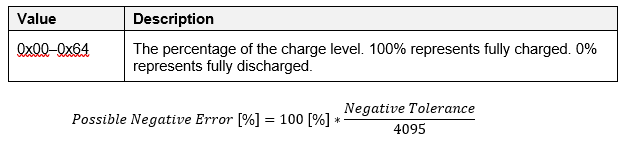
-
-
-
Use a hyphen between a numeral and a unit of measure, or between a number and the object that it modifies, when they modify a noun.
(Exception: It is acceptable not to hyphenate “ms” when used as a modifier. However, do hyphenate “milliseconds” when used as a modifier.)
-
Correct:
-
“5-day delay”
-
“2-second transmit interval”
-
“5-octet field”
-
“512-bit public key”
-
“100-millisecond step resolution” or “100 ms step resolution”
-
“four 2-bit fields”
-
-
-
Avoid a line break between a numeral and its unit of measure. To prevent a line break, enter a non-breaking space (in Microsoft® Word, press Shift + Ctrl + Space).
9.1.3. Numerical ranges
-
For ranges of numbers in body text, use the word “to” rather than “through” between the numbers. The word “to” encompasses the numbers on both ends of a range.
-
Do not use an en dash (–) or any other punctuation mark or symbol to denote a numerical range in body text.
-
For ranges of numbers in table cells:
-
Where cell space is limited, use a hyphen (-) in “value” columns, except between numbers that can be negative numbers.
-
Use “to” when providing a numeric range in descriptions (where text is provided).
-
-
In a range of values, include the unit name or symbol after both numbers in the range (“115 V to 125 V” instead of “115 to 125 V”).
-
Do not use the word “inclusive” after a numerical range. For example, write “any value from 0x0001 to 0x7FFF” rather than “any value from 0x0001 to 0x7FFF inclusive”. If additional clarity is required in a Bluetooth Document, then inform the reader that all numerical ranges provided in the document include the numbers on both ends of the range.
-
To express a range of numbers or other values, do not use “of” preceding the actual range. For example, write “the range 7 to 16 octets”, not “the range of 7 to 16 octets”.
9.1.4. Units of measurement
Symbols for units of measurement in Bluetooth Documents follow the standards in the National Institute of Standards and Technology (NIST) Special Publication 330 [8]. Special Publication 330 conforms to the English text in the Bureau International des Poids et Mesures (BIPM) International System of Units (SI) brochure and is adapted to English (United States). Follow the guidance in this section when writing about units of measurement.
For units of measurement and their symbols that do not appear in NIST Special Publication 330, see Table 8.5.
9.1.4.1. Guidelines for expressing units of measurement
-
Always indicate the units in which numerical values are expressed.
-
Use “µ” for micro, not “u”.
-
In text, spell out the names of units wherever possible. Where there are space constraints, such as in tables, mathematical expressions, or examples, it is acceptable to use symbols.
-
Do not add an “s” to unit symbols to make them plural. For example, “20 kg” is correct; “20 kgs” is incorrect.
-
Do not mix spelled-out unit names with symbols:
-
Correct: “kilometers per hour" or "km/h”
-
Incorrect: “km per hour" or "kilometers/hour”
-
-
Do not mix information with unit symbols:
-
Correct: “the water content is 20 ml/l”
-
Incorrect: “20 ml H2O/l" or "20 ml of water/l”
-
-
Do not use nonstandard symbols for units of measurement. For example, use “s” rather than “sec” (seconds) and “cm3” rather than “cc” (cubic centimeters).
-
Do not modify internationally standardized unit symbols by adding subscript or superscript characters. Do not modify SI units of measurement that include superscript characters (e.g., “m3”).
-
Correct: “20 kg”
-
Incorrect: “20kg”
-
-
To express degrees of temperature in Celsius or Fahrenheit, insert a letter space between the number and the degree symbol (e.g., 10 °C). The symbol for temperatures in kelvin is K, with no “°” symbol before it (e.g., 10 K).
-
Avoid line breaks between numerals and the units of measurement that follow them. To prevent a line break, enter a nonbreaking space (in Microsoft® Word, press Shift + Ctrl + Spacebar).
9.1.4.2. Measurements that do not appear in NIST Special Publication 330
Table 9.1 provides guidelines on the symbols to use for units of measurement that are used in Bluetooth Documents but not listed as SI units.
|
Name |
Symbol |
Note |
||||||||||||||
|---|---|---|---|---|---|---|---|---|---|---|---|---|---|---|---|---|
|
baud |
Bd |
Defined in ISO/IEC 80000-13 [17]. |
||||||||||||||
|
bit |
bit |
Defined in ISO/IEC 80000-13 [17]. Do not use “b”. |
||||||||||||||
|
degrees (angle) |
° |
A unit used to represent the measurement of an angle. The two commonly used units of measurement of angles are radians and degrees. In the case of practical geometry, always measure the angle in degrees. Radian is represented by rad. A degree is represented by ° (degree symbol). The measure of a complete angle in degrees is 360 degrees (also written as 360°), which is the measure of one full rotation. Examples:
|
||||||||||||||
|
Hertz (megahertz, gigahertz) |
Hz |
The basic unit of frequency in the SI system, equal to one cycle per second. A megahertz is a unit of frequency used especially for radio frequencies. One megahertz equals one million hertz. One gigahertz equals one billion hertz. Always use the largest applicable hertz expression (e.g., “one megahertz” rather than “one million hertz”) unless a specific number is needed for technical expression. |
||||||||||||||
|
Hops per second |
hops per second |
Standardized as “hops/s” in the Bluetooth Core Specification |
||||||||||||||
|
inverse of the sine function |
arcsin |
While this is not a unit of measurement, its usage should be agreed upon by the Working Group and defined in the Bluetooth Document. |
||||||||||||||
|
Logarithm |
log n |
The exponent or power to which a base must be raised to yield a given number. Expressed mathematically, x is the logarithm of n to the base b if bx = n, in which case one writes x = logb n. For example, 23 = 8; therefore, 3 is the logarithm of 8 to base 2, or 3 = log2 8. In the same fashion, since 102 = 100, then 2 = log10 100. Logarithms of the latter sort (i.e., logarithms with base 10) are called common, or Briggsian, logarithms and are written simply log n. |
||||||||||||||
|
meters per second |
m/sec |
A unit of speed and a unit of the SI system, meters per second corresponds to the speed at which something travels a distance of one meter in a time of one second. A meter per second equals 3.6 kilometers per hour, or 2.236936 miles per hour. |
||||||||||||||
|
Minute, hour, day |
min, h, d |
Listed in SI as non-SI units which are accepted for use with the International System of Units. |
||||||||||||||
|
Nanoseconds |
ns |
Nanoseconds are one billionth of a second, equal to 1000th of a microsecond, or 1000 picoseconds. In computers, the speed of reading and writing to random access memory (RAM) is measured in nanoseconds. By comparison, the speed of reading or writing to a hard drive or a CD-ROM player, or for information to travel over the Internet, is measured in milliseconds (thousandths of a second), which are a million times longer than nanoseconds. |
||||||||||||||
|
Octet |
octet |
Octets are defined in ISO/IEC 80000-13 [17]. Only use octets to indicate the size of the field. |
||||||||||||||
|
radians |
rad |
The angle created by wrapping a radius along a circle, one radian is approximately equal to 57.2958 degrees. One complete counterclockwise revolution, in radians, is equal to 2π. Radians are converted to degrees using the following formula: Degrees = Angle in Radians × 180° / π Degrees are converted to radians using the following formula: Radians = Angle in Degrees × π / 180°
|
||||||||||||||
|
signal to noise ratio |
SNR |
While this is not a unit of measure, its usage should be agreed upon by the Working Group and defined in the Bluetooth Document. |
||||||||||||||
|
Symbols per second |
Msym/s |
Symbol rate
|
||||||||||||||
|
uint |
uintX |
To convey information on the type of the field (e.g., uint16 is a field with a type "unsigned integer on 16bits") |
9.1.4.3. Measurements commonly misspelled
Table 9.2 lists units of measurement that are commonly misspelled and provides the symbols for those units where applicable.
|
Name |
Symbol |
Note |
|---|---|---|
|
ksamples/s or Ksamples per second |
No symbol exists |
Write the units out as “samples per second”. Correct: "64000 samples per second" Incorrect: "64 ksamples/s" |
|
pi |
π |
Do not use “pi” as the symbol. |
|
Symbols per second |
sym/s |
Do not use “s/s” as the symbol. |
9.2. Mathematical expressions
Bluetooth Documents often contain mathematical expressions such as equations and other formulas. It is important to consistently use standardized syntax and style conventions for this type of content. This section provides references, basic guidelines, and examples for presenting mathematical expressions.
9.2.1. Rules for mathematical expressions
-
Use symbols rather than abbreviations in mathematical expressions, which include symbols for:
-
Physical quantities
-
Units in which those quantities are measured (unit symbols)
-
In mathematical equations and other formulas, always use numerals with units of measurement.
-
-
Where acceptable, round large numbers up or down to the nearest decimal value (e.g., 1,400,000 can be expressed as 1.4 million).
-
For values less than one expressed in decimal form, use a zero preceding the decimal point (e.g., 0.4).
-
For the decimal marker, use a period (dot) on the baseline, not a comma.
-
Use standard superscript and subscript symbols for units of measurement. Units of measurement should always be placed following the text and on the same level as the text (the degree symbol is an exception to this). Subscripts (and, if necessary, superscripts) can be used as discriminators to indicate a specific value or special case, so long as it cannot be confused with exponentiation. For example:
nu, Xi, F3, 90°, Fn-2, 10-6,
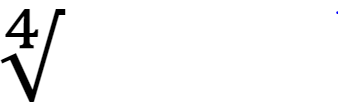
-
Use standard superscript and subscript symbols for units of measurement. For example:
cm3, cp, 1.2 rad, mp
-
Italicize superscripts and subscripts if they represent variables, quantities, or running numbers. Make them regular text (roman type) in all other contexts (e.g., expressing units of measurement or powers of 10).
-
Where possible, use the Equation tool in Microsoft® Word to find preformatted equation types that can be modified and customized as necessary. This tool is in the Symbols ribbon on the Insert tab.

-
Apply the ab Text format to make equations and formulas searchable. Select the entire equation by triple-clicking, then open the Equation tool, and, in the Conversions group, click ab Text.

-
Write inverse trigonometric functions using text, for example, as “arcsin” and not “sin-1”.
9.2.1.1. Modulo operator
-
The modulo operator is always to be written “mod” and never “modulo” or “%”. The operator has the same precedence as multiplication and division.
-
The operator is only to be used with integer operands and never to be used with the second operand negative.
-
When the first operand is negative, the division is rounded down so that the final result is non-negative (e.g., (-8) mod 3 equals 1).
-
The comparison “x = y (mod r)” is allowed and is equivalent to “x mod r = y mod r”. The ≠ comparison is also allowed. The <, <, ≤, and ≥ comparisons must not be used in this way.
-
The comparison “lo ≤ x ≤ hi (mod r)” is allowed and means that (x - lo) mod m must be between 0 and (hi - lo) mod r inclusive. Informally, this means that lo ≤ x ≤ hi without having to special-case the situation where some of the values have wrapped (e.g., “253 ≤ x ≤ 2 (mod 256)” means x must have one of the values 253, 254, 255, 0, 1, or 2).
-
Either operator can be “<“ instead, excluding the corresponding bound.
-
The comparison can be written in “greater-than” form instead of “less-than”, but not a mixture of the two, so “a < b < c (mod r)” is not allowed.
-
9.2.2. Mathematical symbols
Mathematical symbols lists the Unicode character codes for the basic arithmetic signs or symbols. Letters in the codes are not case sensitive.
Be consistent in the choice of symbols, particularly multiplication and division symbols, throughout the document. Always use the same symbol for the same type of operation. Do not use a lowercase "x" as a multiplication symbol, because "x" could be misconstrued as the letter rather than the symbol.
|
Arithmetic operation |
Symbol |
Unicode |
|---|---|---|
|
Addition |
+ |
002B |
|
Subtraction (same as hyphen) |
- |
002D |
|
Multiplication (standard) |
x |
00D7 |
|
Multiplication (scalar only) |
. |
22C5 |
|
Division (preferred symbol) |
/ |
2215 |
|
Division (alternative symbol) |
÷ |
00F7 |
|
Plus or minus |
± |
00B1 |
|
Minus or plus |
∓ |
2213 |
9.2.3. Examples of mathematical expressions
The following are some of the standard types of equations that are commonly used:
Example 1:
 |
Example 2:
 |
Example 3:
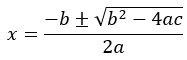 |
Example 4:
 |
9.2.4. Uses for subscript in mathematical expressions
Subscript is commonly used in chemical formulas when the text placed just below the surrounding text indicates the number of atoms of each chemical needed to create the formula. An extremely common example is H2O, the chemical formula for water. The subscript text indicates that water contains two hydrogen atoms (H) and one oxygen atom (O). Other uses for subscript include:
-
Distinguishing between various versions of a subatomic particle.
-
Defining various versions of the same variable (such as X0 and X1).
-
Referring to elements of a vector.
-
Referring to members of a mathematical set or sequence.
-
Representing the base (or radix) of a number written out.
-
Writing out stacked fractions to indicate the denominator of each fraction.
Subscript text can also align with the baseline of the surrounding text when writing fractions diagonally or writing the signs for basis point, permille, and percent.
9.3. Guillemets «»
Guillemets are double-angle quotation marks used to enclose keywords and stereotype names in Unified Modeling Language (UML) notation. This is a specific symbol and should not be replaced with two angle brackets. A single guillemet may be used in Unicode and some other programming languages.
Use guillemets (« ») only in three contexts:
-
To indicate an assigned number from the Bluetooth SIG, such as UUIDs, format types, or appearance values. Use this notation only when the string stands in for the number that the assigned number represents, not when it refers to the number (characteristic) itself.
-
Correct:
-
"The Service UUID shall be set to «Mesh Proxy Service»."
-
"The Mesh Provisioning Data In characteristic is defined using the UUID «Mesh Provisioning Data In» …."
-
-
Incorrect:
-
"The «Proxy Data In» characteristic is used to …."
-
"The Mesh Proxy Service shall be instantiated as a «Primary Service»."
-
-
-
Around ATT error codes (e.g., «Attribute Not Found»), defined in the Bluetooth Attribute Protocol (ATT) Specification.
-
To identify Advertising Data types.
The Unicode codes for guillemets are U+00AB («) and U+00BB (»).
10. Bluetooth brand usage
10.1. Bluetooth word mark
The Bluetooth word mark comprises all text representations of the word Bluetooth. For information on brand usage and Bluetooth word mark requirements, refer to the Brand Guide for Bluetooth Trademarks [6].
10.1.1. Bluetooth word mark and trademark symbol usage
For non-Core specifications, use the registered trademark symbol (®) in the first prominent and technological use of the Bluetooth word mark. If Bluetooth is used in both a Heading 1 heading or subheading and the body of the text, then the registered trademark symbol must be applied in the first instance of each. Subsequent mentions in the same Heading 1 section, even in subsections, do not require the registered trademark symbol.
The registered trademark symbol must appear in any use of the Bluetooth word mark in the abstract, References section, or appendixes, and must appear in the subtitle.
For the Bluetooth Core Specification, use the registered trademark symbol (®) in the first prominent and technological use of the Bluetooth word mark in each Part. If the first use of Bluetooth occurs in a heading for the Bluetooth Core Specification, include the registered trademark symbol in both the heading and the next use of the Bluetooth word mark in the text body.
Examples:
-
Correct:
-
3.1 Secure Bluetooth® connection
-
Connect Bluetooth® devices using up-to-date security measures.
-
-
Incorrect:
-
3.1 Secure Bluetooth connection®
-
3.1 Secure Bluetooth connection
-
Connect Bluetooth devices using up-to-date security measures.
-
11. Acronyms and abbreviations
The following acronyms, initialisms, and abbreviations appear in this document.
|
Acronym/initialism/abbreviation |
Meaning |
|---|---|
|
ATT |
Bluetooth Attribute Protocol |
|
BARB |
Bluetooth Architectural Review Board |
|
BIPM |
Bureau International des Poids et Mesures |
|
BoD |
Bluetooth Board of Directors |
|
BSTS |
Bluetooth SIG Technical Staff |
|
BTLA |
Bluetooth Trademark License Agreement |
|
CR |
Change Request |
|
DIPD |
Draft Improvement Proposal Document |
|
DOI |
Digital Object Identifier |
|
FAQ |
frequently asked questions |
|
FIPD |
Final Improvement Proposal Document |
|
FRD |
Functional Requirements Document |
|
GAP |
Generic Access Profile |
|
GATT |
Generic Attributes Profile |
|
IOP |
Interoperable Prototype Test Event |
|
L2CAP |
Logical Link Control and Adaptation Protocol |
|
LL |
Link Layer |
|
LMP |
Link Manager Protocol |
|
MSC |
message sequence chart |
|
NIST |
National Institute of Standards and Technology |
|
NWP |
New Work Proposal |
|
PCLA |
Patent/Copyright License Agreement |
|
PDU |
Protocol Data Unit |
|
RFU |
Reserved for Future Use |
|
SDO |
standards developing organization |
|
SDP |
Service Discovery Protocol |
|
SI |
International System of Units |
|
SIG |
Special Interest Group |
|
SMPD |
Specification Management Process Document |
|
T_IFS |
Time Inter Frame Space |
|
TOC |
Table of Contents |
|
TOU |
Terms of Use |
|
TSTO |
Test Strategy and Terminology Overview |
|
UML |
Unified Modeling Language |
|
WG |
Working Group |
12. References
[1] Bluetooth® SIG, Specification Management Process Document (SMPD), https://www.bluetooth.com/documents-resources/
[2] Bluetooth® SIG Issue Tracking system, https://bluetooth.atlassian.net/jira/software/c/projects/ES/issues
[3] Bluetooth® SIG, Document Naming and Marking Document, https://www.bluetooth.com/documents-resources/
[4] Merriam-Webster.com Dictionary, https://www.merriam-webster.com
[5] University of Chicago, “Chicago Manual of Style 18th Edition or later”, https://www.chicagomanualofstyle.org/home.html
[6] Bluetooth® SIG, Brand Guide for Bluetooth Trademarks, https://www.bluetooth.com/develop-with-bluetooth/marketing-branding/
[7] Bluetooth® SIG, Documents and resources, https://www.bluetooth.com/documents-resources/
[8] National Institute of Standards and Technology (NIST), “Special Publication 330 - The International System of Units (SI) 2019 Edition”, August 2019, https://www.nist.gov/pml/special-publication-330
[9] Bluetooth® Core Specification, Version 5.0 or later
[10] Strunk, William, White, E B., The Elements of Style, 4th ed. New York: Longman, 2009
[11] Williams, Joseph M., Style: Ten Lessons in Clarity and Grace, 2nd ed. New York, NY: Pearson Longman, 2006
[12] ASD Simplified Technical English Maintenance Group (STEMG), “ASD-STE100 Simplified Technical English Issue 9”, January 15, 2025, https://www.asd-ste100.org
[13] Appropriate Language Mapping Tables, https://www.bluetooth.com/language-mapping/Appropriate-Language-Mapping-Table
[14] Unicode Consortium, "Unicode® 17.0.0", September 9, 2025 https://www.unicode.org/versions/Unicode17.0.0/
[15] Bluetooth® SIG, Test Strategy and Terminology Overview (TSTO), https://www.bluetooth.com/documents-resources/
[16] National Information Standards Organization (NISO), NISO Technical Report 3, ”Guidelines for Alphabetical Arrangement of Letters and Sorting of Numerals and Other Symbols”, https://www.niso.org/sites/default/files/2017-08/tr03.pdf
[17] International Organization for Standardization (ISO), ISO/IEC 80000-13, "Quantities and units Part 13: Information science and technology", https://www.iso.org/standard/87648.html
Appendix A. Readability
The discipline of readability promotes writing practices that make a Bluetooth Document easier to read, comprehend, and implement.
By following a handful of principles, authors can increase the readability of Bluetooth Documents. However, specification text must remain correct and unambiguous, even if the only way to do so does not follow these principles.
A.1. Write short sentences
To help ensure sentences are easy to follow, keep sentences to 20 words or fewer when feasible. When a sentence becomes too long, it can be difficult to understand what the sentence is trying to communicate. This is especially true of technical documents such as specifications. Sentences become long when the author tries to communicate too much information in one sentence. To shorten a sentence, the author should narrow the focus of what they are trying to communicate. Break a long sentence into two or three shorter sentences to make the information easier to follow. Often, a progression emerges, and it is easier to see how one idea or concept leads to or builds on another. However, consider whether breaking up a long sentence introduces other problems such as ambiguity (e.g., the unclear use of the pronoun “this” as in “The Controller shall do X. This applies when Y.”).
A.2. Place orienting and sequencing phrases at the beginning of sentences
Phrases that serve to orient the reader to the content should be placed at the beginning of a sentence. Doing so also puts information into the correct logical sequence, which helps implementers comprehend the relationships and sequences involved in an implementation.
-
Correct: "After mutual authentication when encryption is enabled, the initiating device shall pause and immediately resume encryption to produce a new encryption key."
-
Incorrect: "If encryption is enabled, then the initiating device shall pause and immediately resume encryption to produce a new encryption key after mutual authentication."
To denote sequencing, use explicit words such as “first”, “second”, and so on, or place the sequence in a numbered list organized by the expected order of events.
A.3. Set an objective for a paragraph, and then write your way there
To improve the overall quality of Bluetooth Documents, set objectives for what a reader should come to understand by the end of a paragraph. Then organize the sentences in the paragraph accordingly. This involves communicating a set of related requirements and organizing them according to a progression, if one is present. If a paragraph seems disjointed and jumps around from concept to concept or requirement to requirement, then do the following:
-
Establish what the reader needs to know by the end of the paragraph. This is the objective.
-
Identify all the information (e.g., concepts, requirements, etc.) necessary to achieve that objective. Do not leave out any essential information or include anything that is not necessary to the paragraph’s objective.
-
Begin the paragraph with the first thing the reader needs to know to achieve the objective.
-
Look for a progression among the remaining concepts and requirements.
-
With that progression in mind, compose sentences so that each sentence leads towards the next concept or requirement.
-
Look at how each sentence ends and how each new one begins. Add bridging information to make the progression in information or thought flow more smoothly.
-
Evaluate whether the paragraph achieves the objective and make any necessary adjustments.
A.4. Avoid noun stacks
Authors add meaning and clarity to documents by providing detail. Adjectives are a common way to add detail to nouns. For instance, the meaning of the noun “bird” changes when the adjective “small” or “large” appears in front of the noun. In addition to adjectives, additional nouns can be used like adjectives to describe the primary noun, such as placing the noun “sea” in front of “bird” for the phrase “sea bird”.
To provide greater detail, authors sometimes stack multiple nouns together. If too many nouns are listed in succession, then readers can lose track of the noun being described. To avoid confusion, use a prepositional phrase to break up stacks greater than three nouns in length. For instance, the noun stack “endpoint descriptor parameter values” can be rewritten to “values of all endpoint descriptor parameters”. However, avoid introducing ambiguity when breaking up noun stacks. In some cases, the only option is to leave the noun stack intact.
A.5. Do not turn verbs into nouns
The power of a verb is in its ability to convey meaning through action. A good verb, however, can lose much of its effectiveness if the author decides to use it as a noun. Authors usually do this to sound more formal or authoritative, such as in specifications. However, doing so typically weakens the sentence and obscures the intended meaning. Using a verb or clause as a noun or noun phrase is known as nominalization. The following example takes the verb “determine” and nominalizes it as “determination”.
-
Incorrect: "The Attribute protocol makes no determination on the validity of the Part Attribute Value or the Value Offset."
-
Correct: "The Attribute protocol does not determine the validity of the Part Attribute Value or the Value Offset."
Nominalizations are problematic for three reasons:
-
Nominalizations turn a strong verb (e.g., determine) into an obscure noun.
-
Nominalizations use a weaker verb (e.g., does) because the original verb has been lost.
-
Nominalizations obscure the relationship between the subject (Attribute protocol) and the object (Part Attribute Value or the Value Offset).
A.5.1. Common nominalizations
|
Nominalization |
Verb |
|---|---|
|
Analysis |
Analyze |
|
Argument |
Argue |
|
Assumption |
Assume |
|
Collection |
Collect |
|
Decision |
Decide |
|
Delineation |
Delineate |
|
Determination |
Determine |
|
Disagreement |
Disagree |
|
Discrimination |
Discriminate |
|
Discussion |
Discuss |
|
Distortion |
Distort |
|
Expansion |
Expand |
|
Failure |
Fail |
|
Intention |
Intend |
|
Interference |
Interfere |
|
Intervention |
Intervene |
|
Investigation |
Investigate |
|
Occurrence |
Occur |
|
Performance |
Perform |
|
Understanding |
Understand |