
-
Version: v1.3.1
-
Version Date: 2015-12-15
-
Prepared By: BARB
-
Feedback Email: barb-main@bluetooth.org
Revision History
|
Revision |
Date |
Description |
|---|---|---|
|
Version 1.1 |
22 February 2001 |
First record for this revision history. |
|
D12r00 |
15 August 2005 |
Reformatted document and converted source document to Microsoft Word. |
|
D12r01 |
13 September 2005 |
Editorial updates |
|
D12r02 |
31 October 2005 |
Editorial updates |
|
D12r03 |
10 November 2005 |
Editorial updates |
|
D12r04 |
30 November 2005 |
Editorial updates |
|
D12r05 |
20 March 2006 |
Input reviewer’s comments |
|
D12r06 |
11 July 2007 |
Change must to shall, updated disclaimer, |
|
D12r07 |
01 Oct 2007 |
Update CR |
|
D12r07 |
10 July 2009 |
Initial version implementing functionality in OBEX Application Enhancements DIPD |
|
D12r08 |
16 July 2009 |
Moved L2CAP AMP text into informative appendix; other changes from WG feedback. |
|
D12r09 |
23 July 2009 |
Updated contributors list and incorporated additional changes from WG |
|
D12r10 |
24 July 2009 |
Changed text describing optional use or action commands based on WG input. Incorporated changes for errata 2496. Minor formatting edits. |
|
D12r11 |
20 August 2009 |
Editorial changes based on WG input and fixed incorrect values in tables. Removed section on SDP PDUs and other edit to conform with same changes in OPP spec. |
|
D12r12 |
21 August 2009 |
Minor edits, Added SESSION to OBEX operation table. Added new section to provide a blanket statement about OBEX response codes. |
|
D12r13 |
17 December 2009 |
Incorporated changes post BARB review of OPP spec |
|
D12r14 |
11 January 2010 |
Edit pass to fix typos |
|
D12r15 |
17 January 2010 |
Cleanup for BARB review |
|
D12r169 |
16 February 2010 |
Incorporated BARB comments |
|
D12r17 |
19 February 2010 |
Incorporated additional BARB comments |
|
D2r18 |
19 February 2010 |
Fixed formatting error, spelling mistakes and consistency in terminology |
|
D2r19 |
11 March 2010 |
Incorporated additional BARB comments |
|
D2r20 |
3 June 2010 |
Incorporated OBEX WG comments and added/corrected some references and formatting. |
|
D2r21 |
7 June 2010 |
Add comments from BS OPP review in Appendix |
|
D2r22 |
18 June 2010 |
Include BARB review comments |
|
V12r00 |
26 August 2010 |
Adopted by the Bluetooth SIG Board of Directors |
|
D13r00 |
23 January 2012 |
ESR05: E3944, Table 5.1 |
|
D13r01 |
26 March 2012 |
Address reviewers’ (KK, TB, TH) comments; Change Connect operation->CONNECT operation |
|
D13r02 |
30 April 2012 |
Default Value version number change to 0x0103 Value changed from 1.2 to 0x0103 |
|
V13 |
24 July 2012 |
Adopted by the Bluetooth SIG Board of Directors |
|
d131 |
19 November 2015 |
ESR09 (integrated E4143 and E5557) |
|
v131 |
15 December 2015 |
Adopted by the Bluetooth SIG BoD |
Contributors
|
Name |
Company |
|---|---|
|
Sherry Smith |
Broadcom |
|
Victor Zhodzishsky |
Broadcom |
|
Ole Heftholm-Jensen |
CSR |
|
David Suvak |
Extended Systems |
|
Apratim Purakayastha |
IBM Corporation |
|
Aron Walker |
IBM Corporation |
|
Jon Inouye |
Intel Corporation |
|
Mike Foley |
Microsoft Corporation |
|
Stephane Bouet |
Nokia Mobile Phones |
|
Riku Mettälä |
Nokia Mobile Phones |
|
Kevin Hendrix |
Sybase |
|
Tim Howes |
Nokia Corporation |
|
James Scales |
Nokia Mobile Phones |
|
Steve Rybicki |
PumaTech |
|
Greg Burns |
Qualcomm |
|
Len Ott |
Socket Mobile |
|
Patrik Olsson |
Telefonaktiebolaget LM Ericsson |
|
Shaun Astarabadi |
Toshiba Corporation |
|
Katsuhiro Kinoshita |
Toshiba Corporation |
DISCLAIMER AND COPYRIGHT NOTICE
This disclaimer applies to all draft specifications and final specifications adopted by the Bluetooth SIG Board of Directors (both of which are hereinafter referred to herein as a Bluetooth “Specification”). Your use of this Specification in any way is subject to your compliance with all conditions of such use, and your acceptance of all disclaimers and limitations as to such use, contained in this Specification. Any user of this Specification is advised to seek appropriate legal, engineering or other professional advice regarding the use, interpretation or effect of this Specification on any matters discussed in this Specification.
Use of Bluetooth Specifications and any related intellectual property is governed by the Promoters Membership Agreement among the Promoter Members and Bluetooth SIG (the “Promoters Agreement”), certain membership agreements between Bluetooth SIG and its Adopter and Associate Members, including, but not limited to, the Membership Application, the Bluetooth Patent/Copyright License Agreement and the Bluetooth Trademark License Agreement (collectively, the “Membership Agreements”) and the Bluetooth Specification Early Adopters Agreements (1.2 Early Adopters Agreements) among Early Adopter members of the unincorporated Bluetooth SIG and the Promoter Members (the “Early Adopters Agreement”). Certain rights and obligations of the Promoter Members under the Early Adopters Agreements have been assigned to Bluetooth SIG by the Promoter Members.
Use of the Specification by anyone who is not a member of Bluetooth SIG or a party to an Early Adopters Agreement (each such person or party, a “Member”) is prohibited. The use of any portion of a Bluetooth Specification may involve the use of intellectual property rights ("IPR"), including pending or issued patents, or copyrights or other rights. Bluetooth SIG has made no search or investigation for such rights and disclaims any undertaking or duty to do so. The legal rights and obligations of each Member are governed by the applicable Membership Agreements, Early Adopters Agreement or Promoters Agreement. No license, express or implied, by estoppel or otherwise, to any intellectual property rights are granted herein.
Any use of the Specification not in compliance with the terms of the applicable Membership Agreements, Early Adopters Agreement or Promoters Agreement is prohibited and any such prohibited use may result in (i) termination of the applicable Membership Agreements or Early Adopters Agreement and (ii) liability claims by Bluetooth SIG or any of its Members for patent, copyright and/or trademark infringement claims permitted by the applicable agreement or by applicable law.
THE SPECIFICATION IS PROVIDED “AS IS” WITH NO WARRANTIES WHATSOEVER, INCLUDING ANY WARRANTY OF MERCHANTABILITY, NONINFRINGEMENT, FITNESS FOR ANY PARTICULAR PURPOSE, SATISFACTORY QUALITY, OR REASONABLE SKILL OR CARE, OR ANY WARRANTY ARISING OUT OF ANY COURSE OF DEALING, USAGE, TRADE PRACTICE, PROPOSAL, SPECIFICATION OR SAMPLE.
Each Member hereby acknowledges that products equipped with the Bluetooth wireless technology ("Bluetooth Products") may be subject to various regulatory controls under the laws and regulations applicable to products using wireless non licensed spectrum of various governments worldwide. Such laws and regulatory controls may govern, among other things, the combination, operation, use, implementation and distribution of Bluetooth Products. Examples of such laws and regulatory controls include, but are not limited to, airline regulatory controls, telecommunications regulations, technology transfer controls and health and safety regulations. Each Member is solely responsible for the compliance by their Bluetooth Products with any such laws and regulations and for obtaining any and all required authorizations, permits, or licenses for their Bluetooth Products related to such regulations within the applicable jurisdictions. Each Member acknowledges that nothing in the Specification provides any information or assistance in connection with securing such compliance, authorizations or licenses. NOTHING IN THE SPECIFICATION CREATES ANY WARRANTIES, EITHER EXPRESS OR IMPLIED, REGARDING SUCH LAWS OR REGULATIONS.
ALL LIABILITY, INCLUDING LIABILITY FOR INFRINGEMENT OF ANY INTELLECTUAL PROPERTY RIGHTS OR FOR NONCOMPLIANCE WITH LAWS, RELATING TO USE OF THE SPECIFICATION IS EXPRESSLY DISCLAIMED. To the extent not prohibited by law, in no event will Bluetooth SIG or its Members or their affiliates be liable for any damages, including without limitation, lost revenue, profits, data or programs, or business interruption, or for special, indirect, consequential, incidental or punitive damages, however caused and regardless of the theory of liability, arising out of or related to any furnishing, practicing, modifying, use or the performance or implementation of the contents of this Specification, even if Bluetooth SIG or its Members or their affiliates have been advised of the possibility of such damages. BY USE OF THE SPECIFICATION, EACH MEMBER EXPRESSLY WAIVES ANY CLAIM AGAINST BLUETOOTH SIG AND ITS MEMBERS OR THEIR AFFILATES RELATED TO USE OF THE SPECIFICATION.
If this Specification is an intermediate draft, it is for comment only. No products should be designed based on it except solely to verify the prototyping specification at SIG sponsored IOP events and it does not represent any commitment to release or implement any portion of the intermediate draft, which may be withdrawn, modified, or replaced at any time in the adopted Specification.
Bluetooth SIG reserves the right to adopt any changes or alterations to the Specification it deems necessary or appropriate.
Copyright © 2001-2015. The Bluetooth word mark and logos are owned by Bluetooth SIG, Inc. All copyrights in the Bluetooth Specifications themselves are owned by Ericsson AB, Lenovo (Singapore) Pte. Ltd., Intel Corporation, Microsoft Corporation, Apple Inc., Nokia Corporation and Toshiba Corporation. Other third-party brands and names are the property of their respective owners.
Document Terminology
The Bluetooth SIG has adopted portions of the IEEE Standards Style Manual, which dictates use of the words ``shall,’’ ``should,’’ ``may,’’ and ``can,’’ in the development of documentation, as follows:
-
The word shall is used to indicate mandatory requirements strictly to be followed in order to conform to the standard and from which no deviation is permitted (shall equals is required to).
-
The use of the word must is deprecated and shall not be used when stating mandatory requirements; must is used only to describe unavoidable situations.
-
The use of the word will is deprecated and shall not be used when stating mandatory requirements; will is only used in statements of fact.
-
The word should is used to indicate that among several possibilities one is recommended as particularly suitable, without mentioning or excluding others; or that a certain course of action is preferred but not necessarily required; or that (in the negative form) a certain course of action is deprecated but not prohibited (should equals is recommended that).
-
The word may is used to indicate a course of action permissible within the limits of the standard (may equals is permitted).
-
The word can is used for statements of possibility and capability, whether material, physical, or causal (can equals is able to)
Foreword
This document, together with the Generic Object Exchange profile and the Generic Access profile form the File Transfer usage model.
Interoperability between devices from different manufacturers is provided for a specific service and usage model if the devices conform to a Bluetooth SIG-defined profile specification. A profile defines a selection of messages and procedures (generally termed capabilities) from the Bluetooth SIG specifications, and gives an unambiguous description of the air interface for specified service(s) and usage model(s).
All defined features are process-mandatory. This means that if a feature is used, it is used in a specified manner. Whether the provision of a feature is mandatory or optional is stated separately for both sides of the Bluetooth air interface.
1. Introduction
1.1. Scope
The File Transfer Profile (FTP) defines the requirements for the protocols and procedures that shall be used by the applications providing the File Transfer usage model. This profile uses the Generic Object Exchange profile (GOEP) [7] to define the interoperability requirements for the protocols needed by the applications. The most common devices using these usage models can be (but are not limited to) PCs, notebooks, and PDAs.
The scenarios covered by this profile are the following:
-
Usage of a Bluetooth device (e.g. a notebook PC) to browse an object store (file system) of another Bluetooth device. Browsing involves viewing objects (files and folders) and navigating the folder hierarchy of another Bluetooth device. For example, one PC browsing the file system of another PC.
-
A second usage is to transfer objects (files and folders) between two Bluetooth devices. For example, copying files from one PC to another PC.
-
A third usage is for a Bluetooth device to manipulate objects (files and folders) on another Bluetooth device. This includes deleting objects, and creating new folders.
1.2. Bluetooth Profile Structure
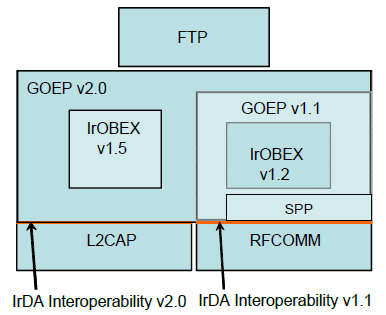
In Figure 1.1, the Bluetooth profile structure and the dependencies of the profiles are depicted. A profile is dependent upon another profile if it re-uses parts of that profile, by implicitly or explicitly referencing it. Dependency is illustrated in the figure: a profile has dependencies on the profile(s) in which it is contained – directly and indirectly. For example, the File Transfer profile is dependent on Generic Object Exchange, Serial Port (for compatibility with devices implementing earlier versions of this profile), and Generic Access profiles.
1.3. OBEX-Related Specifications Used by this Profile
This profile refers to the following two specifications:
-
IrDA Interoperability Specification v2.0 [8].
-
Defines how the applications can function over both Bluetooth wireless technology and IrDA.
-
Specifies how OBEX is mapped over RFCOMM, L2CAP, and TCP.
-
-
Generic Object Exchange Profile Specification v2.0 [7].
-
Generic interoperability specification for the application profiles using OBEX over L2CAP
-
Defines the interoperability requirements of the lower protocol layers (e.g. Baseband and LMP) for the application profiles.
-
1.4. Symbols and Conventions
1.4.1. Requirement Status Symbols
In this document (especially in the profile requirements tables in Annex A), the following symbols are used:
-
‘M’ for mandatory to support (used for capabilities that shall be used in the profile);
-
‘O’ for optional to support (used for capabilities that can be used in the profile);
-
‘C’ for conditional support (used for capabilities that shall be used in case a certain other capability is supported);
-
‘X’ for excluded (used for capabilities that may be supported by the unit but shall never be used in the profile);
-
‘N/A’ for not applicable (in the given context it is impossible to use this capability).
Some excluded capabilities are capabilities that, according to the relevant Bluetooth specification, are mandatory. These are features that may degrade operation of devices following this profile. Therefore, these features shall never be activated while a unit is operating as a unit within this profile.
1.4.2. Signaling diagram conventions
The following arrows are used in diagrams describing procedures:
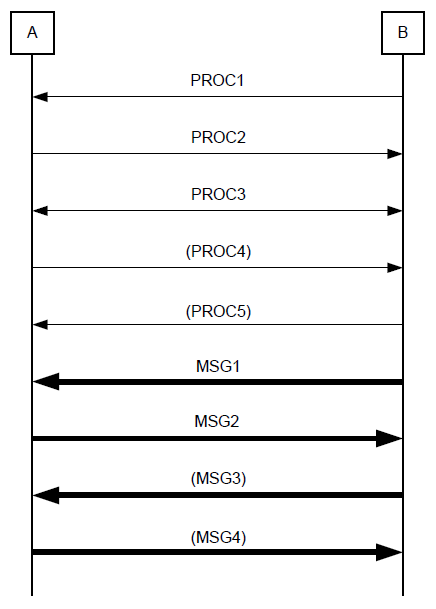
In Figure 1.2, the following cases are shown: PROC1 is a sub-procedure initiated by B. PROC2 is a sub-procedure initiated by A. PROC3 is a sub-procedure where the initiating side is undefined (may be both A and B). PROC4 indicates an optional sub-procedure initiated by A, and PROC5 indicates an optional sub-procedure initiated by B.
MSG1 is a message sent from B to A. MSG2 is a message sent from A to B. MSG3 indicates an optional message from A to B, and MSG4 indicates an optional message from B to A.
2. Profile Overview
2.1. Profile Stack
Figure 2.1shows the protocols and entities used in this profile.
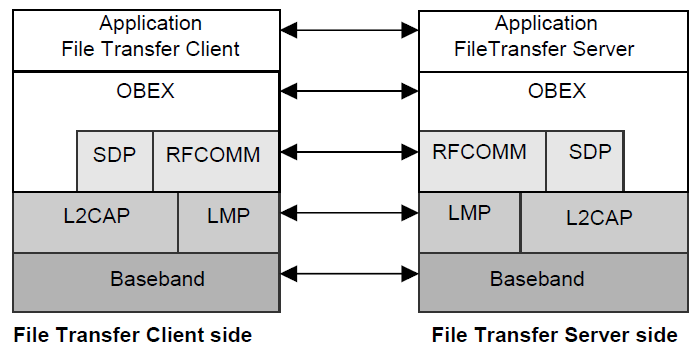
The Baseband, LMP, and L2CAP are the OSI layer 1 and 2 Bluetooth protocols [1]. RFCOMM with TS 07.10 [2] is the Bluetooth adaptation of GSM TS 07.10 ETSI, TS 07.10, Version 6.3.0. SDP is the Bluetooth service discovery protocol [6]. OBEX [8] is the Bluetooth adaptation of IrDA Object Exchange Protocol (IrOBEX) [4].
L2CAP interoperability requirements are defined in GOEP v2.0 [7]. This profile requires backwards compatibility with previous versions of FTP based on GOEP v1.1. The procedures for backwards compatibility defined in section 6.2 of GOEP v2.0 [7] shall be used.
2.2. Configurations and Roles
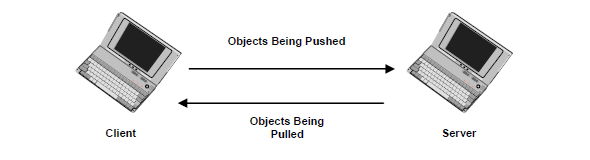
The following roles are defined for this profile:
Client – The Client device initiates the operation, which pushes and pulls objects to and from the Server or instructs the Server to perform actions on objects on the Server. In addition to the interoperability requirements defined in this profile, the Client shall also comply with the interoperability requirements for the Client of the GOEP if not defined to the contrary. The Client shall be able to interpret the OBEX Folder Listing format and may display this information for the user.
Server – The Server device is the target remote Bluetooth device that provides an object exchange server and folder browsing capability using the OBEX Folder Listing format. In addition to the interoperability requirements defined in this profile, the Server shall comply with the interoperability requirements for the Server of the GOEP if not defined in the contrary.
2.3. User Requirements and Scenarios
The scenarios covered by this profile are the following:
-
If file browsing is supported on the Client and the Server, the Client is able to browse the object store of the Server. Clients are required to pull and understand Folder Listing Objects. Servers are required to respond to requests for Folder Listing Objects. Servers should have a root folder. The root folder is typically not the root directory of the file system, but a designated public folder. A Server may expose different root folders based on the user or device initiating the OBEX connection. Servers are not required expose a folder hierarchy. For security reasons, Servers should reject attempts by a Client to browse files and folders above or outside the root folder by returning an appropriate error response. Special care should be taken to ensure that “wildcard” characters in the folder path string do not allow the remote client to access such files and folders. This might require converting the received path string to fully resolved path name. Many systems provide function calls which can perform such a conversion.
-
Use of the Client to transfer objects to and from the Server. The transfer of objects includes folders and files. Clients shall support the ability to push or pull files from the Server. Clients are not required to push or pull folders. Servers are required to support file push, pull, or both. Servers are allowed to have read-only folders and files, which means they can restrict object pushes. Thus, Servers are not required to support folder push or pull.
-
Use of the Client to create folders and delete objects (folders and files) on the Server. Clients are not required to support folder/file deletion or folder creation. Servers are allowed to support read-only folders and files, which means they can restrict folder/file deletion and creation.
-
Use of the Client to copy, rename, or move objects (folders and files) on the Server. Clients are not required to support folder/file copying, moving or renaming. Servers are required to support folder/file copying, moving or renaming except in the case where the server file system is read-only.
-
Use of the Client to set access permissions on objects (folders and files) on the Server. Neither Clients nor Servers are required to support setting of access permissions.
A device adhering to this profile shall support Client capability, Server capability or both. The restrictions applying to this profile are the same as in the GOEP.
2.4. Profile fundamentals
The profile fundamentals are the same as defined in GOEP.
LMP authentication and encryption are mandatory to support and optional to use. When using Core Specification v2.1 or later, encryption is mandatory to use; otherwise optional.
Support for OBEX authentication is required but its use is optional.
Note: This profile does not mandate the Server or Client to enter any discoverable or connectable modes automatically, even if they are able to do so.
On the Client side, end-user intervention is typically needed to initiate file transfer (see User Interface Aspects).
Note: Support of bonding is required but its use is optional.
3. User Interface Aspects
3.1. File Transfer Mode Selection, Servers
Servers shall be placed in File Transfer mode. This mode enables a Client to initiate file transfer operations with the Server. When entering this mode, Servers
Public devices, devices that want to be visible at all times, or devices that cannot supply a user interface to enable File Transfer mode should use General Discoverable Mode (see Generic Access Profile [1]) instead of Limited Discoverable Mode. Devices in General Discoverable Mode may still enter Limited Discoverable Mode for limited periods. Entry into the Limited Discoverable Mode may be triggered by a button-press or user interface menu option.
It is recommended that entry into Limited Discoverable Mode be set and unset by user interaction.
3.2. Function Selection, Clients
Clients provide file transfer functions to the user via a user interface. An example of a file transfer user interface is a file-tree viewer to browse folders and files. Using such a system file-tree viewer, the user can browse and manipulate files on another PC, which appears in the network view.
File Transfer Applications may provide the functions: shown in Table 3.1.
|
File Transfer Application |
Function |
|---|---|
|
Select Server |
Selecting the Server from a list of possible Servers, and setting up a connection to it. |
|
Navigate Folders |
Displaying the Server’s folder hierarchy, including the files in the folders, and moving through the Server’s folder hierarchy to select the current folder. The current folder is where items are pulled and/or pushed. |
|
Pull Object |
Copying a file or a folder from the Server to the Client. |
|
Push Object |
Copying a file or folder from the Client to the Server. |
|
Delete Object |
Deleting a file or folder on the Server. |
|
Create Folder |
Creating a new folder on the Server. |
|
Copy Object |
Copying a file or a folder from one location on the Server to another. |
|
Move/Rename Object |
Moving or renaming a file or folder on the Server. |
|
Set Permissions |
Setting access permissions on a file or folder on the Server. |
When the user selects the Select Server function, an inquiry procedure will be performed to produce a list of available devices in the vicinity. Requirements on inquiry procedures are discussed in GOEP.
3.3. Application Usage
In this section, the presented scenarios work as examples. Variations in the actual implementations are possible and allowed.
When the Client wants to select a Server, the following user interaction can be followed:
|
Client |
Server |
|---|---|
|
The user sets the device into File Transfer mode. A Server typically does not need to provide any other user interaction. |
|
|
The user of the Client selects the File Transfer Application on the device. |
|
|
A list of Servers that may support the File Transfer service is displayed to the user. |
|
|
The user selects a Server to which to connect. The Server may require the user of the Client to enter a password for authentication. Additional numeric comparison or passkey entry may be required depending on the security level requirements on Client and Server |
If the Client requires authentication of the Server, then the Server will need to prompt the user of the Server for a password. Additional numeric comparison or passkey entry may be required depending on the security level requirements on Client and Server. |
|
After the connection is complete, including any authentication, the contents of the Server’s root folder is displayed. |
The following user interaction shows how the user of the Client performs file transfer functions. The operations assume a Server has already been selected as described above.
|
Client |
Server |
|---|---|
|
The user is presented with the folder hierarchy of the Server. The first presentation has the root folder selected as the current folder. |
|
|
The user chooses a folder to be the current folder. The contents of this folder are displayed. |
|
|
To push a file from the Client to the Server, the user selects a file on the Client and activates the Push Object function. The object is transferred to the current folder on the Server. |
|
|
To pull a file from the Server, the user selects a file in the current folder of the Server and activates the Pull Object function. The user is notified of the result of the operation. |
|
|
To delete a file on the Server, the user selects the file in the Server’s current folder and activates the Delete Object function. The user is notified of the result of the operation. |
|
|
To create a new folder on the Server, the user activates the Create Folder function. This function requests a name from the user for the folder. When complete, a new folder is created in the Server’s current folder. |
|
|
To move or rename an object on the Server, the user selects the object in the Server’s current folder and activates the Rename Object function. The user is prompted to provide a new name or folder location for the object. The user is notified of the result of the operation. |
|
|
To copy an object on the Server, the user selects the object in the Server’s current folder and the target folder and activates the Copy Object function. The user is notified of the result of the operation. |
|
|
To set permissions on an object on the Server, the user selects the object in the Server’s current folder and activates the Set Permissions function. The user is prompted to provide the requested access permissions. The user is notified of the result of the operation. |
4. Application Layer
This section describes the feature requirements on units active in the File Transfer use case.
4.1. Feature Overview
The File Transfer application is divided into three main features, as shown in Table 4.1.
|
Features |
Support in |
Support in |
|
|---|---|---|---|
|
1. |
Folder Browsing |
M |
M |
|
2. |
Object Transfer: File Transfer Folder Transfer |
M O |
M O* |
|
3. |
Object Manipulation |
O |
O* |
- *
-
Optional, but the Server shall respond with an appropriate error code if it doesn’t support these capabilities.
4.2. Folder Browsing
A folder browsing session may begin with the Client connecting to the Server and pulling the contents of the Server’s root folder. When an OBEX connection is made, the Server starts out with its current folder set to the root folder. The Server may choose to expose different root folders to different users and/or devices. The Server has the right to refuse to disclose the contents of the root folder by replying to the GET folder object request with an Unauthorized or Forbidden response. If allowed, the contents of the folder shall be transferred in the Folder Listing format specified in IrDA Object Exchange Protocol (IrOBEX) [4].
Table 4.2 shows the application procedure required by the Client to connect to the Server and pull the contents of the root folder.
|
Client |
Details |
|---|---|
|
OBEX CONNECT. |
Target Header shall be set to the Folder Browsing UUID: This UUID is sent in binary (16 bytes) with most significant byte sent first (0xF9 is sent first). |
|
Pull the contents of the Server’s root folder using GET. |
The Type Header shall be set to the MIME-type of the Folder Listing Object (x-obex/folder-listing). The Connection Id header shall be set to the value returned in the Connect operation. A Name header shall either not be used or be specified as an empty Name header. |
Browsing an object store involves displaying folder contents and setting the ‘current folder’. The OBEX SETPATH command is used to set the current folder. A Server shall support the SETPATH command to set the root folder (default directory). To display a folder hierarchy starting with the root folder, the Client shall read the root folder contents using GET. It shall then retrieve the contents of all sub-folders using GET. If the sub-folders contain folders, then the Client shall retrieve the contents of these folders and so on. To retrieve the contents of a folder, the Client shall set the current folder to the sub-folder using SETPATH, and then pull the sub-folder contents using GET. Table 4.3 shows the application procedure required for retrieving the contents of a sub-folder.
|
Client |
Details |
|---|---|
|
Set the current folder to the sub-folder using OBEX SETPATH. |
Name header is set to the name of the sub-folder. Connection Id header is required. |
|
Pull the contents of the sub-folder using GET. |
Since the sub-folder is the current folder, either no Name header or an empty Name header shall be sent. The Type Header shall be set to the MIME-type of the Folder Listing Object (x-obex/folder-listing). Connection Id header is required. |
4.3. Object Transfer
Objects are transferred from the Client to the Server using OBEX PUT, and objects are transferred from the Server to the Client using OBEX GET. Transferring files requires a single PUT or GET operation per file. Successful transfer of a file does not necessarily imply that file can be immediately retrieved due to the protection policies enforced by the Server. Transferring folders requires transferring all the items stored in a folder, including other folders. The process of transferring a folder may require that new folders be created. The SETPATH command is used to create folders.
Table 4.4 shows the application procedure for transferring a folder from the Client to the Server. If the folder contains other folders, then these other folders are transferred using the same method. The folder is transferred to the current folder on the Server.
|
Client |
Details |
|---|---|
|
Create a new folder (if it does not already exist) in the Server’s current folder using SETPATH. The current folder is changed to this new folder. |
Name header is set to the name of the new folder. Connection Id header is required. |
|
Push all files to the new folder using a PUT command for each file. |
The Name header is set to the name of the file. Connection Id header is required. |
|
Folders are created using SETPATH. |
Name header is set to folder name. This application procedure is applied recursively to each folder. Connection Id header is required. |
|
Set the current folder back to the parent folder using SETPATH. |
The Backup flag is set and no Name header is sent. Connection Id header is required. |
Table 4.5 shows the application procedure for transferring a folder from the Server to the Client.
|
Client |
Details |
|---|---|
|
Set the current folder to the folder which is to be transferred using SETPATH. |
The Name header is set to the name of the folder. Connection ID header is required. |
|
Pull the contents of the folder using GET. |
Either no Name header or an empty Name header shall be sent, and the Type Header shall be set to the MIME-type of the Folder Listing Object (x-obex/folder-listing). |
|
Pull all files to the new folder using a GET command for each file. |
The Name header is set to the name of the file. Connection ID header is required. |
|
Pull all Folders to the new folder using this application procedure. |
This application procedure is applied recursively to each folder. |
|
Set the current folder back to the parent folder, using SETPATH. |
The Backup flag is set and no Name header is sent. Connection ID header is required. |
4.4. Object Manipulation
A Client can create, delete, rename, move, copy, and set permissions on folders and files on a Server for which it has proper access privileges. A brief summary of these functions is shown below.
-
A file is deleted by using a PUT command with the name of the file in a Name header and no Body header.
-
An empty folder is deleted by using a PUT command with the name of the folder in a Name header and no Body header.
-
A non-empty folder can be deleted in the same way as an empty folder but Servers may not allow this operation. If a Server refuses to delete a non-empty folder it shall return the “Precondition Failed” (0xCC) response code. This response code tells the Client that it shall first delete all the elements of the folder individually before deleting the folder.
-
A new folder is created in the Server’s current folder by using the SETPATH command with the name of the folder in a Name header. If a folder with that name already exists, then a new folder is not created. In both cases, the current folder is set to the new folder.
-
A folder or file in the Server’s current folder can be renamed or moved by using the ACTION command and the Move/Rename Object action identifier with the name of the file or folder in the Name header and the destination name in the DestName header. In the case of a rename operation, the value of the DestName header is the new name for the object. In the case of a Move operation, the value of the DestName header is a path name to the new destination. Path names are specified using either the backslash “\” or slash “/” character. If the first character in the destination name is a backslash or slash the path is relative to the Server’s root folder, otherwise the path is relative to the Server’s current folder. The path must be valid in so far as each folder in the path must already exist on the Server. The following table shows examples of move and rename operations.
Name
DestName
Explanation
faq.txtinfo.txtFile in Server’s current folder is renamed
list.txt/list.txtFile in Server’s current folder is moved to the Server’s root folder
plan.docdocs\plan.docFile in Server’s current folder is moved the subfolder docs of the Server’s current folder.
P0145.jpg/pictures/pets/fido.jpgFile in Server’s current folder is moved to the folder pictures/pets where pictures is subfolder of the Server’s root folder and renamed.
If the folder or file identified by DestName already exists, the rename or move operation is not performed and the ACTION command is rejected. If a folder is moved, all files and subfolders are moved also. Renaming a folder does not change the Server’s current folder.
-
A folder or file in the Server’s current folder can be copied by using the ACTION command and the Copy Object action identifier. The use of the Name and DestName headers is the same as move/rename. If a folder is copied, all files and subfolders are copied also. Copying a folder does not change the Server’s current folder.
-
The access permissions on a folder or file in the Server’s current folder can be set using the ACTION command and the Set Object Permissions action identifier with the name of the file or folder in the Name header and the permission values in the Permissions header.
5. OBEX
5.1. OBEX Operations Used
Table 5.1 shows the OBEX operations that are used in the File Transfer profile. OBEX operations not listed in this table are not used by the File Transfer profile and shall be ignored by implementations.
|
Operation no. |
OBEX Operation |
Client |
Server |
Prohibited when using RFCOMM |
|---|---|---|---|---|
|
1 |
CONNECT |
M |
M |
|
|
2 |
DISCONNECT |
M |
M |
|
|
3 |
PUT |
M |
M |
|
|
4 |
GET |
M |
M |
|
|
5 |
ABORT |
M |
M |
|
|
6 |
SETPATH |
M |
M |
|
|
7 |
ACTION |
O |
O |
Y |
|
8 |
SESSION |
O |
O |
Y |
Table 5.2 shows the specified OBEX headers that are used in the File Transfer profile. OBEX headers not listed in this table are not used by the File Transfer profile and shall be ignored by implementations.
|
Header |
OBEX Headers |
Client |
Server |
Prohibited when using RFCOMM |
|---|---|---|---|---|
|
1 |
Count |
O |
O |
|
|
2 |
Name |
M |
M |
|
|
3 |
Type |
M |
M |
|
|
4 |
Length |
M |
M |
|
|
5 |
Time |
O |
O |
|
|
6 |
Description |
O |
O |
|
|
7 |
Target |
M |
M |
|
|
8 |
HTTP |
O |
O |
|
|
9 |
Body |
M |
M |
|
|
10 |
End of Body |
M |
M |
|
|
11 |
Who |
M |
M |
|
|
12 |
Connection Id |
M |
M |
|
|
13 |
Authenticate Challenge |
M |
M |
|
|
14 |
Authenticate Response |
M |
M |
|
|
15 |
Single Response Mode |
O |
O |
Y |
|
16 |
Single Response Mode Parameters |
C1 |
C1 |
Y |
|
17 |
Session Parameters |
C2 |
C2 |
Y |
|
18 |
Session Sequence Number |
C2 |
C2 |
Y |
|
19 |
ActionId |
O |
O |
Y |
|
20 |
DestName |
O |
O |
Y |
|
21 |
Permissions |
O |
O |
Y |
- C1:
-
Mandatory if Single Response Mode is supported otherwise excluded
- C2:
-
Mandatory if Session operation is supported otherwise excluded
All other OBEX headers not shown in the above table are excluded from this feature.
5.2. OBEX Response Codes Used
The permitted response codes for each OBEX operation are described in IrDA Object Exchange Protocol (IrOBEX) [4]. The tables for the operations described below highlight response codes that have a specific meaning for FTP.
5.3. Initialization of OBEX
Devices implementing the File Transfer profile can optionally use OBEX authentication. The initialization procedure is defined in GOEP [7].
5.4. Establishment of an OBEX Connection
The OBEX connection shall use a Target header set to the File Browsing UUID, F9EC7BC4-953C-11D2-984E-525400DC9E09. This UUID is sent in binary (16 bytes) with 0xF9 sent first. OBEX authentication can optionally be used. This profile follows the procedures described in GOEP [7] with the Target, Connection Id, and Who headers being mandatory.
5.5. Browsing Folders
Browsing folders involves pulling Folder Listing objects and setting the current folder. Navigating a folder hierarchy requires moving forward and backward by changing the current folder. Upon completion of the OBEX CONNECT operation, the Server’s current folder is the root folder. As noted previously, different root folders may be exported based on the Client device and/or user.
5.5.1. Pulling a Folder Listing Object
Pulling a Folder Listing object uses a GET operation and follows the procedure described in GOEP [7]. The Connection Id and Type headers are mandatory. A Name header containing the name of the folder is used to pull the listing of a folder. Sending the GET command without a name header is used to pull the contents of the current folder. An empty Name header shall also be accepted. Typically, a folder browsing application will pull the contents of the current folder, so a Name header is either not used or an empty Name header is sent. The Type header shall be set to ‘x-obex/folder-listing’.
5.5.2. Setting the Current Folder (Forward)
Setting the current folder requires the SETPATH operation. The SETPATH request shall include the following fields and headers:
|
Field/ Header |
Name |
Value |
Status |
Explanation |
|---|---|---|---|---|
|
Field |
Opcode for |
0x85 |
M |
- |
|
Field |
Packet Length |
Varies |
M |
- |
|
Field |
Flags |
0x02 |
M |
‘Backup level’ flag is set to 0 and ‘Don’t Create’ flag is set to 1. |
|
Field |
Constants |
0x00 |
M |
Constants are not used, and the field shall be set to 0. |
|
Header |
Connection Id |
Varies |
M |
Connection Id is set to the value returned by the Server during the OBEX CONNECT operation. This shall be the first header. |
|
Header |
Name |
Varies |
M |
Name of the folder. |
The response packet for the SETPATH request has the following fields and headers:
|
Field/ Header |
Name |
Value |
Status |
Explanation |
|---|---|---|---|---|
|
Field |
Response |
0xA0, 0xC4 or 0xC1 |
M |
0xA0 for success or 0xC4 if the folder does not exist or 0xC1 if folder browsing is not permitted. |
|
Field |
Packet Length |
Varies |
M |
- |
Other headers such as Description can optionally be used.
5.5.2. Setting the Current Folder (Backward)
Setting the current folder back to the parent folder requires the SETPATH operation. The SETPATH request shall include the following fields and headers (note that a Name header is not used):
|
Field/ Header |
Name |
Value |
Status |
Explanation |
|---|---|---|---|---|
|
Field |
Opcode for |
0x85 |
M |
- |
|
Field |
Packet Length |
Varies |
M |
- |
|
Field |
Flags |
0x03 |
M |
‘Backup level’ flag is set to 1 and ‘Don’t Create’ flag is set to 1. |
|
Field |
Constants |
0x00 |
M |
Constants are not used, and the field shall be set to 0. |
|
Header |
Connection Id |
Varies |
M |
Connection Id is set to the value returned by the Server during the OBEX CONNECT operation. This shall be the first header. |
The response packet for the SETPATH request has the following fields and headers:
|
Field/ Header |
Name |
Value |
Status |
Explanation |
|---|---|---|---|---|
|
Field |
Response |
0xA0 or |
M |
0xA0 for success, or 0xC4 if the current folder is the root. |
|
Field |
Packet Length |
Varies |
M |
- |
Other headers, such as Description, can optionally be used.
5.5.3. Setting the Current Folder (Root)
Setting the current folder to the root requires the SETPATH operation. The SETPATH request shall include the following fields and headers:
|
Field/ Header |
Name |
Value |
Status |
Explanation |
|---|---|---|---|---|
|
Field |
Opcode for |
0x85 |
M |
- |
|
Field |
Packet Length |
Varies |
M |
- |
|
Field |
Flags |
0x02 |
M |
‘Backup level’ flag is set to 0 and ‘Don’t Create’ flag is set to 1. |
|
Field |
Constants |
0x00 |
M |
Constants are not used, and the field shall be set to 0. |
|
Header |
Connection Id |
Varies |
M |
Connection Id is set to the value returned by the Server during the OBEX CONNECT operation. This shall be the first header. |
|
Header |
Name |
Empty |
M |
Name header is empty. |
The response packet for the SETPATH request has the following fields and headers:
|
Field/ Header |
Name |
Value |
Status |
Explanation |
|---|---|---|---|---|
|
Field |
Response |
0xA0 |
M |
0xA0 for success. |
|
Field |
Packet Length |
Varies |
M |
- |
Other headers, such as Description, can optionally be used.
5.6. Pushing Objects
Pushing object involves pushing files and folders.
5.6.1. Pushing Files
Pushing files follows the procedure described in GOEP [7]. The Connection Id header is mandatory.
5.6.2. Pushing Folders
Pushing folders involves creating new folders and pushing files. It may also involve navigating through the folder hierarchy. Navigation and Pushing files are described in GOEP [7].
5.6.3. Creating New Folders
Creating a new folder requires the SETPATH operation. The SETPATH request shall include the following fields and headers:
|
Field/ Header |
Name |
Value |
Status |
Explanation |
|---|---|---|---|---|
|
Field |
Opcode for |
0x85 |
M |
- |
|
Field |
Packet Length |
Varies |
M |
- |
|
Field |
Flags |
0x00 |
M |
‘Backup level’ flag is set to 0 and ‘Don’t Create’ flag is set to 0. |
|
Field |
Constants |
0x00 |
M |
Constants are not used, and the field shall be set to 0. |
|
Header |
Connection Id |
Varies |
M |
Connection Id is set to the value returned by the Server during the OBEX CONNECT operation. This shall be the first header. |
|
Header |
Name |
Varies |
M |
Name of the folder. |
The response packet for the SETPATH request has the following fields and headers:
|
Field/ Header |
Name |
Value |
Status |
Explanation |
|---|---|---|---|---|
|
Field |
Response |
0xA0 or |
M |
0xA0 for success or 0xC1 if the current folder is read only and creation of a new folder is unauthorized. |
|
Field |
Packet Length |
Varies |
M |
- |
Other headers such as Description can optionally be used.
5.7. Pulling Objects
Pulling objects involves pulling files and folders.
5.7.1. Pulling Files
Pulling files follows the procedure described in GOEP [7]. The Connection Id header is mandatory.
5.7.2. Pulling Folders
Pulling folders involves navigating the folder hierarchy, pulling folder listing objects and pulling files. Navigating the folder hierarchy, pulling folder listing-objects, and pulling files are described in GOEP [7] .
5.8. Manipulating Objects
Manipulating objects includes deleting objects and creating new folders, copying and renaming or moving files and folders, and setting permissions on files and folders. Creating new folders is described in GOEP [7]. Deleting objects involves deleting files and folders.
5.8.1. Deleting Files
Deleting a file requires the PUT operation. The PUT request shall include the following fields and headers (note that no Body or End Body headers are sent):
|
Field/ Header |
Name |
Value |
Status |
Explanation |
|---|---|---|---|---|
|
Field |
Opcode for PUT |
0x82 |
M |
- |
|
Field |
Packet Length |
Varies |
M |
- |
|
Header |
ConnectionID |
Varies |
M |
Connection Id is set to the value returned by the Server during the OBEX CONNECT operation. This shall be the first header. |
|
Header |
Name |
Varies |
M |
The header value is the name of the object to delete. |
The response packet for the PUT request has the following fields and headers:
|
Field/ Header |
Name |
Value |
Status |
Explanation |
|---|---|---|---|---|
|
Field |
Response |
0xA0, |
M |
0xA0 for success, 0xC1 for unauthorized (e.g. read only) or 0xC4 if the file does not exist. |
|
Field |
Packet Length |
Varies |
M |
- |
Other headers such as Description can optionally be used.
5.8.1. Deleting Folders
A folder can be deleted using the same procedure used to delete a file (see Deleting Files). Deleting a non-empty folder will delete all its contents, including other folders. Some Servers may not allow this operation and will return the “Precondition Failed” (0xCC) response code, indicating that the folder is not empty. In this case, the Client will need to delete the contents before deleting the folder.
5.8.2. Moving/Renaming Files and Folders
Renaming or Moving a file or folder requires the Action operation. The Move/Rename ACTION request shall include the following fields and headers:
|
Field/ Header |
Name |
Value |
Status |
Explanation |
|---|---|---|---|---|
|
Field |
Opcode for |
0x86 |
M |
- |
|
Field |
Packet Length |
Varies |
M |
- |
|
Header |
ActionId |
0x01 |
M |
The header value specifies the action identifier (0x01) for the Move/Rename Object Action. |
|
Header |
Name |
Varies |
M |
The header value is the name of the file or folder on the Server to be moved or renamed. |
|
Header |
DestName |
Varies |
M |
The header value is the new name or destination for the object. |
The response packet for the Move/Rename ACTION request has the following fields and headers:
|
Field/ Header |
Name |
Value |
Status |
Explanation |
|---|---|---|---|---|
|
Field |
Response |
0xA0, 0xC4, 0xC3, 0xE0, 0xC9, 0xD1, 0xB4 |
M |
0xA0 for success |
|
Field |
Packet Length |
Varies |
M |
- |
5.8.3. Copying Files and Folders
Copying a file or folder requires the Action operation. The Copy ACTION request shall include the following fields and headers:
|
Field/ Header |
Name |
Value |
Status |
Explanation |
|---|---|---|---|---|
|
Field |
Opcode for |
0x86 |
M |
- |
|
Field |
Packet Length |
Varies |
M |
- |
|
Header |
ActionId |
0x00 |
M |
The header value specifies the action identifier (0x00) for the Copy Object Action. |
|
Header |
Name |
Varies |
M |
The header value is the name of the file or folder to be copied. |
|
Header |
DestName |
Varies |
M |
The header value is the name of the destination object. |
The response packet for the Copy ACTION request has the following fields and headers:
|
Field/ Header |
Name |
Value |
Status |
Explanation |
|---|---|---|---|---|
|
Field |
Response |
0xA0, 0xC4, 0xC3, 0xE0, 0xC9, 0xD1, 0xB4 |
M |
0xA0 for success Other response codes as described in the IrDA v1.4 specification. |
|
Field |
Packet Length |
Varies |
M |
- |
5.8.4. Settings Permission on Files and Folders
Setting permissions on a file or folder requires the Action operation. The Set Object Permissions ACTION request shall include the following fields and headers:
|
Field/ Header |
Name |
Value |
Status |
Explanation |
|---|---|---|---|---|
|
Field |
Opcode for |
0x86 |
M |
- |
|
Field |
Packet Length |
Varies |
M |
- |
|
Header |
ActionId |
0x02 |
M |
The header value specifies the action identifier (0x02) for the Set Object Permissions action. |
|
Header |
Name |
Varies |
M |
The name of the file or folder for this operation. |
|
Header |
Permissions |
Varies |
M |
The header value is the permissions to set. |
The response packet for the Set Object Permissions ACTION request has the following fields and headers:
|
Field/ Header |
Name |
Value |
Status |
Explanation |
|---|---|---|---|---|
|
Field |
Response |
0xA0, 0xC4, 0xC3, 0xD1, 0xC9 |
M |
0xA0 for success Other response codes as described in the IrDA v1.4 specification. |
|
Field |
Packet Length |
Varies |
M |
- |
5.9. Disconnection
See GOEP [7].
5.10. Single Response Mode
When transferring “large” objects and both devices support GOEP v2.0 Single Response Mode (SRM) should be used. The definition of “large” is implementation-dependent. The OBEX Length header should be used to deduce the size of the object being transferred.
5.11. Reliable Sessions
When transferring “large” objects and both devices support GOEP v2.0, Reliable Sessions should be used. The definition of “large” is implementation-dependent. When sending an object the Client is expected to obtain the size of the object from the local file system. When receiving an object the Client should use the OBEX Length header to deduce the size of the object being received.
When a session is suspended due to a Client request or a transport disconnection the Server shall decide whether to save or discard the current session. Only sessions that have been saved by the Server can be resumed. The Server may use the OBEX Length header to decide which sessions to save.
6. Service Discovery
6.1. SD Service Records
The service belonging to the File Transfer profile is a server, which enables bi-directional generic file transfer. OBEX is used as a session protocol for this service. The following service records shall be put into the Service Discovery database.
|
Item |
Definition: |
Type/ Size: |
Value:* |
AttrID |
Status |
Default Value |
|---|---|---|---|---|---|---|
|
Service Class ID List |
See [6] |
M |
||||
|
Service Class #0 |
UUID |
OBEX File Transfer |
M |
|||
|
Protocol Descriptor list |
See [6] |
M |
||||
|
Protocol ID #0 |
UUID |
L2CAP |
M |
|||
|
Protocol ID #1 |
UUID |
RFCOMM |
M |
|||
|
Param #0 |
CHANNEL |
Uint8 |
Varies |
M |
||
|
Protocol ID #2 |
UUID |
OBEX |
M |
|||
|
Service name |
Display-able Text name |
String |
Varies |
See [6] |
O |
"OBEX File Transfer" |
|
BluetoothProfileDescriptorList |
See [6] |
O |
||||
|
Profile ID #0 |
Supported profile |
UUID |
OBEX File Transfer |
OBEX File Transfer [6] |
||
|
Param #0 |
Profile version |
Uint16 |
0x0103 |
0x0103 |
||
|
GoepL2CapPsm |
L2CAP PSM |
Uint16 |
Varies |
See [6] |
M |
* UUID values are defined in the Bluetooth SIG Assigned Numbers – Service Discovery [6].
7. GOEP Interoperability Requirements
This section defines the requirements to interoperate with different versions of GOEP.
Client devices implementing this profile shall implement GOEP v2.0 or later and follow GOEP SDP Interoperability Requirements to determine the version of GOEP on the Server device.
The following table shows which IrOBEX version shall be used between devices implementing different versions of this profile:
|
Client |
v1.2 or later |
Earlier than v1.2 |
|---|---|---|
|
Server |
||
|
v1.2 or later |
IrOBEX v1.5 |
IrOBEX v1.2 |
|
Earlier than v1.2 |
IrOBEX v1.2 |
IrOBEX v1.2 |
When GOEP v2.0 or later is used, RFCOMM shall not be used to convey OBEX. When GOEP v1.1 is used, L2CAP shall not directly be used to convey OBEX; and features from IrOBEX later than v1.2 shall not be used.
8. Normative References
[1] Core Specification, v3.0 or later
[2] RFCOMM with TS 07.10
[3] ETSI, TS 07.10, Version 6.3.0
[4] Infrared Data Association, IrDA Object Exchange Protocol (IrOBEX), Version 1.5.
[5] Infrared Data Association, IrMC (Ir Mobile Communications) Specification with Published Errata, Version 1.1, February 1999.
[6] Bluetooth SIG Assigned Numbers – Service Discovery
[7] Generic Object Exchange Profile v2.0
[8] IrDA Interoperability v2.0
9. Appendix A: FTP over AMP (Informative)
This appendix provides guidance to implementers when using FTP in devices conforming to Bluetooth v3.0+HS or later.
9.1. FTP using OBEX over L2CAP
When FTP is using OBEX over L2CAP, devices should use a high speed AMP when transferring “large” files or many “small” objects. SRM should be used to fully utilize HS capabilities of the devices.
The implementer of an FTP device should consider the use of a high speed AMP when transferring files; the Initiator can initiate a connection over AMP and both the Initiator and the Responder can initiate an L2CAP Move to AMP procedure based on the size of the file.
9.2. FTP using OBEX over RFCOMM
When FTP is using OBEX over RFCOMM, the RFCOMM entity may also be transporting traffic from other profiles. This means the L2CAP Move procedure should be used only if all profiles running over RFCOMM are capable of running over AMP and accept a move onto another logical link. It is recommended that the L2CAP Move procedure not be performed when using OBEX over RFCOMM. Devices should use OBEX over L2CAP as specified in GOEP v2.0 to obtain the benefit of the high speed AMP when using this profile.
10. Appendix B: Acronyms and Abbreviations
|
Acronym or Abbreviation |
Meaning |
|---|---|
|
AMP |
Alternate MAC/PHY |
|
BB |
Baseband |
|
CoD |
Class of Device |
|
FTP |
File Transfer Profile |
|
GOEP |
Generic Object Exchange Profile |
|
HCI |
Host Controller Interface |
|
HS |
High Speed |
|
L2CAP |
Logical Link and Control Adaptation Protocol |
|
LC |
Link Controller |
|
LM |
Link Manager |
|
LMP |
Link Manager Protocol |
|
MSC |
Message Sequence Chart |
|
OBEX |
Object Exchange Protocol |
|
PSM |
Protocol Service Multiplexer |
|
QoS |
Quality of Service |
|
RFCOMM |
Serial Cable Emulation Protocol |
|
SD |
Service Discovery |
|
SDP |
Service Discovery Protocol |
|
SDPDB |
Service Discovery Protocol Database |
|
SRM |
Single Response Mode |
|
UI |
User Interface |
|
UUID |
Universal Unique Identifier |