
-
Version: v1.0
-
Version Date: 2024-09-10
-
Prepared By: Hearing Aid Working Group
Version History
|
Version Number |
Date |
Comments |
|---|---|---|
|
v1.0 |
2024-09-10 |
Adopted by the Bluetooth SIG Board of Directors. |
Acknowledgments
|
Name |
Company |
|---|---|
|
Nick Hunn |
GN Hearing A/S |
|
Hai Shalom |
Google LLC |
|
Jeff Solum |
Starkey Hearing Technologies |
|
Mohammad Afaneh |
Novel Bits, LLC |
|
Georg Dickmann |
Sonova AG |
|
Jack He |
Google LLC |
|
Rongxuan Liu |
Google LLC |
Use of this specification is your acknowledgement that you agree to and will comply with the following notices and disclaimers. You are advised to seek appropriate legal, engineering, and other professional advice regarding the use, interpretation, and effect of this specification.
Use of Bluetooth specifications by members of Bluetooth SIG is governed by the membership and other related agreements between Bluetooth SIG and its members, including those agreements posted on Bluetooth SIG’s website located at www.bluetooth.com. Any use of this specification by a member that is not in compliance with the applicable membership and other related agreements is prohibited and, among other things, may result in (i) termination of the applicable agreements and (ii) liability for infringement of the intellectual property rights of Bluetooth SIG and its members. This specification may provide options, because, for example, some products do not implement every portion of the specification. All content within the specification, including notes, appendices, figures, tables, message sequence charts, examples, sample data, and each option identified is intended to be within the bounds of the Scope as defined in the Bluetooth Patent/Copyright License Agreement (“PCLA”). Also, the identification of options for implementing a portion of the specification is intended to provide design flexibility without establishing, for purposes of the PCLA, that any of these options is a “technically reasonable non-infringing alternative.”
Use of this specification by anyone who is not a member of Bluetooth SIG is prohibited and is an infringement of the intellectual property rights of Bluetooth SIG and its members. The furnishing of this specification does not grant any license to any intellectual property of Bluetooth SIG or its members. THIS SPECIFICATION IS PROVIDED “AS IS” AND BLUETOOTH SIG, ITS MEMBERS AND THEIR AFFILIATES MAKE NO REPRESENTATIONS OR WARRANTIES AND DISCLAIM ALL WARRANTIES, EXPRESS OR IMPLIED, INCLUDING ANY WARRANTIES OF MERCHANTABILITY, TITLE, NON-INFRINGEMENT, FITNESS FOR ANY PARTICULAR PURPOSE, OR THAT THE CONTENT OF THIS SPECIFICATION IS FREE OF ERRORS. For the avoidance of doubt, Bluetooth SIG has not made any search or investigation as to third parties that may claim rights in or to any specifications or any intellectual property that may be required to implement any specifications and it disclaims any obligation or duty to do so.
TO THE MAXIMUM EXTENT PERMITTED BY APPLICABLE LAW, BLUETOOTH SIG, ITS MEMBERS AND THEIR AFFILIATES DISCLAIM ALL LIABILITY ARISING OUT OF OR RELATING TO USE OF THIS SPECIFICATION AND ANY INFORMATION CONTAINED IN THIS SPECIFICATION, INCLUDING LOST REVENUE, PROFITS, DATA OR PROGRAMS, OR BUSINESS INTERRUPTION, OR FOR SPECIAL, INDIRECT, CONSEQUENTIAL, INCIDENTAL OR PUNITIVE DAMAGES, HOWEVER CAUSED AND REGARDLESS OF THE THEORY OF LIABILITY, AND EVEN IF BLUETOOTH SIG, ITS MEMBERS OR THEIR AFFILIATES HAVE BEEN ADVISED OF THE POSSIBILITY OF THE DAMAGES.
Products equipped with Bluetooth wireless technology ("Bluetooth Products") and their combination, operation, use, implementation, and distribution may be subject to regulatory controls under the laws and regulations of numerous countries that regulate products that use wireless non-licensed spectrum. Examples include airline regulations, telecommunications regulations, technology transfer controls, and health and safety regulations. You are solely responsible for complying with all applicable laws and regulations and for obtaining any and all required authorizations, permits, or licenses in connection with your use of this specification and development, manufacture, and distribution of Bluetooth Products. Nothing in this specification provides any information or assistance in connection with complying with applicable laws or regulations or obtaining required authorizations, permits, or licenses.
Bluetooth SIG is not required to adopt any specification or portion thereof. If this specification is not the final version adopted by Bluetooth SIG’s Board of Directors, it may not be adopted. Any specification adopted by Bluetooth SIG’s Board of Directors may be withdrawn, replaced, or modified at any time. Bluetooth SIG reserves the right to change or alter final specifications in accordance with its membership and operating agreements.
Copyright © 2024. All copyrights in the Bluetooth Specifications themselves are owned by Apple Inc., Ericsson AB, Intel Corporation, Lenovo (Singapore) Pte. Ltd., Microsoft Corporation, Nokia Corporation, and Toshiba Corporation. The Bluetooth word mark and logos are owned by Bluetooth SIG, Inc. Other third-party brands and names are the property of their respective owners.
1. Introduction
The Broadcast Audio URI (BAU) specification specifies and provides guidance on how a Bluetooth Uniform Resource Identifier (URI) can assist Broadcast Assistants to select specific Audio Streams from specific Broadcast Sources.
1.1. Language
1.1.1. Language conventions
In the development of a specification, the Bluetooth SIG has established the following conventions for use of the terms “shall”, “shall not”, “should”, “should not”, “may”, “must”, and “can”. In this Bluetooth specification, the terms in Table 1.1 have the specific meanings given in that table, irrespective of other meanings that exist.
|
Term |
Definition |
|---|---|
|
shall |
—used to express what is required by the specification and is to be implemented exactly as written without deviation |
|
shall not |
—used to express what is forbidden by the specification |
|
should |
—used to express what is recommended by the specification without forbidding anything |
|
should not |
—used to indicate that something is discouraged but not forbidden by the specification |
|
may |
—used to indicate something that is permissible within the limits of the specification |
|
must |
—used to indicate either:
|
|
can |
—used to express a statement of possibility or capability |
1.1.1.1. Implementation alternatives
When specification content indicates that there are multiple alternatives to satisfy specification requirements, if one alternative is explained or illustrated in an example it is not intended to limit other alternatives that the specification requirements permit.
1.1.1.2. Discrepancies
It is the goal of Bluetooth SIG that specifications are clear, unambiguous, and do not contain discrepancies. However, members can report any perceived discrepancy by filing an erratum and can request a test case waiver as appropriate.
1.1.2. Reserved for Future Use
Where a field in a packet, Protocol Data Unit (PDU), or other data structure is described as "Reserved for Future Use" (irrespective of whether in uppercase or lowercase), the device creating the structure shall set its value to zero unless otherwise specified. Any device receiving or interpreting the structure shall ignore that field; in particular, it shall not reject the structure because of the value of the field.
Where a field, parameter, or other variable object can take a range of values, and some values are described as "Reserved for Future Use," a device sending the object shall not set the object to those values. A device receiving an object with such a value should reject it, and any data structure containing it, as being erroneous; however, this does not apply in a context where the object is described as being ignored or it is specified to ignore unrecognized values.
When a field value is a bit field, unassigned bits can be marked as Reserved for Future Use and shall be set to 0. Implementations that receive a message that contains a Reserved for Future Use bit that is set to 1 shall process the message as if that bit was set to 0, except where specified otherwise.
The acronym RFU is equivalent to Reserved for Future Use.
1.1.3. Prohibited
When a field value is an enumeration, unassigned values can be marked as “Prohibited.” These values shall never be used by an implementation, and any message received that includes a Prohibited value shall be ignored and shall not be processed and shall not be responded to.
Where a field, parameter, or other variable object can take a range of values, and some values are described as “Prohibited,” devices shall not set the object to any of those Prohibited values. A device receiving an object with such a value should reject it, and any data structure containing it, as being erroneous.
“Prohibited” is never abbreviated.
1.2. Table requirements
Requirements in this specification are defined as "Mandatory" (M), "Optional" (O), "Excluded" (X), “Not Applicable” (N/A), or "Conditional" (C.n). Conditional statements (C.n) are listed directly below the table in which they appear.
1.3. Conformance
Each capability of this specification shall be supported in the specified manner. This specification may provide options for design flexibility, because, for example, some products do not implement every portion of the specification. For each implementation option that is supported, it shall be supported as specified.
2. Using a Broadcast Audio URI to advertise Bluetooth LE Audio broadcasts
BAU specifies the use of a Broadcast Audio Uniform Resource Identifier (URI) to assist Broadcast Assistants in selecting specific Audio Streams from specific Broadcast Sources. This simplifies the user experience by allowing them to scan a QR code [10] or tap a Near Field Communication (NFC) tag [11], which directs their Broadcast Assistant to instruct its Broadcast Sinks to synchronize to that specific Broadcast Source.
Information in the Broadcast Audio URI can be used to select specific streams from within a Broadcast Isochronous Group (BIG) or its subgroups. For example, different QR codes could be used to select different language streams that are being transmitted by a Broadcast Source. The Broadcast Audio URI allows the level of information describing a Broadcast Source’s streams to be selected, so that Broadcast Assistants can offer a variety of user experiences. The Broadcast Audio URI may also be used by GATT Clients that do not support extended advertisements to emulate a Broadcast Assistant and instruct Broadcast Sinks to synchronize to a specific Broadcast Source.
BAU provides examples of how to use this feature, specifying the elements of the Bluetooth Low Energy (LE) Audio specifications that need to be included. It includes standardized formatting details to expose this information in the form of a Broadcast Audio URI. These formats can also be used for other out-of-band (OOB) methods. Sections 2 and 4 of this specification provide examples of the Broadcast Audio URI being used to enable interactions using QR codes, while Section 3 defines the format of the Bluetooth Broadcast Audio URI. Section 5 looks at practical considerations for Broadcast Assistants.
2.1. Discovering and selecting Bluetooth LE Audio broadcasts
The Basic Audio Profile (BAP) [1] and the Broadcast Audio Scan Service (BASS) [2] define how a Broadcast Assistant can discover and select broadcast streams from Bluetooth LE Audio Broadcast Sources. The Broadcast Assistant first scans to discover available Broadcast Sources within range. These are then presented by a user interface so that the user can decide which broadcast to listen to. After they make that choice, the Broadcast Assistant will write the information it discovered about the broadcast to its connected Broadcast Sinks.
Figure 2.1 shows one possible implementation, where a user selects one stream from among the four Broadcast Sources that their Broadcast Assistant has found.
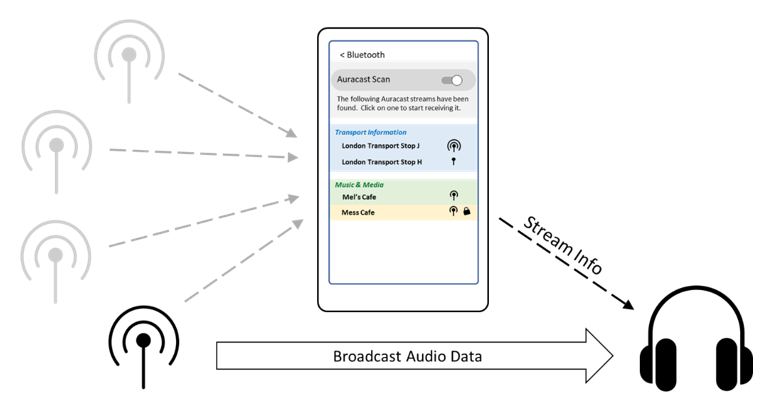
As the number of Broadcast Sources increases, the list of discovered devices will grow, following the trend that we have seen with Wi-Fi access points. The user selection task will become more complex, and it can become further complicated as Broadcast Sources begin to include multiple alternative streams, such as different languages, multiple codec configurations for different audio qualities, and specific Assisted Listening Streams (ALSs) that target users with hearing difficulties.
2.2. An out-of-band approach
To address the problem mentioned in Section 2.1 and help users connect to a specific stream, OOB methods are particularly useful in developing new use cases. One way of using them is with QR codes. Users can use the camera on their smartphone to scan a QR code, capturing information to guide the Broadcast Assistant to select a specific stream.
Figure 2.2 shows how this can be implemented in a music app on a smartphone. A dynamically generated QR code lets Jon’s friends scan his phone screen, which then directs their earbuds to synchronize to the music that Jon is sharing from his phone.
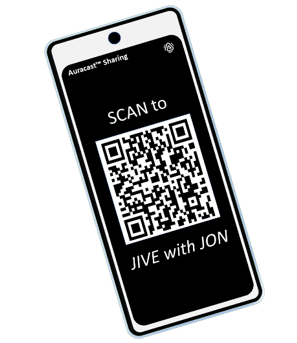 |
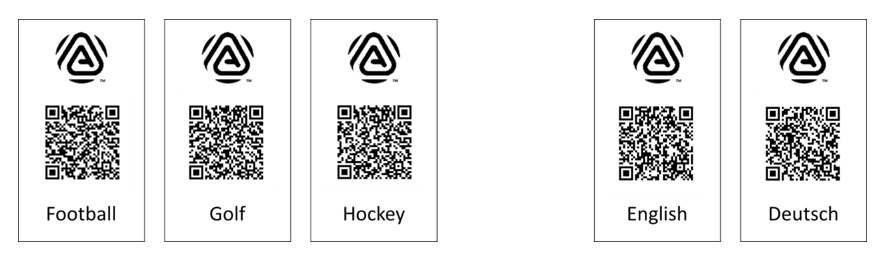
Figure 2.3 shows a different example, where static QR codes representing audio streams containing different screens and languages can be printed out and used in venues such as sports bars or cinemas. A user can scan the QR code corresponding to the stream they want to listen to, which could seamlessly connect their earbuds or hearing aids to the selected broadcast stream. These QR codes provide the specific information that their Broadcast Assistant needs to select the corresponding Broadcast Source and instruct its Broadcast Sinks to synchronize with the selected streams, simplifying the selection experience.
The Broadcast Audio URI represented by a QR code can also include the Broadcast_Code to decrypt the Audio Stream of a private broadcast. An example is when a user shares audio from their smartphone, where a dynamically generated QR code includes the Broadcast_Code for that session.
2.3. How the out-of-band method works
A Broadcast Assistant scans for the extended and periodic advertisements that are sent by every Broadcast Source. These identify the transmitter and provide information about the number of streams that it is transmitting (including their content) and where to find them. The Broadcast Assistant uses this information to allow a user to select an available Audio Stream and then instruct its Broadcast Sinks to synchronize to specific Broadcast Isochronous Streams (BISes) from the selected transmitter.
The Broadcast Audio URI can be used as an alternative method of providing complete or partial information about a broadcast, where a QR code is an example of its graphical representation. To facilitate the out-of-band method, there are two roles:
-
URI Encoder: A device that supports the Broadcast Audio URI and can generate and optionally display a representation of the URI (for example, a device that generates a QR code and displays it on its screen)
-
URI Decoder: A device that supports the Broadcast Audio URI and can acquire and parse the URI (for example, a device that scans a QR code using a camera application)
If all the information is static or if a QR code can be generated dynamically, then a QR code can convey enough information for a device that reads it to write an Add_Source or Modify_Source command to the BASS server in its Broadcast Sinks without the need to perform scanning. However, static QR codes cannot offer Periodic Advertising Synchronization Transfer (PAST) operation[1], because that data is dynamic. (More details on the implications for Broadcast Assistants are provided in Section 5.4.)
Alternatively, a Broadcast Assistant can use the information contained within the QR code to jump to the specific advertising data for that Broadcast Source that it discovered from its scanning process. In this case, the information in the QR code would not replace the information gathered by the Broadcast Assistant’s scanning. Instead, it is used to reduce the selection choices from a potentially large number of available Broadcast Sources to relevant broadcasts contained in the QR Code. This compound method of scanning and reading a Broadcast Audio URI allows support for PAST.
QR codes that represent encrypted broadcasts may contain a code necessary to decrypt encrypted broadcasts without additional user intervention.
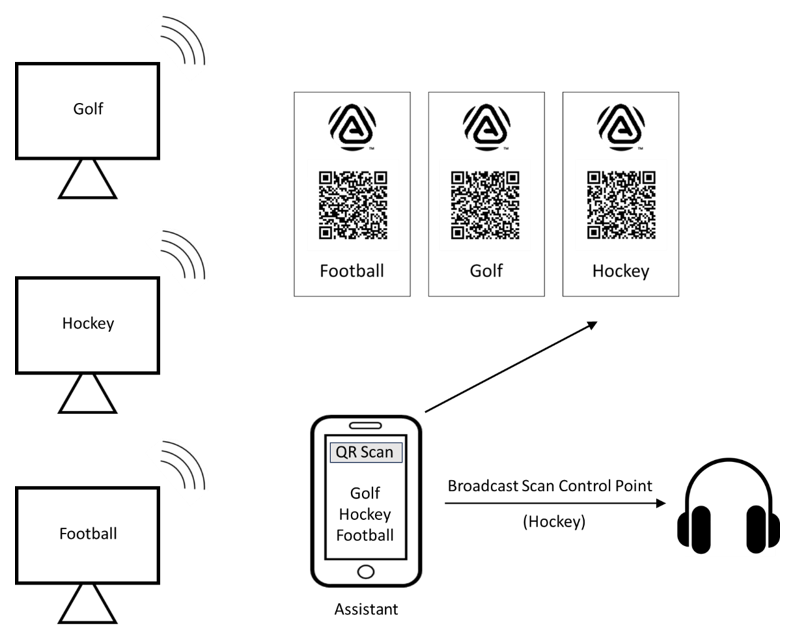
Figure 2.4 shows the process for a user in a sports bar that has three TVs showing football, golf, and hockey. The user’s Broadcast Assistant, which has already started scanning, discovered these three TVs. The user decides to use the QR scanner feature in their Broadcast Assistant to scan the printed QR code for the TV showing hockey. This tells the Broadcast Assistant to select the information it found for the “Hockey” TV and instructs the user’s headphones to synchronize to the broadcast streams from that TV.
This is a simplistic example to explain the process. The user application is likely to conceal the background scanning to provide a smoother user experience, but that is implementation specific.
3. The Broadcast Audio URI
To provide an interoperable experience, it is necessary for all QR codes and other OOB methods to present data for a Broadcast Assistant in the same format. The format defined in this specification follows the Uniform Resource Identifier (URI): Generic Syntax document [3], in the form of a string. The string shall contain the prefix identifier of "BLUETOOTH:" to indicate the presence of Bluetooth data to the scanning device.
3.1. The Broadcast Audio URI and its relation to BASS
All of the data that is conveyed is already defined in the underlying Bluetooth LE Audio specifications, with the majority of elements being defined within BASS [2]. To differentiate the Broadcast Audio URI from any other Bluetooth URI usages, the
“BLUETOOTH:” scheme prefix shall be followed by an identifier:data pair signifying that it is a Broadcast Audio URI, comprising a universally unique identifier (UUID) with the BASS-assigned UUID defined in the Bluetooth Assigned Numbers (AN) document [4] in the string form of “UUID:184F;”. This combination of the Bluetooth scheme identifier, BASS UUID, and subsequent data tuples is referred to as the Broadcast Audio URI and is common for all OOB methods.
3.2. Data elements for directing Broadcast Assistants
Very few data elements need to be present in a Broadcast Audio URI to direct a Broadcast Assistant to select a specific Broadcast Source. These are listed in Table 3.1, which contains the details for the parameters that should be included after the BASS UUID. The formats identified in the “Format” column are defined in Table 3.2.
Each data element contains information that is used by a Broadcast Assistant to identify an entry in its internal database of scanned Broadcast Sources. Having identified it, the Broadcast Assistant should request an action on a Scan Delegator by adding or modifying an instance of one of the BASS Server’s Broadcast Receive State characteristics.
|
Parameter |
Req |
ID |
Format |
Value |
Reference |
|---|---|---|---|---|---|
|
Broadcast_Name1 |
M |
BN |
String |
A UTF-8 string containing a minimum of 4 and a maximum of 32 human-readable characters, which is then encoded in Base64 [5] |
See Section 5.1.1 in the Public Broadcast Profile (PBP) [6]. |
|
Advertiser_Address_Type |
C.1 |
AT |
Bit |
“ “ |
See Section 3.1.1.4 in [2]. |
|
Advertiser_Address |
O2 |
AD |
Address |
The Advertiser Address for the Broadcast Source, represented by 12 uppercase hexadecimal characters |
See Section 3.1.1.4 in [2] and Volume 4, Part E, Section 7.8.67 in the Bluetooth Core Specification [7]. |
|
Broadcast_ID |
C.2 |
BI |
Number |
The 3 octet Broadcast_ID of the Broadcast Source |
See Section 3.1.1.4 in [2]. |
|
Broadcast_Code6 |
C.3 |
BC |
String |
A 128-bit (16 octets) value encoded in Base64 [5] |
See Volume 3, Part C, Section 3.2.6.3 in [7]. |
|
Standard_Quality4 |
O |
SQ |
Bit |
“ “ |
See Table 4.1 in [6]. |
|
High_Quality4 |
O |
HQ |
Bit |
“ “ |
See Table 4.1 in [6]. |
|
Vendor Specific5 |
O |
VS |
String |
Any vendor-specific data that may be safely ignored by a Scan Delegator or a Broadcast Assistant without any functional impact to standardized features |
See Table 7.1 in [4]. |
|
|||||
- C.1:
-
If the Advertiser_Address is present, then the Advertiser_Address_Type shall also be present.
- C.2:
-
Mandatory if the Broadcast_ID is static or if the Broadcast Audio URI medium supports dynamic representation of the value, otherwise Optional.
- C.3:
-
Mandatory if the Broadcast Streams are encrypted (see Table 4.1 in [6]), otherwise Excluded.
If a Broadcast Source has a Public Device Address, then the Public Device Address should be included, because it provides a unique identifier for each Broadcast Source. If the Broadcast Source has a Random Device Address, then the Random Device Address should only be included if the medium using the Broadcast Audio URI can represent it dynamically. Random addresses are usually changed every 15 minutes.
The Broadcast_ID should be present when the Broadcast Source is transmitting multiple BIGs, because the Broadcast_ID identifies a particular stream to be selected.
The Standard_Quality and High_Quality parameters in Table 3.1 are helpful to identify the presence of Auracast™ transmissions.
Stream metadata should be included when a specific BIS or Broadcast Audio Source Endpoint (BASE) subgroup is indicated by the Broadcast Audio URI. An example is where a particular language is selected from a Broadcast Source that is simultaneously broadcasting multiple languages. In this case, multiple QR codes can be displayed for the same Broadcast Source, each with an appropriately populated Broadcast Audio URI for a different language stream.
The purpose of the information contained in the Broadcast Audio URI is not necessarily to replace scanning by the Broadcast Assistant, but to simplify the task of selecting a stream by the user. Most Broadcast Assistants with the ability to scan a QR code are likely to allow a user to set selection policies, which are used to filter the displayed scanning information. The elements of a QR code should be limited to those parameters that identify the Broadcast Source among those that a Broadcast Assistant has found, allowing it to apply its preconfigured policies. Additional information, such as Stream Metadata and Stream Quality, should only be included where the intention is to request that the Broadcast Assistant uses these to override its policies.
A Broadcast Assistant may have enough knowledge about the user’s preference to select the correct Broadcast Source using just the Broadcast Name data. However, the Device Address and the Broadcast ID (if it is static) should also be included, because that information allows the correct stream to be selected in cases where multiple transmitters share the same Broadcast Name, or a transmitter is using multiple BIGs.
A GATT client can emulate the functionality of a Broadcast Assistant by using information contained in a Broadcast Audio URI to perform an Add Source or Modify Source operation on the BASS server of its Broadcast Sink. This is described in Section 3.8.
3.3. Bluetooth URI data format usage
The following common rules are applied to the URI data formats used with the Broadcast Audio URI:
-
Each Broadcast Audio URI data element shall be identified by an identifier listed in Table 3.1 or Table 3.3.
-
Each identifier shall be expressed in uppercase US-ASCII characters.
-
Each identifier shall be followed by a colon
“:”as a delimiter, followed by the data relevant for that element (which may be empty). -
A semi-colon
“;”shall be used to terminateidentifier:datapair fields. -
A semi-colon
“;”that is not attached to anyidentifier:datapair field shall indicate the end of a Broadcast Audio URI, and any additional subsequent characters shall be ignored. -
The order of the non-repeated identifiers in the Broadcast Audio URI is not important but should follow the order specified in Table 3.1 to maintain readability.
-
The order of arrayed URI data elements shall be that of the subgroups.
-
A mandatory identifier with no or empty data shall be terminated immediately after the identifier delimiter.
-
White spaces that appear outside of Base64-encoded string data elements shall be ignored.
-
If a non-arrayed URI data element is repeated, only the first instance shall be used.
-
Unknown identifiers and their associated values shall be ignored.
-
If an
identifier:valuepair with a valid identifier contains malformed or insufficient data, the entire Broadcast Audio URI shall be rejected. -
Vendor-specific data, if it exists, shall be included in the vendor-specific identifier defined in Table 3.1.
3.4. Formatting Bluetooth URI data elements
The rules specified in Table 3.2 shall be used to format Broadcast Audio URI data elements.
|
Identifier Type |
Description |
Example |
|---|---|---|
|
Bit |
The value “0” or “1”, used to identify single bits. |
SQ:1 HQ:1 |
|
Number |
All numbers are represented as hexadecimal values using the same number of characters as the parameters defined in [2], using uppercase letters and numbers. |
BI:ADE42F BI:3C42 NS:1 |
|
Address |
Device Addresses are represented by 12 uppercase hexadecimal characters. Leading zeroes are retained. |
AD:001122334455 |
|
Bitfield |
Bitfields are encoded in the appropriate number of octets using uppercase letters and numbers. Leading zeroes may be omitted and ignored. Therefore, 0b00000010 would be encoded as 02 (or 2 with leading zeros omitted), and 0b0000110000000001 would be encoded as 0C01 (or C01). |
BS:1 These may also be arrayed and delimited by a semi-colon: BS:1; BS:2 |
|
String |
The resulting ASCII string from Base64 encoding of UTF-8 encoded strings, or binary Length | Type | Value (LTV) Metadata; see Section 3.1.2 in [6] and Sections 6.12.6.3-6.12.6.13 in [4]. For example, a BIG with two subgroups containing different languages might contain the following metadata in the Level 2 BASE: Subgroup 0 Program info: “English audio stream” Language: English (eng) Subgroup 1 Program info: “Audio en Español” Language: Spanish (spa) These would generate the respective binary LTV metadata elements, represented by hexadecimal escape sequences in the Example column. |
English: SM: FQNFbmdsaXNoIGF1ZGlvIHN0cmVhbQQEZW5n Spanish: SM: EQNBdWRpbyBlbiBFc3Bhw7FvbAQEc3Bh |
3.5. Capturing and parsing the Broadcast Audio URI elements
When a user instructs a Broadcast Assistant to read a Broadcast Audio URI, the Broadcast Assistant shall receive the complete text string and parse it in the following order:
-
Detect the existence of a Broadcast Audio URI with the prefix
“BLUETOOTH:”. If no matching prefix is found, the Broadcast Assistant shall abort its parsing operation; otherwise, it shall continue to process the string from the first character after the colon“:”delimiter. -
Tokenize the Broadcast Audio URI using the semi-colon
“;”delimiter to create a list ofidentifier:datapairs. If tokenization results in an error, it shall abort its parsing operation. Intermediate information does not need to be retained, but this is implementation specific. -
Detect a BASS data element
“UUID:”and the BASS UUID. If there is no BASS UUID match, or if tokenization results in an error, the Broadcast Assistant shall abort its parsing operation. -
For each tokenized data element:
-
Use the colon
“:”delimiter to separate the identifier from the data. -
If the identifier is not defined in Table 3.1 (unknown identifier), the identifier shall be ignored and parsing should proceed to the next tokenized data element.
-
If the identifier is the vendor-specific identifier, it can be ignored or processed in an implementer-specific way.
-
If the identifier is defined in Table 3.1, decode the value accordingly (either Base64 string decode, number read, bit read, bitfield read, or address read) and add the decoded value to a data structure holding the broadcast information being constructed. The decoded string shall be padded to the required length specified in BASS, along with the restoration of leading zeroes.
-
-
If the constructed data structure does not contain all mandatory values, the Broadcast Assistant shall abort.
-
If the parsing is aborted because of an error, the Broadcast Assistant should notify the user about the error.
3.6. Generating information for the Add Source or Modify Source operation
After the Broadcast Assistant has decoded the information from reading the Broadcast Audio URI, the Broadcast Assistant may use the information it contains in different ways:
-
If the Broadcast Assistant is also scanning for Broadcast Sources, it may use the scanning data it acquires to match the appropriate scanning record in its internal database and construct the information for an Add Source or Modify Source operation, which it sends to its Broadcast Sink(s) by writing to the respective Broadcast Audio Scan Control Point characteristic. In this case, the key URI data element is the Broadcast_Name, which the Broadcast Assistant will use to identify the matching record in its internal database of discovered Broadcast Sources.
-
If a Broadcast Source contains more than one BIG, then the Broadcast Audio URI should identify a specific BIG to be selected using the Broadcast_ID parameter.
-
If being used by a GATT Client, it can assemble an Add Source or Modify Source operation. This is described in Section 3.8.
3.6.1. Using metadata to identify specific broadcast streams
Some Broadcast Sources may transmit multiple different streams that convey the same audio content in different forms. These allow a Broadcast Source to support a range of different applications, such as:
-
Providing Assisted Listening Audio Streams that have been processed to enhance voice intelligibility for users with hearing issues.
-
Transmitting multiple different language streams.
-
Transmitting simultaneous stereo and mono streams.
For all these options, a Metadata LTV is included in the Level 2 subgroups of the BASE structure of the Broadcast Source’s periodic advertisements to identify the purpose of each stream or group of streams within a subgroup. This may be in addition to Metadata LTVs contained in the Public Broadcast Announcement, which pertain to
all the streams in a BIG. Separate SM and PM identifiers are defined in Table 3.4 to indicate the source of the metadata.
Where multiple stream options are available for users, such as a choice of English or German language streams, this choice would normally be displayed as options on the Broadcast Assistant, cluttering the display. To simplify the selection process, a Broadcast Audio URI may include this metadata. These direct a Broadcast Assistant to choose a specific BIG or a specific subgroup within a BIG when composing the content for an Add_Source or Modify_Source command that it sends to the Broadcast Audio Scan Control Point Characteristic of each of its Broadcast Sinks. For example, different printed QR codes could be used to select different language streams.
In many cases, the Broadcast Audio URI may only include a single metadata element or a subset of metadata to distinguish a specific stream. That would be the case where a different URI is generated to allow a user to choose a specific language stream, such as the examples shown in Figure 4.2. In other situations, a Broadcast Audio URI might include all available metadata to allow a Broadcast Assistant to reconstruct the full BASE LTV structure. A Broadcast Assistant implementation should accommodate these alternatives.
Relevant metadata LTV structures are defined in Section 6.12.6 in [4] and include the structures listed in Table 3.3.
|
Metadata LTV |
Assigned Numbers Section |
Usage |
|---|---|---|
|
Language |
6.12.6.4 |
Identifies the language of the streams of a subgroup. |
|
Parental Rating |
6.12.6.6 |
Indicates the age rating of the audio content. |
|
Assisted Listening Stream |
6.12.6.12 |
Indicates that the stream has been enhanced to help users with hearing difficulties. |
The Broadcast Assistant will use this information to identify specific BIS_Sync entries (see Table 3.4) that direct each of its Broadcast Sinks(s) to synchronize to a specific BIS in a subgroup.
The Broadcast Assistant uses the information it receives from reading a Broadcast Audio URI to direct its selection of individual streams, using this information to replace user choices that would otherwise have been manually entered from a displayed menu. An implementer can decide whether the user should confirm that choice or whether it is written directly to the Broadcast Sinks. Reading a Broadcast Audio URI simply automates the selection process.
When parsing the BASE structure, the Broadcast Assistant may apply prior configuration preferences based on its knowledge of its Broadcast Sinks’ Published Audio Capabilities (PAC) records – defined in the Published Audio Capabilities Service (PACS) [8] – to help it decide which stream to select, especially when there are multiple streams. Examples of this are where one or more BIGs are present that:
-
Provide audio content at different quality levels, such as the Standard Quality (SQ) and High Quality (HQ) configurations defined in [6].
-
Provide options for both mono and stereo versions of the same audio content.
In accordance with BAP, a Broadcast Assistant shall check whether a Broadcast Receive State characteristic instance exists for a selected BIG before performing an Add Source or Modify Source operation.
3.7. Extended Bluetooth URI data elements
In some devices such as TVs and smartphones, an application may dynamically generate a QR code for a user to scan. In these cases, it may be advantageous to include additional data elements corresponding to other parameters used in the Add Source or Modify Source operations on the Broadcast Audio Scan Control Point characteristic. These are listed in Table 3.4.
All these data elements are optional for devices that support the URI encode or URI decode roles. Broadcast Assistants and GATT Clients that can read a Broadcast Audio URI should be able to parse and identify them.
|
Parameter |
ID |
Format |
Value |
Comment |
|---|---|---|---|---|
|
Advertising_SID |
AS |
Number |
Range: 00 to 0F represented by 2 uppercase hexadecimal characters All other values: RFU |
See Section 3.1.1.4 in [2]. |
|
PA_Interval |
PI |
Number |
SyncInfo field Interval represented by 4 uppercase hexadecimal characters The value “FFFF” signifies an unknown PA_Interval. |
See Section 3.1.1.4 in [2]. |
|
Num_Subgroups |
NS |
Number |
The number of subgroups in the BIG The range of values is 1 to 31, represented by 2 uppercase hexadecimal characters. |
See Section 3.1.1.4 in [2]. |
|
BIS_Sync1 |
BS |
Bitfield |
BIS_Sync parameter for the [ith] subgroup in the BIG 4-octet bit field The first instance of this identifier indicates subgroup index 0. Additional instances of this identifier indicate the next subgroup’s indices. Bit 0-30: BIS_index[1-31] “0”: (0b0): Do not synchronize to BIS_index[x], where x is the BIS_index “1”: (0b1): Synchronize to BIS_index[x] A value of “FFFFFFFF” indicates no preference. This is a recommendation to the Broadcast Sink. |
See Section 3.1.1.4 in [2]. |
|
SG_Number_of_BISes1 |
NB |
Number |
Indicates how many BISes are available in the [ith] subgroup Range: 1-31 represented by 2 uppercase hexadecimal characters (leading zeros may be omitted) |
See Section 3.7.2.2. in [1]. |
|
SG_Metadata1, 2 |
SM |
String |
Subgroup metadata for the [ith] subgroup |
See Section 3.1.1.4 in [2]; Sections 6.12.6.3-6.12.6.13 in [4]. |
|
Public Broadcast Announcement Metadata2, 3 |
PM |
String |
Metadata contained in the Public Broadcast Announcement |
See Section 4 in [6]. |
|
||||
The Broadcast Audio URI does not include an identifier:data pair for PA_Sync. A Broadcast Assistant that is scanning sets the value in its Broadcast_Audio_Scan_Control_Point command to 0x01 if it supports PAST and 0x02 if it does not. A GATT Client, which does not support scanning, sets it to
0x02.
Normally, the Broadcast Assistant would assume that the action of receiving a Broadcast Audio URI means that it may instruct its Broadcast Sinks to synchronize to the streams. If the selected streams are not present, the Broadcast Assistant or Broadcast Sink should inform the user. How this is done is implementation specific.
3.7.1. Additional rules for extended Bluetooth URI parameters
The following rules shall be used for extended Broadcast Audio URI parameters:
-
If the value of Num_Subgroups is greater than 1, BIS_Sync, Number of BISes, and Subgroup Metadata shall be represented by multiple
identifier:datapairs. These pairs shall be included based on the ascending order of the subgroup number, followed by the BIS index. -
Arrays shall be serialized using repeated identifiers. If one arrayed
identifier:datapair is included, then allidentifier:datapairs for that parameter shall be included. Subgroups that have no data shall terminate theiridentifier:datapair immediately after the identifier. -
The order of appearance of a repeated URI data element indicates its index [i].
3.8. Using Broadcast URI data to populate Add Source or Modify Source operations
A Broadcast Assistant or non-scanning GATT Client can use the data in a Broadcast URI to populate an Add Source or Modify Source operation to a Broadcast Audio Scan Control Point characteristic. Table 3.5 shows the elements of the Add Source operation from Section 3.1.1.4 in [2], indicating which elements come from a Broadcast Audio URI, such as a QR code, and which are generated locally by the Broadcast Assistant or GATT Client. Omitted leading zeroes need to be restored and decoded strings padded to meet BASS requirements. This table shows the minimum data that a GATT Client would use to perform these operations to successfully request a Broadcast Sink to synchronize to a Broadcast Source. If only the minimum information is provided, the Broadcast Sink or Broadcast Assistant would need to determine the missing elements by scanning for the specific Broadcast Source.
|
Field (from Section 3.1.1.4 and 3.1.1.5 in [2]) |
Value for a Static QR Code |
Comment |
|---|---|---|
|
Advertiser Address Type |
0x00 |
If this is a static address, the value is set to 0x00. If it is not a static address, the value is set to 0x01. Note that a random address is not appropriate for static QR codes. |
|
Advertiser Address |
From the Broadcast Audio URI |
– |
|
Advertising_SID |
From the Broadcast Audio URI |
– |
|
Broadcast_ID |
From the Broadcast Audio URI |
– |
|
PA Sync |
0x02 |
0x02 indicates that PAST is not available. If a Broadcast Assistant is also scanning and supports PAST, it can set this to 0x01. |
|
PA Interval |
0xFFFF |
The value 0xFFFF indicates that the PA_Interval value is unknown. If a Broadcast Assistant knows the value, then it should use that value. |
|
Num_Subgroups |
From the Broadcast Audio URI |
This is needed to determine the number [i] of BIS_Sync entries and defaults to 1 if it is not present in the Broadcast Audio URI string. |
|
BIS_Sync[i] |
Varies. There are [i] instances |
If this is not set in the Broadcast Audio URI or derived from PAC records, this should be set to 0xFFFFFFFF (No preference), letting the Broadcast Sink decide. |
|
Metadata_Length[i] |
Computed from the Broadcast Audio URI |
For an Auracast™ transmitter, the Broadcast Name LTV is present in the |
|
Metadata[i] |
From Broadcast Audio URI |
As a minimum, the Broadcast_Name LTV shall be included. This needs to have [i] instances in the Add Source operation. The Broadcast_Name is only a single |
To support both Broadcast Assistants and GATT Clients, a Broadcast Audio URI should include the following elements:
-
Advertiser Address
-
Advertising_SID
-
Broadcast_ID
-
Broadcast_Name
-
Num_Subgroups (can be omitted if only one subgroup)
4. Examples of Broadcast Audio URIs as QR codes
This section shows some examples of a Broadcast Audio URI that is used to generate QR codes.
4.1. The Sports Bar
The first example is the “Hockey” TV shown in Figure 2.4. This is a simple Broadcast Source that has a single BIG containing one subgroup comprising a single mono stream sampled at 24kHz. It is not encrypted, so there is no Broadcast Code. This TV has a static Broadcast_ID value, so the Broadcast Audio URI contains all the following information (based on Table 3.4 and Table 3.5) that the Broadcast Assistant requires to instruct its Broadcast Sinks to synchronize to the stream.
-
Broadcast Name (BN): “Hockey”
-
Standard Quality (SQ):1 (Yes)
-
Advertiser_Address_Type (AT): 0 (Public Device Address)
-
Advertiser Address (AD): AABBCC001122
-
Advertising_SID (AS): 01
-
Broadcast_ID (BI): DE51E9
-
PA_Interval (PI): FFFF (unknown)
-
Num_Subgroups (NS): 01
-
BIS_Sync[0] (BS: 00000001
This results in a 91-character Broadcast Audio URI:
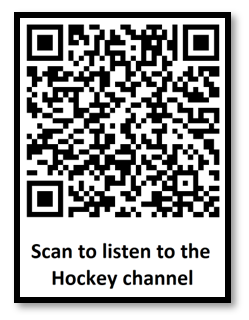
BLUETOOTH:UUID:184F;BN:SG9ja2V5;SQ:1;AT:0;AD:AABBCC001122;AS:1;BI:DE51E9;PI:FFFF;NS:1;BS:1;;
Note: The leading zeros are omitted from the Advertising_SID, Num_Subgroups, and BIS_Sync[0] data elements.
This string is represented by the QR code in Figure 4.1.
 |
As there is a single mono stream, the Broadcast Assistant will instruct both right and left earbuds to synchronize to the same mono stream. The Broadcast Assistant also needs to determine the value to set the PA_Sync feature, based on whether it has enough information from its own scanning to support PAST.
The Broadcast Name in this example is only used locally by the Broadcast Assistant for its local display. A Broadcast Assistant could decide to write it to the Broadcast Audio Scan Control Point characteristic and hence the Broadcast Receive State characteristic instance by including it as content for the Broadcast_Name metadata LTV.
4.2. The multi-lingual TV
This example shows how a specific subgroup from a Broadcast Source can be selected using a QR code. It could be a transmitter in a cinema or a personal TV that is broadcasting stereo soundtracks in two languages: English and German. A simplified version of the BASE is shown in Figure 4.2.
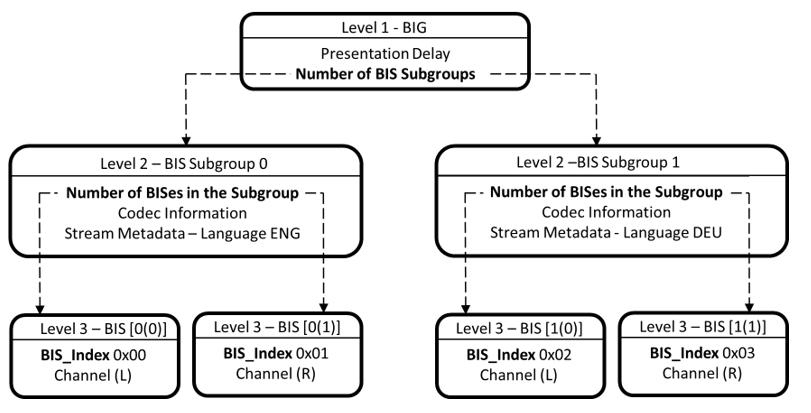
In this example, the resulting QR code from the Broadcast Audio URI must contain a Broadcast_Code, because the content is encrypted. Here, the assumption is made that the Broadcast_ID is not static, but changes on a session-by-session basis. Therefore, it is not useful to include it in a static QR code. This requires the Broadcast Assistant to scan to acquire this information. In this example, the primary purpose of the QR code is to automate the selection of the German language stream on a TV.
-
Broadcast Name (BN): “Robin’s TV”
-
Advertiser_Address_Type (AT): 0 (Public Device Address)
-
Advertiser Address (AD): AABBCC012345
-
Broadcast_Code (BC): “FilmFlicsA1”[2],[3]
-
Subgroup Metadata (SM):
-
Length 04 | Type 04 | Value: German (ISO 639-3 “deu” [64 65 75])
-
Length 02 | Type 06 | Value: Recommended for listeners of any age [01]
-
-
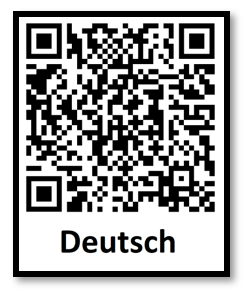
This results in a 102-character Broadcast Audio URI:
BLUETOOTH:UUID:184F;BN:Um9iaW7igJlzIFRW;AT:0;AD:AABBCC012345; BC:RmlsbUZsaWNzQTE=;SM:BARkZXUCBgE=;;
This is represented by the QR code in Figure 4.3.
The Broadcast Assistant should use this information to select the streams in BIS Subgroup 2 of this BIG and instruct its Broadcast Sinks to synchronize to the appropriate BISes. The Broadcast Audio URI does not include the BIS_Sync information but leaves the task of selecting the appropriate BIS_Sync for each of its Broadcast Sinks to the Broadcast Assistant, based on its scanning and knowledge of its Broadcast Sinks' Published Audio Capabilities.
Where items of information are not available, as would be the case if the Broadcast Audio URI were read by a non-scanning GATT Client, its Broadcast Sink would need to scan to retrieve the missing information.
5. Implications of BAU for Broadcast Assistants
Broadcast Assistants and non-scanning GATT Clients that incorporate support for Broadcast Audio URIs in their applications need to be aware of the mix of information that they obtain from the Broadcast Audio URI, information that they may need to provide from their own scanning and notifications from their Broadcast Sinks acting as BASS servers.
5.1. Limitations exposed by PAC records
Broadcast Assistants and GATT Clients will usually read the PAC records of their paired Broadcast Sinks to determine their capabilities. This informs them of what the Broadcast Sinks support and provides a first level of selection policy. They can discard streams that they have discovered if their Broadcast Sinks are incapable of decoding or rendering them. Examples of these include:
-
Limitations in Low Complexity Communications Codec (LC3) decoding; for example, the Broadcast Sink only supports Standard Quality (16/24kHz sampling)
-
Support for mono or stereo
5.2. Local user-configured policies
Most fully featured BAU applications will allow users to configure additional polices, which they will use to filter the display of discovered Broadcast Sources, such as:
-
Specific language(s) preferred
-
Age content restriction
-
A preference for streams that are made available to help intelligibility[4]
-
Preferential display of favorite or recently connected streams
Locally configured policies allow a more relevant display of discovered streams, highlighting the options that are most likely to meet the user’s preferences.
5.3. Reading a Broadcast Audio URI
Reading a Broadcast Audio URI should be considered as the user stating a preference for a specific stream. Because it is a user choice, this would normally override a locally preset preference, resulting in the Broadcast Assistant proceeding to write an operation to the Broadcast_Audio_Scan_Control_Point characteristic of its Broadcast Sinks, instructing them to synchronize to the chosen broadcast streams. A user interface may request that the user confirms this, and may also display alternative options, such as other languages or Audio Stream qualities, but that is implementation specific.
If the Broadcast Audio URI parameters do not contain enough information to complete an Add Source or a Modify Source operation, and do not correspond to a stream that the Broadcast Assistant has discovered, then the Broadcast Assistant should continue scanning to try to find the Broadcast Source. It may also read its Broadcast Sinks’ Broadcast Receive State characteristic instances to see if they contain the missing information. If it fails to obtain the necessary information, it should inform the user that the stream has not been found.
5.4. Static and dynamic information
The information included in the Broadcast Audio URI may be static or dynamic. In some cases, such as a QR code generated on a mobile phone, the information may contain everything that a Broadcast Assistant requires to populate a Broadcast Audio Scan Control Point operation. In other cases, the Broadcast Assistant may need to use the information it has parsed in conjunction with its own scanning to populate the Broadcast Audio Scan Control Point operation.
QR codes and other URI implementations may make a deliberate decision about the level of information provided. For example, a QR code representing a Broadcast Source that is transmitting multiple different language streams may contain BIS_Sync information for a specific language, implying that the Broadcast Assistant should select that specific stream. This is shown in the example in Figure 4.3. Alternatively, the QR code could omit any language information, in which case the Broadcast Assistant should either select a pre-configured preferred language option or present the user with a choice of all available languages that it has discovered by its own scanning or has been notified by one of its Broadcast Sinks.
Broadcast Assistants need to be aware that URIs with differing amounts of information can lead to different choices being presented to users. The user experience of a Broadcast Assistant or GATT Client implementation should accommodate these differences.
5.5. Out of range
Broadcast Assistants should be aware that the existence of an OOB Broadcast Audio URI does not mean that the associated Broadcast Source is transmitting or within range. A static QR code may refer to a Broadcast Source that has been moved, turned off, or is in a different location. For example, a different location could be a printed ticket with a QR code that only works in a specific place. For these reasons, devices that can perform scanning should check that the referenced Broadcast Source is available before instructing their Broadcast Sinks to synchronize to streams. When an intended Broadcast Source is not available, they should provide an appropriate indication to the user.
6. Acronyms and abbreviations
|
Acronym/Abbreviation |
Meaning |
|---|---|
|
AD |
advertising data (as in AD Type) |
|
AN |
Assigned Numbers |
|
ALS |
Assisted Listening Stream |
|
BAP |
Basic Audio Profile |
|
BASE |
Broadcast Audio Source Endpoint |
|
BASS |
Broadcast Audio Scan Service |
|
BIG |
Broadcast Isochronous Group |
|
BIS |
Broadcast Isochronous Stream |
|
GATT |
General Attribute Profile |
|
HQ |
High Quality (as defined in PBP) |
|
LC3 |
Low Complexity Communications Codec |
|
LE |
Low Energy (as in Bluetooth Low Energy) |
|
LTV |
Length | Type | Value (as in format for metadata) |
|
NFC |
Near Field Communication |
|
OOB |
out-of-band |
|
PAST |
Periodic Advertising Synchronization Transfer |
|
PAC |
Published Audio Capabilities |
|
PACS |
Published Audio Capabilities Service |
|
PAST |
Periodic Advertising Synchronization Transfer |
|
PBP |
Public Broadcast Profile |
|
QR code |
quick response code |
|
RFU |
Reserved for Future Use |
|
SQ |
Standard Quality (as defined in PBP) |
|
URI |
Uniform Resource Identifier |
|
UUID |
universally unique identifier |
7. References
[1] Basic Audio Profile, Version 1.0.1 or later
[2] Broadcast Audio Scan Service, Version 1.0 or later
[3] Berners-Lee, T., Fielding, R., and Masinter, L., “RFC 3986: Uniform Resource Identifier (URI): Generic Syntax”, January 2005, https://datatracker.ietf.org/doc/html/rfc3986
[4] Bluetooth Assigned Numbers, https://www.bluetooth.com/specifications/specs/assigned-numbers/
[5] Josefsson, Simon, “RFC 4648: The Base16, Base32, and Base64 Data Encodings”, October 2006, https://datatracker.ietf.org/doc/html/rfc4648
[6] Public Broadcast Profile, Version 1.0 or later
[7] Bluetooth Core Specification, Version 5.2 or later
[8] Published Audio Capabilities Service, Version 1.0.1 or later
[9] Auracast Simple Transmitter Best Practices Guide, https://www.bluetooth.com/bluetooth-resources/auracast-simple-transmitter-best-practices-guide/
[10] International Organization for Standardization (ISO), “ISO/IEC 18004:2015, Information technology–Automatic identification and data capture techniques–QR Code bar code symbology specification”, February 2015, https://www.iso.org/standard/62021.html
[11] NFC Forum, Tag Type Technical Specifications, https://nfc-forum.org/build/specifications#tag-type-technical-specifications
[1] PAST is a process described in [7] to streamline the way that a Broadcast Sink can synchronize to a Broadcast Source by receiving dynamic information about its transmissions.
[2] A BIG can contain multiple streams in different languages, but if they are encrypted, the same Broadcast_Code is used to decrypt all of them.
[3] A UTF-8 encoded human readable Broadcast Code length may be smaller than 16 octets, and leading zeros may be omitted from the URI.